Get Fabric or SQL Certified for Free.
Get certified for free when you join Fabric Data Days 2026 and dive into Fabric, Power BI, SQL, AI, and other essential data skills.
Join now- Power BI forums
- Get Help with Power BI
- Desktop
- Service
- Report Server
- Power Query
- Mobile Apps
- Developer
- DAX Commands and Tips
- Custom Visuals Development Discussion
- Health and Life Sciences
- Power BI Spanish forums
- Translated Spanish Desktop
- Training and Consulting
- Instructor Led Training
- Dashboard in a Day for Women, by Women
- Galleries
- Data Stories Gallery
- Themes Gallery
- Contests Gallery
- QuickViz Gallery
- Quick Measures Gallery
- Visual Calculations Gallery
- Notebook Gallery
- Translytical Task Flow Gallery
- TMDL Gallery
- R Script Showcase
- Webinars and Video Gallery
- Ideas
- Custom Visuals Ideas (read-only)
- Issues
- Issues
- Events
- Upcoming Events
Try your skills in the Power BI Dataviz World Championship! Round one ends June 26. Join now
- Power BI forums
- Forums
- Get Help with Power BI
- Desktop
- Re: Calculating difference between rows (Duration)...
- Subscribe to RSS Feed
- Mark Topic as New
- Mark Topic as Read
- Float this Topic for Current User
- Bookmark
- Subscribe
- Printer Friendly Page

- Mark as New
- Bookmark
- Subscribe
- Mute
- Subscribe to RSS Feed
- Permalink
- Report Inappropriate Content
Calculating difference between rows (Duration).
Ive searched and found similiar solutions to my problem but not excactly what i need to make it work. Really need help at this point.
I mocked up excactly what i need in Excel as an example, butI need the time difference between two rows as show in the snip in Power BI. Not sure if Query M or if DAX is the right way to go.
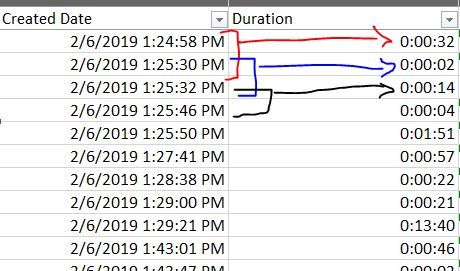
I do love figuring these things out by digging around the Community, but im short on time. Any help is appreciated
Solved! Go to Solution.
- Mark as New
- Bookmark
- Subscribe
- Mute
- Subscribe to RSS Feed
- Permalink
- Report Inappropriate Content
Can handle something like this ( as with pretty much everything) in Power Query or DAX. I prefer to use Power Query for as much as I can, so that's the route I went. Please see the attached PBIX file below and you can step through the applied steps, but here's a quick overview:
- Sort the data ascending by Date and then by time
- Group the data by date, as I assume there will be more than 1 day of data
- Add an Index column to each sub-table, one starting at 1 and one starting at 0
- Merge the sub-table with itself using those two index columns
- This will pull in the previous row's time (and since we sorted earlier, it is in the correct order)
- Expand the merged table to show Time.1
- Sort the sub-table again, by Time and ascending
- Add a custom colum to each sub-table that subtracts Time and Time.1, this is your duration
- Select only the columns you want ( in the example I kept Date, Time, Duration)
- Expand the entire column and all your data will be there with the appropriate Duration measure
- Set your data types and you are good to go
Here's the code if you are so inclined, I'd rather step through but that's just me
let
    Source = Table.FromRows(Json.Document(Binary.Decompress(Binary.FromText("bVJJjgJBDPtLn5HIWou/gvj/N3CB0DBKpD7ZFTux+/G4/K77bqL7ul0CGZB1PW//cYNt5Ci4QxWSDZ4TPgseUOJVP2AOkwb3zZGCJ8W79wMqiCi4GnRQqyPo3FymDtnwRmqcjLx6kzB+VokFpVTjsZCri5vPjYvVXEmkd8GaIJMlVcLf1X0nTH4qIm4Fz5NU7ILz5rNuwSc0EFLwBZuI6suCZMG1EgrNv2B/CIOwbe8I/mZWd2V5rryvJTjUSMUpT+p5p1Xt8vvU3XnMU543UutEqI35ZlDd5XT2Y1MJRsK661an7vWWer4A", BinaryEncoding.Base64), Compression.Deflate)), let _t = ((type text) meta [Serialized.Text = true]) in type table [Column1 = _t, Column2 = _t]),
    #"Changed Type" = Table.TransformColumnTypes(Source,{{"Column1", type date}, {"Column2", type time}}),
    #"Renamed Columns" = Table.RenameColumns(#"Changed Type",{{"Column1", "Date"}, {"Column2", "Time"}}),
    #"Sorted Rows" = Table.Sort(#"Renamed Columns",{{"Date", Order.Ascending}, {"Time", Order.Ascending}}),
    #"Grouped Rows" = Table.Group(#"Sorted Rows", {"Date"}, {{"Data", each _, type table}}),
    #"Removed Columns" = Table.RemoveColumns(#"Grouped Rows",{"Date"}),
    #"Added Custom" = Table.AddColumn(#"Removed Columns", "Index1", each Table.AddIndexColumn( [Data], "Index", 1,1)),
    #"Removed Columns1" = Table.RemoveColumns(#"Added Custom",{"Data"}),
    #"Added Custom1" = Table.AddColumn(#"Removed Columns1", "Index2", each Table.AddIndexColumn( [Index1], "Index2", 0, 1)),
    #"Removed Columns2" = Table.RemoveColumns(#"Added Custom1",{"Index1"}),
    #"Added Custom2" = Table.AddColumn(#"Removed Columns2", "Merge", each Table.NestedJoin(
[Index2], {"Index2"},
[Index2], {"Index"},
"Merged",
JoinKind.LeftOuter
)),
    #"Removed Columns3" = Table.RemoveColumns(#"Added Custom2",{"Index2"}),
    #"Added Custom3" = Table.AddColumn(#"Removed Columns3", "Custom", each Table.ExpandTableColumn([Merge], "Merged", {"Time"}, {"Time.1"})),
    #"Removed Columns4" = Table.RemoveColumns(#"Added Custom3",{"Merge"}),
    #"Added Custom4" = Table.AddColumn(#"Removed Columns4", "Custom.1", each Table.Sort([Custom],{{"Time", Order.Ascending}})),
    #"Removed Columns5" = Table.RemoveColumns(#"Added Custom4",{"Custom"}),
    #"Added Custom5" = Table.AddColumn(#"Removed Columns5", "Custom", each Table.AddColumn(
[Custom.1],
"Duration",
each
[Time] - [Time.1]
)),
    #"Removed Columns6" = Table.RemoveColumns(#"Added Custom5",{"Custom.1"}),
    #"Added Custom6" = Table.AddColumn(#"Removed Columns6", "Custom.1", each Table.SelectColumns([Custom],{"Date", "Time", "Duration"})),
    #"Removed Columns7" = Table.RemoveColumns(#"Added Custom6",{"Custom"}),
    #"Expanded Custom.1" = Table.ExpandTableColumn(#"Removed Columns7", "Custom.1", {"Date", "Time", "Duration"}, {"Date", "Time", "Duration"}),
    #"Changed Type1" = Table.TransformColumnTypes(#"Expanded Custom.1",{{"Date", type date}, {"Time", type time}, {"Duration", type duration}})
in
    #"Changed Type1"
Final Table:
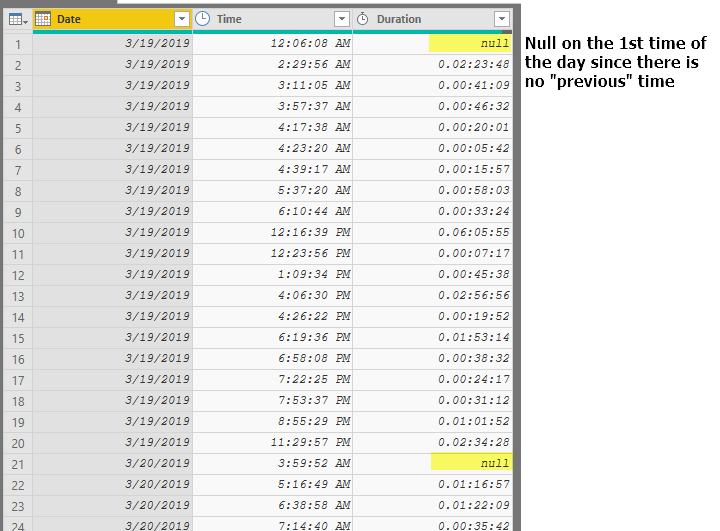
PBIX File
https://1drv.ms/u/s!Amqd8ArUSwDS0AvvfmqTtcjGCqmj
Hope it helps!
-Nick


- Mark as New
- Bookmark
- Subscribe
- Mute
- Subscribe to RSS Feed
- Permalink
- Report Inappropriate Content
hi, @Anonymous
I suggest you use DAX to add a column
Step1:
Add an Index column based on Created Date clolumn
You could do this in Edit Queries or use Rankx Function
Step2:
Create a column by this formula
Result:

here is pbix file, please try it.
Best Regards,
Lin
If this post helps, then please consider Accept it as the solution to help the other members find it more quickly.
- Mark as New
- Bookmark
- Subscribe
- Mute
- Subscribe to RSS Feed
- Permalink
- Report Inappropriate Content
hi, @Anonymous
I suggest you use DAX to add a column
Step1:
Add an Index column based on Created Date clolumn
You could do this in Edit Queries or use Rankx Function
Step2:
Create a column by this formula
Result:
here is pbix file, please try it.
Best Regards,
Lin
If this post helps, then please consider Accept it as the solution to help the other members find it more quickly.
- Mark as New
- Bookmark
- Subscribe
- Mute
- Subscribe to RSS Feed
- Permalink
- Report Inappropriate Content
Can handle something like this ( as with pretty much everything) in Power Query or DAX. I prefer to use Power Query for as much as I can, so that's the route I went. Please see the attached PBIX file below and you can step through the applied steps, but here's a quick overview:
- Sort the data ascending by Date and then by time
- Group the data by date, as I assume there will be more than 1 day of data
- Add an Index column to each sub-table, one starting at 1 and one starting at 0
- Merge the sub-table with itself using those two index columns
- This will pull in the previous row's time (and since we sorted earlier, it is in the correct order)
- Expand the merged table to show Time.1
- Sort the sub-table again, by Time and ascending
- Add a custom colum to each sub-table that subtracts Time and Time.1, this is your duration
- Select only the columns you want ( in the example I kept Date, Time, Duration)
- Expand the entire column and all your data will be there with the appropriate Duration measure
- Set your data types and you are good to go
Here's the code if you are so inclined, I'd rather step through but that's just me
let
    Source = Table.FromRows(Json.Document(Binary.Decompress(Binary.FromText("bVJJjgJBDPtLn5HIWou/gvj/N3CB0DBKpD7ZFTux+/G4/K77bqL7ul0CGZB1PW//cYNt5Ci4QxWSDZ4TPgseUOJVP2AOkwb3zZGCJ8W79wMqiCi4GnRQqyPo3FymDtnwRmqcjLx6kzB+VokFpVTjsZCri5vPjYvVXEmkd8GaIJMlVcLf1X0nTH4qIm4Fz5NU7ILz5rNuwSc0EFLwBZuI6suCZMG1EgrNv2B/CIOwbe8I/mZWd2V5rryvJTjUSMUpT+p5p1Xt8vvU3XnMU543UutEqI35ZlDd5XT2Y1MJRsK661an7vWWer4A", BinaryEncoding.Base64), Compression.Deflate)), let _t = ((type text) meta [Serialized.Text = true]) in type table [Column1 = _t, Column2 = _t]),
    #"Changed Type" = Table.TransformColumnTypes(Source,{{"Column1", type date}, {"Column2", type time}}),
    #"Renamed Columns" = Table.RenameColumns(#"Changed Type",{{"Column1", "Date"}, {"Column2", "Time"}}),
    #"Sorted Rows" = Table.Sort(#"Renamed Columns",{{"Date", Order.Ascending}, {"Time", Order.Ascending}}),
    #"Grouped Rows" = Table.Group(#"Sorted Rows", {"Date"}, {{"Data", each _, type table}}),
    #"Removed Columns" = Table.RemoveColumns(#"Grouped Rows",{"Date"}),
    #"Added Custom" = Table.AddColumn(#"Removed Columns", "Index1", each Table.AddIndexColumn( [Data], "Index", 1,1)),
    #"Removed Columns1" = Table.RemoveColumns(#"Added Custom",{"Data"}),
    #"Added Custom1" = Table.AddColumn(#"Removed Columns1", "Index2", each Table.AddIndexColumn( [Index1], "Index2", 0, 1)),
    #"Removed Columns2" = Table.RemoveColumns(#"Added Custom1",{"Index1"}),
    #"Added Custom2" = Table.AddColumn(#"Removed Columns2", "Merge", each Table.NestedJoin(
[Index2], {"Index2"},
[Index2], {"Index"},
"Merged",
JoinKind.LeftOuter
)),
    #"Removed Columns3" = Table.RemoveColumns(#"Added Custom2",{"Index2"}),
    #"Added Custom3" = Table.AddColumn(#"Removed Columns3", "Custom", each Table.ExpandTableColumn([Merge], "Merged", {"Time"}, {"Time.1"})),
    #"Removed Columns4" = Table.RemoveColumns(#"Added Custom3",{"Merge"}),
    #"Added Custom4" = Table.AddColumn(#"Removed Columns4", "Custom.1", each Table.Sort([Custom],{{"Time", Order.Ascending}})),
    #"Removed Columns5" = Table.RemoveColumns(#"Added Custom4",{"Custom"}),
    #"Added Custom5" = Table.AddColumn(#"Removed Columns5", "Custom", each Table.AddColumn(
[Custom.1],
"Duration",
each
[Time] - [Time.1]
)),
    #"Removed Columns6" = Table.RemoveColumns(#"Added Custom5",{"Custom.1"}),
    #"Added Custom6" = Table.AddColumn(#"Removed Columns6", "Custom.1", each Table.SelectColumns([Custom],{"Date", "Time", "Duration"})),
    #"Removed Columns7" = Table.RemoveColumns(#"Added Custom6",{"Custom"}),
    #"Expanded Custom.1" = Table.ExpandTableColumn(#"Removed Columns7", "Custom.1", {"Date", "Time", "Duration"}, {"Date", "Time", "Duration"}),
    #"Changed Type1" = Table.TransformColumnTypes(#"Expanded Custom.1",{{"Date", type date}, {"Time", type time}, {"Duration", type duration}})
in
    #"Changed Type1"
Final Table:
PBIX File
https://1drv.ms/u/s!Amqd8ArUSwDS0AvvfmqTtcjGCqmj
Hope it helps!
-Nick
- Mark as New
- Bookmark
- Subscribe
- Mute
- Subscribe to RSS Feed
- Permalink
- Report Inappropriate Content
Sorry for the late reply and thank you for the detailed response. I went through your steps and then and understood excaclty what it was your were doing with the data. This is a good solution that i will use in the future.
Helpful resources

Data Days 2026
Don't miss out on Data Days, June 15 through August 7. Learn Fabric, Power BI, SQL, AI and more.

Power BI DataViz World Championships - June 2026
A new Power BI DataViz World Championship is coming this June! Don't miss out on submitting your entry.

| User | Count |
|---|---|
| 22 | |
| 20 | |
| 19 | |
| 19 | |
| 11 |


| User | Count |
|---|---|
| 62 | |
| 54 | |
| 46 | |
| 44 | |
| 32 |


