cancel
Showing results for 
Search instead for 
Did you mean: 

July 28 - August 9 | Final Round of the Power BI Dataviz World Championships. This is your chance. Learn more

Reply
mekkern
Regular Visitor

Calculating consumption column using EARLIER function

I have power meeter readings from from 61 (M05-M65) sensors reporting every 10 min for a one week period, a total of 70875 records in my excel table. A meeter reading is reported for each sensor along with a time stamp.


Capture.PNG


I use the following formula to calculate a collumn with the difference between two consecutive meeter readings for a sensor to determine the power consumption for that sensor in that interval:


Increment_ = (IF(
ISBLANK(
calculate(
MAX(LCU_data[Power meter (Wm)]); ALL(LCU_data); LCU_data[Pole]=EARLIER(LCU_data[Pole]); LCU_data[RTC]<EARLIER(LCU_data[RTC])));0;
LCU_data[Power meter (Wm)]-calculate(MAX(LCU_data[Power meter (Wm)]); ALL(LCU_data); 
LCU_data[Pole]=EARLIER(LCU_data[Pole]); LCU_data[RTC]<EARLIER(LCU_data[RTC]))))


No suprise i run out of memory.


If i delete data from all but one sensor in excel and then import as a smaller table and alter the code accordingly i get what i want:

Increment_ = (IF(
ISBLANK(
calculate(
MAX(M05[Power meter (Wm)]); ALL(M05); M05[Pole]=EARLIER(M05[Pole]); M05[RTC]<EARLIER(M05[RTC])));0;
M05[Power meter (Wm)]-calculate(MAX(M05[Power meter (Wm)]); ALL(M05); 
M05[Pole]=EARLIER(M05[Pole]); M05[RTC]<EARLIER(M05[RTC]))))
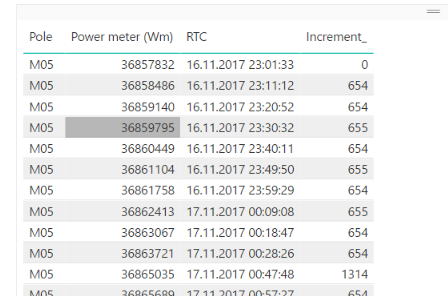
 

Capture.PNG

I cant make individual tables for each sensor, but is there a way to do this calculation sequentially per sensor and not get into the issue with the EARLIER function running out of memory when performed on the whole table?

1 ACCEPTED SOLUTION
DAX0110
Resolver V
Resolver V

I would suggest doing this in the query editor with the following general steps :


1. start query1

2. sort by Pole and RTC columns (only if they aren't already sorted)

3. add an index column

4. add a custom column called "previndex" with the formula:  [index] - 1

5. duplicate the query to query2

6. merge query1 and query2 on query1[previndex] = query2[index] and query1[Pole] = query2[Pole]

7. calculate the difference between the two [Power meter (Wm)] columns


View solution in original post

1 REPLY 1
DAX0110
Resolver V
Resolver V

I would suggest doing this in the query editor with the following general steps :


1. start query1

2. sort by Pole and RTC columns (only if they aren't already sorted)

3. add an index column

4. add a custom column called "previndex" with the formula:  [index] - 1

5. duplicate the query to query2

6. merge query1 and query2 on query1[previndex] = query2[index] and query1[Pole] = query2[Pole]

7. calculate the difference between the two [Power meter (Wm)] columns


Helpful resources

Announcements
Fabric Community Sticker Design Challenge Barcelona Carousel

Fabric Community Sticker Challenge - Barcelona 2026

If you love stickers, then you will definitely want to check out our community sticker challenge, Barcelona edition!

July Power BI Update Carousel

Power BI Monthly Update - July 2026

Check out the July 2026 Power BI update to learn about new features.

Power BI DataViz World Championships carousel

Power BI DataViz World Championships - June 2026

A new Power BI DataViz World Championship is coming this June! Don't miss out on submitting your entry.

Top Solution Authors