Hello Power BI Community,
I am trying to calculate a weighted measure where the result is a single value.
This is student assessment data where there are four possible levels that a student might have achieved (beginning, devloping, proficient or distinguished) where each of these levels needs to be weighted (beginning=0, developing=0.5, proficient=1.0, distinguished=1.5).
To accomplish this (without DAX), I simply determine the number of students at each level and then multiply them by the value (above) and lastly divide by the number of students assessed.
To complicate this formula--I have duplicate records, so I need to filter by performance level and by a distinct Student ID.
If you are willing, please take a look at the code below and offer suggestions.
Bmk 2 Retest 4 5 ES Weighted Performance =
VAR Beginning =
    CALCULATE (
        COUNTROWS ( 'Bmk 2 Retest 4 5 ES' ),
        FILTER ( 'Bmk 2 Retest 4 5 ES', DISTINCT ( 'Bmk 2 Retest 4 5 ES'[StudentID] ) ),
        FILTER (
            'Bmk 2 Retest 4 5 ES',
            'Bmk 2 Retest 4 5 ES'[performance_level] = "Beginning"
        )
    )
VAR Developing =
    CALCULATE (
        COUNTROWS ( 'Bmk 2 Retest 4 5 ES' ),
        FILTER ( 'Bmk 2 Retest 4 5 ES', DISTINCT ( 'Bmk 2 Retest 4 5 ES'[StudentID] ) ),
        FILTER (
            'Bmk 2 Retest 4 5 ES',
            'Bmk 2 Retest 4 5 ES'[performance_level] = "Developing"
        )
    )
VAR Proficient =
    CALCULATE (
        COUNTROWS ( 'Bmk 2 Retest 4 5 ES' ),
        FILTER ( 'Bmk 2 Retest 4 5 ES', DISTINCT ( 'Bmk 2 Retest 4 5 ES'[StudentID] ) ),
        FILTER (
            'Bmk 2 Retest 4 5 ES',
            'Bmk 2 Retest 4 5 ES'[performance_level] = "Proficient"
        )
    )
VAR Distinguished =
    CALCULATE (
        COUNTROWS ( 'Bmk 2 Retest 4 5 ES' ),
        FILTER ( 'Bmk 2 Retest 4 5 ES', DISTINCT ( 'Bmk 2 Retest 4 5 ES'[StudentID] ) ),
        FILTER (
            'Bmk 2 Retest 4 5 ES',
            'Bmk 2 Retest 4 5 ES'[performance_level] = "Distinguished"
        )
    )
VAR NumberAssessed =
    CALCULATE (
        COUNTROWS ( 'Bmk 2 Retest 4 5 ES' ),
        FILTER ( 'Bmk 2 Retest 4 5 ES', DISTINCT ( 'Bmk 2 Retest 4 5 ES'[StudentID] ) )
    )
RETURN
    CALCULATE (
        ( ( beginning * 0 )
            + ( developing * 0.5 )
            + ( proficient * 1.0 )
            + ( distinguished * 1.5 ) )
            / NumberAssessed
    )
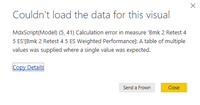
When I try to display the measure in a Card I receive this error:
Your help is greatly appreciated,
Michael


