cancel
Showing results for 
Search instead for 
Did you mean: 

Learn from the best! Meet the four finalists headed to the FINALS of the Power BI Dataviz World Championships! Register now

Reply
Anonymous
Not applicable

Calculating a Measure over Time

Hi,

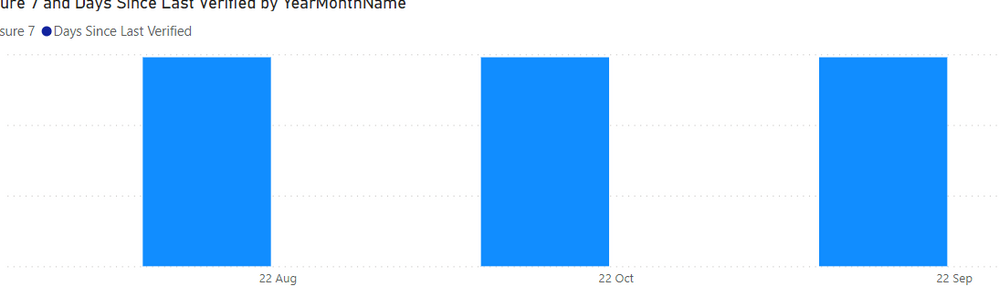
I am trying to create a series of calculation where I have a report date (say 10/1) and am trying to show the days since creation and days since last verified.


My problem is that I need this calculation to work for each reporitng month (8/1,9/1, 10/1) and I want to use measures as opposed to creating columns to capture the calculation vs each reporitng month.

What is the best way to go about doing this?

My data is laid out this and I want to show similar scores both as a snapshot in time and on a trend.


Any ideas would be greatly appreciated


Project  Created     Last Verified    Days Since Created   Days Since Verified   Staleness

A          5/1             6/1                  150                            120                           =(150+120)/2=135


PBIDesktop_Bmyi6HK2pM.png


3 REPLIES 3
Anonymous
Not applicable

Hi,
I have another dilemma related to this same thing.


I need to be able to filter the entire dashboard by a month end date.  My problem is that these calculations are based off a disconnected table but I still need fitler all the data by a month.

For example, select "Sepetember 22" from the main calendar and have everything (including this great calculation) and have it show only that month.


How do I use a disconnected calendar table and a connected table in conjunction with one another. 

Anonymous
Not applicable

This is awesome thanks!


To further complicate things, I need to calculate a percent stale over time vs a disconnected date table.  Stale would be greater than 30 days


Percent stale would be the number stale/divide by the count of active and unverified applicaitons. 

I am trying to do this with a pretty complicated measure and I am getting zero percent and I am scratching my head.   Do you have a change to this formula or a way to do this cleaner?

Thanks


CIIDCreated DateReport TypeDays Since Created
15/1/2022Total Active Applications180
28/1/2022Total Active Applications90
310/1/2022Unverified Applications30
411/1/2022Unverified Applications0


  At 11/1 
   3 Applications stale 30 Days (2 active, 1 unverified) 
  At 10/1 
  2 Applications Stale 
    
    
  Stale = greater than 30 days 
    
  Percent Stale = Stale/ (Count of Active and Unverified Applications) 
  At 11/1 
  3/4=75% 
    
  At 10/1 
  3/3=100% 


CUMULATIVE_STALENESS =
var _filterdate1=max('FILTER DATES'[EOM])
var stale_count=calculate(DISTINCTCOUNT('MASTER REPORTING QUERY'[CI ID]),'MASTER REPORTING QUERY'[Reporting Type]="Unverified",'MASTER REPORTING QUERY'[Adjusted Created Date]-_filterdate1>=30)


var _countact=calculate(DISTINCTCOUNT('MASTER REPORTING QUERY'[CI ID]),'MASTER REPORTING QUERY'[Reporting Type]="Total Active Applications")
var _unver=calculate(DISTINCTCOUNT('MASTER REPORTING QUERY'[CI ID]),'MASTER REPORTING QUERY'[Reporting Type]="Unverified")
var _filterdate=max('FILTER DATES'[CalendarDate])
var _distinctcount_active_unver=_unver+_countact
var filter_count=calculate(_distinctcount_active_unver,'MASTER REPORTING QUERY'[Adjusted Created Date]<=_filterdate>=30)

Return
divide(stale_count,_distinctcount_active_unver,0)


v-jingzhang
Community Support
Community Support

Hi @Anonymous 


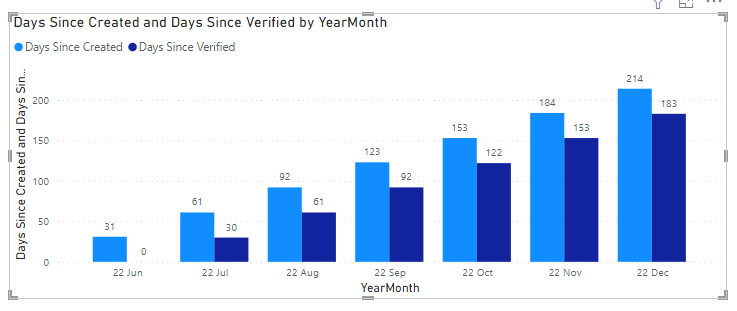
If I understand it correctly, you can try these measures:


Days Since Created = 
VAR monthStart = MIN('Date'[Date])
RETURN
SUMX('Table',DATEDIFF('Table'[Created],monthStart,DAY))
Days Since Verified = 
VAR monthStart = MIN('Date'[Date])
RETURN
SUMX('Table',DATEDIFF('Table'[Last Verified],monthStart,DAY))


vjingzhang_0-1667891159538.png

I have a Date table in the demo. You can download the attachment at bottom to see details. 


Best Regards,
Community Support Team _ Jing
If this post helps, please Accept it as Solution to help other members find it.

Helpful resources

Announcements
Power BI DataViz World Championships carousel

Power BI DataViz World Championships - June 2026

A new Power BI DataViz World Championship is coming this June! Don't miss out on submitting your entry.

Join our Fabric User Panel

Join our Fabric User Panel

Share feedback directly with Fabric product managers, participate in targeted research studies and influence the Fabric roadmap.

March Power BI Update Carousel

Power BI Community Update - March 2026

Check out the March 2026 Power BI update to learn about new features.