Share feedback directly with Fabric product managers, participate in targeted research studies and influence the Fabric roadmap.
Sign up nowGet Fabric certified for FREE! Don't miss your chance! Learn more
Hi,
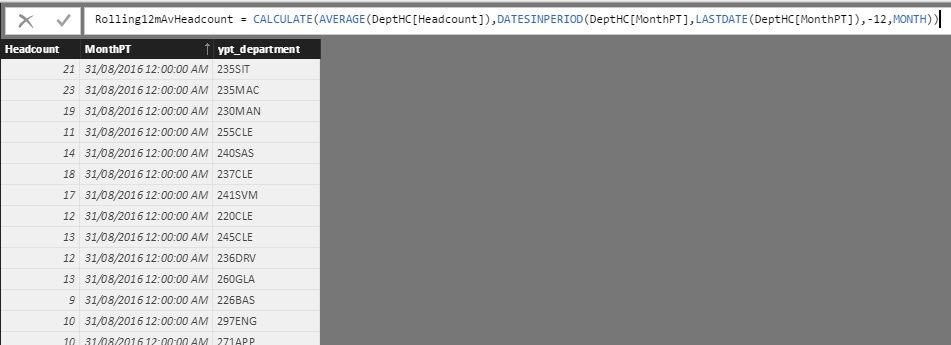
I have a table which displays how many people are in each department at the end of every month.
I'm looking at creating a rolling 12 month measure that gives you the average amount of people across all departments for the past 12 months. (i.e. a headcount).
I've tried using the below formula but it is giving me values of around 9 and 10 for the most recent 12 months as a example, when that number should be around 300:
Rolling12mAvHeadcount = CALCULATE(AVERAGE(DeptHC[Headcount]),DATESINPERIOD(DeptHC[MonthPT],LASTDATE(DeptHC[MonthPT]),-12,MONTH))
I'm sure I've almost cracked it, just some guidance would be fantastic.
Thanks
Dataset - Headcount by Department per Month
Hi @BhaveshPatel thanks very much for your response.
On the second last line of your formula, do you need a SUM or AVERAGE function before you name [DEPTHC HEADCOUNT]?
Thanks
It should be average as you are calculating AVERAGE.
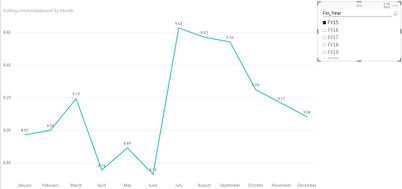
Ok, your equation appears to be averaging the headcount against the departments though, instead of averaging the amount of people overall (Should be around 300 average, as opposed to 9). Hopefully you can see in the screenshot below.
Sorry for late reply. Send me the test file and will fix the issue for you.
Share feedback directly with Fabric product managers, participate in targeted research studies and influence the Fabric roadmap.
If you love stickers, then you will definitely want to check out our Community Sticker Challenge!
Check out the January 2026 Power BI update to learn about new features.
| User | Count |
|---|---|
| 63 | |
| 62 | |
| 42 | |
| 20 | |
| 18 |