cancel
Showing results for 
Search instead for 
Did you mean: 

Get Fabric certified for FREE! Don't miss your chance! Learn more

Reply
wooand
Helper II
Helper II

Calculating Percentage Values

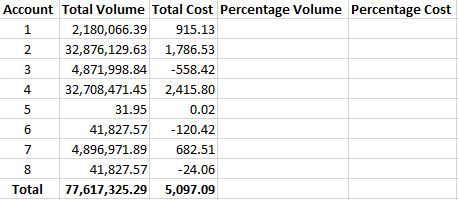
So, in the table below I need to calculate the 'Percentage Volume' and 'Percentage Cost' columns.  Can anyone help me please?


Capture.JPG

1 ACCEPTED SOLUTION
nickchobotar
Skilled Sharer
Skilled Sharer

Hi @wooand


Here you go:

Percentage Volume = 
DIVIDE(
	SUM(Table1[Total Volume]),
	CALCULATE(
		SUM(Table1[Total Volume]),
		ALLSELECTED()
	)
)


Percentage Cost = 
DIVIDE(
	SUM(Table1[Total Cost]),
	CALCULATE(
		SUM(Table1[Total Cost]),
		ALLSELECTED()
	)
)

Thanks, N -

View solution in original post

3 REPLIES 3
nickchobotar
Skilled Sharer
Skilled Sharer

Hi @wooand


Here you go:

Percentage Volume = 
DIVIDE(
	SUM(Table1[Total Volume]),
	CALCULATE(
		SUM(Table1[Total Volume]),
		ALLSELECTED()
	)
)


Percentage Cost = 
DIVIDE(
	SUM(Table1[Total Cost]),
	CALCULATE(
		SUM(Table1[Total Cost]),
		ALLSELECTED()
	)
)

Thanks, N -

Perfect.  Many thanks indeed @nickchobotar.  You've saved my keyboard from a beating!

Thank you @wooand  

Helpful resources

Announcements
Join our Fabric User Panel

Join our Fabric User Panel

Share feedback directly with Fabric product managers, participate in targeted research studies and influence the Fabric roadmap.

January Power BI Update Carousel

Power BI Monthly Update - January 2026

Check out the January 2026 Power BI update to learn about new features.

FabCon Atlanta 2026 carousel

FabCon Atlanta 2026

Join us at FabCon Atlanta, March 16-20, for the ultimate Fabric, Power BI, AI and SQL community-led event. Save $200 with code FABCOMM.