


cancel
Showing results for 
Search instead for 
Did you mean: 

Level up your Power BI skills this month - build one visual each week and tell better stories with data! Get started

Reply
BrendaB
Frequent Visitor

Calculating Last Year Issue

Hi again. 


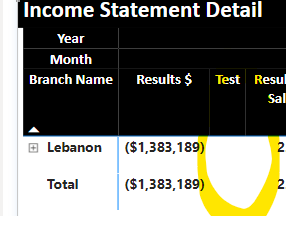
Having an issue with my LY cacluation. I have data in the matrix from 2020-2023 and need to see LY's results number in a column for each year.  The below calculation is carring the same number for each year. I have tried various built in calculations, but I end up with no data in my column. I am sure I am missing something simple...thanks in advance. 


BrendaB_0-1698948861490.png

BrendaB_1-1698949191622.png


1 ACCEPTED SOLUTION
BrendaB
Frequent Visitor

For whatever reason, this is the measure that worked. 

Thanks for the help.

BrendaB_0-1699030793111.png


View solution in original post

3 REPLIES 3
BrendaB
Frequent Visitor

For whatever reason, this is the measure that worked. 

Thanks for the help.

BrendaB_0-1699030793111.png


BrendaB
Frequent Visitor

I am wondering if there is an issue because I am using the 'Date'Date Hierarchy'' that was created within my 'consolidatedupload' table, rather than using a separate date table. I tried both of the solutions above, and they both result in a 'blank' (see below). I did drop the matrix in a table form to try and figure out what went wrong, and although there was a total at the bottom, the individual rows were all blank. 


BrendaB_0-1698958442211.png


Anand24
Super User
Super User

Hi @BrendaB ,
Create a calculated measure with below dax and pull into matrix:

LY $ = CALCULATE(SUM('ConsolidatedUpload'[NetChanges]), DATEADD('ConsolidatedUpload'[Date], -1, YEAR))

OR

LY $ = CALCULATE(SUM('ConsolidatedUpload'[NetChanges]), SAMEPERIODLASTYEAR('ConsolidatedUpload'[Date]))
PBI_SuperUser_Rank@1x.png  

Give a Thumbs Up if this post helped you in any way and Mark This Post as Solution if it solved your query !!!

Proud To Be a Super User !!!
LinkedIn

Helpful resources

Announcements
April Power BI Update Carousel

Power BI Monthly Update - April 2026

Check out the April 2026 Power BI update to learn about new features.

Fabric SQL PBI Data Days

Data Days 2026 coming soon!

Sign up to receive a private message when registration opens and key events begin.

New to Fabric survey Carousel

New to Fabric Survey

If you have recently started exploring Fabric, we'd love to hear how it's going. Your feedback can help with product improvements.

Power BI DataViz World Championships carousel

Power BI DataViz World Championships - June 2026

A new Power BI DataViz World Championship is coming this June! Don't miss out on submitting your entry.