Get Fabric or SQL Certified for Free.
Get certified for free when you join Fabric Data Days 2026 and dive into Fabric, Power BI, SQL, AI, and other essential data skills.
Join now- Power BI forums
- Get Help with Power BI
- Desktop
- Service
- Report Server
- Power Query
- Mobile Apps
- Developer
- DAX Commands and Tips
- Custom Visuals Development Discussion
- Health and Life Sciences
- Power BI Spanish forums
- Translated Spanish Desktop
- Training and Consulting
- Instructor Led Training
- Dashboard in a Day for Women, by Women
- Galleries
- Data Stories Gallery
- Themes Gallery
- Contests Gallery
- QuickViz Gallery
- Quick Measures Gallery
- Visual Calculations Gallery
- Fabric Apps Gallery
- Notebook Gallery
- Translytical Task Flow Gallery
- TMDL Gallery
- R Script Showcase
- Webinars and Video Gallery
- Ideas
- Custom Visuals Ideas (read-only)
- Issues
- Issues
- Events
- Upcoming Events
July 28 - August 9 | Final Round of the Power BI Dataviz World Championships. This is your chance. Learn more
- Power BI forums
- Forums
- Get Help with Power BI
- Desktop
- Re: Calculating Average excluding MEASURE data
- Subscribe to RSS Feed
- Mark Topic as New
- Mark Topic as Read
- Float this Topic for Current User
- Bookmark
- Subscribe
- Printer Friendly Page


- Mark as New
- Bookmark
- Subscribe
- Mute
- Subscribe to RSS Feed
- Permalink
- Report Inappropriate Content
Calculating Average excluding MEASURE data
Hello - Trying to develop a measure excluding certain data.
| Project | PF | Avg PF | Exclude? |
| Project 1 | 2.47 | 2.20 | 1 |
| Project 2 | 1.54 | 2.20 | |
| Project 3 | 2.59 | 2.20 |
Currently Average is calculated correctly [2.47 + 1.54 + 2.59] / 3 = 2.20
But i wanted to ignore Project 1 in the average calculation (as exclude = 1). Hence i want the average PF to be [1.54 +2.59] = 2.07
I am currently using the below formula, but it is still considering all 3 projects
Avg PF =
I am trying to show a CHART (Column-Line) visual, and hence i need to show all the 3 x Projects PF values in columns, but the average line should be based on 2 x Projects.
Kindly note "Exclude" is a measure based on=
Appreciate the support
Solved! Go to Solution.


- Mark as New
- Bookmark
- Subscribe
- Mute
- Subscribe to RSS Feed
- Permalink
- Report Inappropriate Content
Hi,
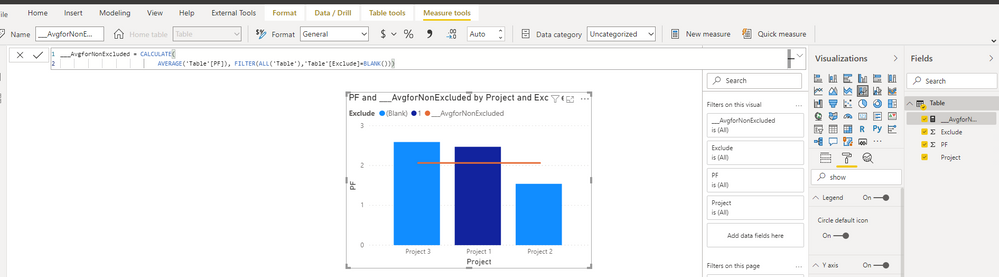
Like this?
___AvgforNonExcluded = CALCULATE(
                            AVERAGE('Table'[PF]), FILTER(ALL('Table'),'Table'[Exclude]=BLANK()))
As seen here:
Please mark as solution if so. Thumbs up for the effort are appreciated.
Kind regards,
Steve.
Proud to be a Super User!
Awesome Keyboard Shortcusts in Power BI, thumbs up if you like the article
My Community Blog Articles (check them out!)
My Blog - Power M code to automatically detect column types -
How to create test data using DAX!


- Mark as New
- Bookmark
- Subscribe
- Mute
- Subscribe to RSS Feed
- Permalink
- Report Inappropriate Content
@hackfifi
I forgot to remove the variable, as it always stays static, please check now:
Avg PF (Excluded) =
AVERAGEX(
    FILTER(ALL(Table2[Project]),[Exclude] <> 1),
    [PF]
)
________________________
If my answer was helpful, please consider Accept it as the solution to help the other members find it
Click on the Thumbs-Up icon if you like this reply 🙂
⭕ Subscribe and learn Power BI from these videos
⚪ Website ⚪ LinkedIn ⚪ PBI User Group
- Mark as New
- Bookmark
- Subscribe
- Mute
- Subscribe to RSS Feed
- Permalink
- Report Inappropriate Content
Hi,
Like this?
___AvgforNonExcluded = CALCULATE(
                            AVERAGE('Table'[PF]), FILTER(ALL('Table'),'Table'[Exclude]=BLANK()))
As seen here:
Please mark as solution if so. Thumbs up for the effort are appreciated.
Kind regards,
Steve.
Proud to be a Super User!
Awesome Keyboard Shortcusts in Power BI, thumbs up if you like the article
My Community Blog Articles (check them out!)
My Blog - Power M code to automatically detect column types -
How to create test data using DAX!

- Mark as New
- Bookmark
- Subscribe
- Mute
- Subscribe to RSS Feed
- Permalink
- Report Inappropriate Content
Hi,
Does this measure work? Drag this measure to a card visual.
=averagex(filter(values(data[project]),data[exclude?]<>1),[pf])
Hope this helps.
Regards,
Ashish Mathur
http://www.ashishmathur.com
https://www.linkedin.com/in/excelenthusiasts/


- Mark as New
- Bookmark
- Subscribe
- Mute
- Subscribe to RSS Feed
- Permalink
- Report Inappropriate Content
Will this formula helps you!? Please Share your Kudoes
Did I answer your question? Mark my post as a solution! Appreciate your Kudos!!
MY Blog || My YouTube Channel || Connect with me on Linkedin || My Latest Data Story - Ageing Analysis
Proud to be a Super User!
- Mark as New
- Bookmark
- Subscribe
- Mute
- Subscribe to RSS Feed
- Permalink
- Report Inappropriate Content
@VijayP - can you copy / paste the code please?
Also FYI -
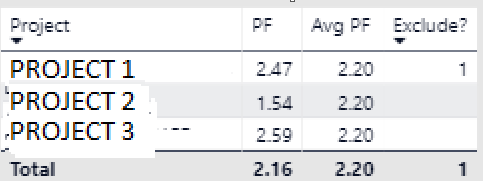
"PF" is a measure
i have a filter for selection of projects i.e. Projects_Alias
and also a filter for selection of refrence projects i.e. 'Ref Project'. The list of projects is the same of both filters
But when a project is selected from 'Ref Project', it calculates a "1" for the "exclude measure"
- Mark as New
- Bookmark
- Subscribe
- Mute
- Subscribe to RSS Feed
- Permalink
- Report Inappropriate Content
@hackfifi
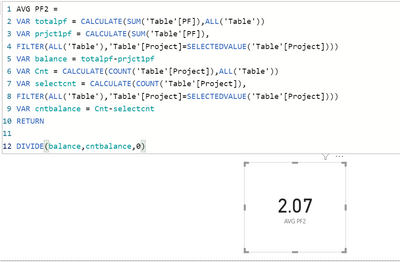
create PF as a column and use this measure to get the result
IF you want use PF As measure Change 'Table'[PF] to [PF] and remaining formula will be same
AVG PF2 =
VAR totalpf = CALCULATE(SUM('Table'[PF]),All('Table'))
VAR prjct1pf = CALCULATE(SUM('Table'[PF]),
FILTER(ALL('Table'),'Table'[Project]=SELECTEDVALUE('Table'[Project])))
VAR balance = totalpf-prjct1pf
VAR cnt = CALCULATE(COUNT('Table'[Project]),All('Table'))
VAR selectcnt = CALCULATE(COUNT('Table'[Proejct]),
FILTER(ALL('Table'),'Table'[Project]=SELECTEDVALUE('Table'[Project])))
VAR cntbalance = cnt-selectcnt
RETURN
Divide(balance,cntbalance,0)
Did I answer your question? Mark my post as a solution! Appreciate your Kudos!!
MY Blog || My YouTube Channel || Connect with me on Linkedin || My Latest Data Story - Ageing Analysis
Proud to be a Super User!
- Mark as New
- Bookmark
- Subscribe
- Mute
- Subscribe to RSS Feed
- Permalink
- Report Inappropriate Content
Sorry @VijayP it did not work...i was getting AVGPF2 value is 0
i have to use "ALLSELECTED" as i have over 100 projects in the dataset, but i have selected only 3
I am essentially trying to calculate the average PF of SELECTED PROJECTS where EXCLUDE<>1
- Mark as New
- Bookmark
- Subscribe
- Mute
- Subscribe to RSS Feed
- Permalink
- Report Inappropriate Content
@hackfifi
You may try this measure:
Avg PF (Excluded) =
VAR __Exclude = [Exclude] RETURN
AVERAGEX(
    FILTER( ALLSELECTED(Table2[Project], Table2[PF]) ,  __Exclude <> 1),
    Table2[PF]
)
________________________
If my answer was helpful, please consider Accept it as the solution to help the other members find it
Click on the Thumbs-Up icon if you like this reply 🙂
⭕ Subscribe and learn Power BI from these videos
⚪ Website ⚪ LinkedIn ⚪ PBI User Group
- Mark as New
- Bookmark
- Subscribe
- Mute
- Subscribe to RSS Feed
- Permalink
- Report Inappropriate Content
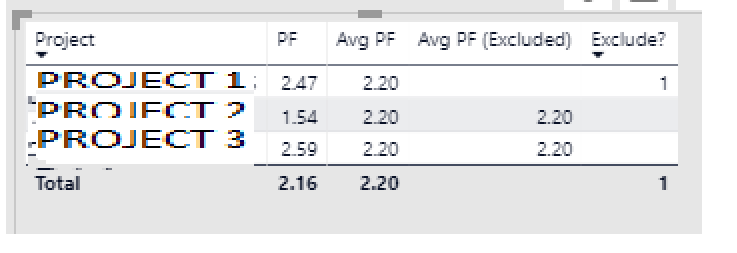
hi @Fowmy ...kindly note PF is a measure, so i modified your formula as below
- Mark as New
- Bookmark
- Subscribe
- Mute
- Subscribe to RSS Feed
- Permalink
- Report Inappropriate Content
@hackfifi
Then use it this way, if it doesn't work, show the expected results based on your sample.
Avg PF (Excluded) =
VAR __Exclude = [Exclude] RETURN
AVERAGEX(
    FILTER( ALLSELECTED(Table2),  __Exclude <> 1),
    [PF]
)
________________________
If my answer was helpful, please consider Accept it as the solution to help the other members find it
Click on the Thumbs-Up icon if you like this reply 🙂
⭕ Subscribe and learn Power BI from these videos
⚪ Website ⚪ LinkedIn ⚪ PBI User Group
- Mark as New
- Bookmark
- Subscribe
- Mute
- Subscribe to RSS Feed
- Permalink
- Report Inappropriate Content
@Fowmy - Based on the sample, the expected result should be the average of the exclude <> 1 i.e. (1.54 + 2.59) / 2 = 2.07
Currently the result of your formula is still the average of the 3 data points i.e. (2.47+1.54+2.59)/3 which is 2.20
Hope that is clear, and thanks again for your time.
- Mark as New
- Bookmark
- Subscribe
- Mute
- Subscribe to RSS Feed
- Permalink
- Report Inappropriate Content
@hackfifi
I forgot to remove the variable, as it always stays static, please check now:
Avg PF (Excluded) =
AVERAGEX(
    FILTER(ALL(Table2[Project]),[Exclude] <> 1),
    [PF]
)
________________________
If my answer was helpful, please consider Accept it as the solution to help the other members find it
Click on the Thumbs-Up icon if you like this reply 🙂
⭕ Subscribe and learn Power BI from these videos
⚪ Website ⚪ LinkedIn ⚪ PBI User Group
- Mark as New
- Bookmark
- Subscribe
- Mute
- Subscribe to RSS Feed
- Permalink
- Report Inappropriate Content
Thanks @Fowmy - that worked.
So just for my understanding, how did it change by just removing the variable? i thought the variable was doing the same thing?

Helpful resources

Fabric Community Sticker Challenge - Barcelona 2026
If you love stickers, then you will definitely want to check out our community sticker challenge, Barcelona edition!

Power BI Monthly Update - July 2026
Check out the July 2026 Power BI update to learn about new features.

Power BI DataViz World Championships - June 2026
A new Power BI DataViz World Championship is coming this June! Don't miss out on submitting your entry.

| User | Count |
|---|---|
| 28 | |
| 28 | |
| 20 | |
| 19 | |
| 19 |


| User | Count |
|---|---|
| 43 | |
| 31 | |
| 18 | |
| 18 | |
| 16 |


