cancel
Showing results for 
Search instead for 
Did you mean: 

The Power BI Data Visualization World Championships is back! Get ahead of the game and start preparing now! Learn more

Reply
rendalignacio
Helper I
Helper I

Calculating 3 months per registry

Hi,


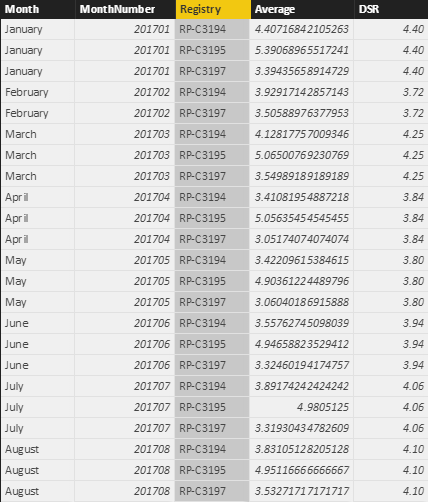
I need help on the table that I have. I want to get the 3 month (Aug, Jul and Jun) average per registry of the average table.


Can you help me in providing the DAX measurement or if i need a new table?


Average.png

6 REPLIES 6
Ashish_Mathur
Super User
Super User

Hi,


Share the link from where i can download your file.  Also, please show the expected result.


Regards,
Ashish Mathur
http://www.ashishmathur.com
https://www.linkedin.com/in/excelenthusiasts/

Hi,


Sorry, I cannot share the pbix as there are a lot of files in it.


But, for the result, what i would want is to show the average of the last 3 months per aircraft registry.


Hi,


Share a dummy dataset.


Regards,
Ashish Mathur
http://www.ashishmathur.com
https://www.linkedin.com/in/excelenthusiasts/
v-sihou-msft
Microsoft Employee
Microsoft Employee

@rendalignacio


If you want to calculate the moving 3 months average,you can write a measure like below:


Moving 3 months avg=
CALCULATE (
    AVERAGE ( Table[DSR] ),
    ALLEXCEPT ( Table, Table[Registry] ),
    FILTER ( ALL ( Table ), Table[MonthYearNumber] )
        > ( MAX ( Table[MonthYearNumber] ) - 3 )
        && Table[MonthYearNumber] <= MAX ( Table[MonthYearNumber] )
)

Regards,

Hi,


From the formula you have provided, it gives me an error "A function 'FILTER' has been used in a True/False expression that is used as a table filter expression. This is not allowed."


Also, can i place this in a table?


Thank you

@rendalignacio


Sorry, there's an incorrect bracket. 


Updated:


Moving 3 months avg=
CALCULATE (
    AVERAGE ( Table[DSR] ),
    ALLEXCEPT ( Table, Table[Registry] ),
    FILTER ( ALL ( Table ), Table[MonthYearNumber] 
        > ( MAX ( Table[MonthYearNumber] ) - 3 )
        && Table[MonthYearNumber] <= MAX ( Table[MonthYearNumber] ))
)

Helpful resources

Announcements
Power BI DataViz World Championships

Power BI Dataviz World Championships

The Power BI Data Visualization World Championships is back! Get ahead of the game and start preparing now!

December 2025 Power BI Update Carousel

Power BI Monthly Update - December 2025

Check out the December 2025 Power BI Holiday Recap!

FabCon Atlanta 2026 carousel

FabCon Atlanta 2026

Join us at FabCon Atlanta, March 16-20, for the ultimate Fabric, Power BI, AI and SQL community-led event. Save $200 with code FABCOMM.