Don't miss your chance to take the Fabric Data Engineer (DP-700) exam on us!
Learn moreWe've captured the moments from FabCon & SQLCon that everyone is talking about, and we are bringing them to the community, live and on-demand. Starts on April 14th. Register now
Hello,
I suppose I am still new to Power BI in this forum to perhaps my question is easy for some.
Still I have played with this issue for days now and I cannot seem to solve it desite browsing myself blue in the face.
I got 2 data sets linked through 1 to many ID (Activity ID).
Now, I can sum the revenue in Table 2 by something like below which works fine.
Calculate(Sum(Table2[Revenue]),Filter(Table2,Table2[Activity ID]=Table1[Activity ID])).
However since both tables are being sliced dynamically I cannot actully copy data from table 2 to table 1.
So I have to use a measure. Now if I plot the average revenue from the above formula I get something completely different reason being the average revenue is reference the product and not the Activity. Not right or wrong I just need it the other way round.
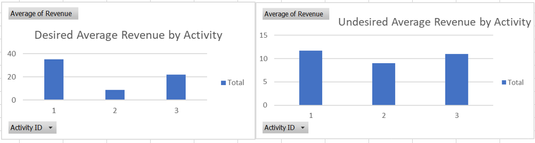
I have tried a lot of function with SumX, Summarize etc.. I am getting diffent results compared to the alternative fasion using a spreadsheet. I suppose I have learned a lot in the process between tables vs Measures, graphics interface etc. but I am still learning.
Can anway advise please how I make the average Revenue data in a Measure reference the activity..... at least I think that is the issue.
Kind regards
Alex
Solved! Go to Solution.
Hello,
I managed to figure this our myself. I should have used this forum to start with rather than using a search browser. So thanks to everyone for contributing to this forum.
So to change the calculated average Price per something else I suppose the logic is simple.
Sum all the Prices together in a Calculate(Sum( Table2[Revenue])) then average them out over a different parameter using AverageX(Values('new parameter',Sum) so the total expression will look like this:
AverageX(Values(Table1[Activity],Calculate(Sum( Table2[Revenue])))
Thanks and regards
Alex
Hello,
I managed to figure this our myself. I should have used this forum to start with rather than using a search browser. So thanks to everyone for contributing to this forum.
So to change the calculated average Price per something else I suppose the logic is simple.
Sum all the Prices together in a Calculate(Sum( Table2[Revenue])) then average them out over a different parameter using AverageX(Values('new parameter',Sum) so the total expression will look like this:
AverageX(Values(Table1[Activity],Calculate(Sum( Table2[Revenue])))
Thanks and regards
Alex
If you have recently started exploring Fabric, we'd love to hear how it's going. Your feedback can help with product improvements.
A new Power BI DataViz World Championship is coming this June! Don't miss out on submitting your entry.
Share feedback directly with Fabric product managers, participate in targeted research studies and influence the Fabric roadmap.
| User | Count |
|---|---|
| 57 | |
| 38 | |
| 35 | |
| 19 | |
| 17 |
| User | Count |
|---|---|
| 73 | |
| 70 | |
| 37 | |
| 35 | |
| 25 |