Don't miss your chance to take the Fabric Data Engineer (DP-600) exam for FREE! Find out how by attending the DP-600 session on April 23rd (pacific time), live or on-demand.
Learn moreNext up in the FabCon + SQLCon recap series: The roadmap for Microsoft SQL and Maximizing Developer experiences in Fabric. All sessions are available on-demand after the live show. Register now
Hello,
I suppose I am still new to Power BI in this forum to perhaps my question is easy for some.
Still I have played with this issue for days now and I cannot seem to solve it desite browsing myself blue in the face.
I got 2 data sets linked through 1 to many ID (Activity ID).
Now, I can sum the revenue in Table 2 by something like below which works fine.
Calculate(Sum(Table2[Revenue]),Filter(Table2,Table2[Activity ID]=Table1[Activity ID])).
However since both tables are being sliced dynamically I cannot actully copy data from table 2 to table 1.
So I have to use a measure. Now if I plot the average revenue from the above formula I get something completely different reason being the average revenue is reference the product and not the Activity. Not right or wrong I just need it the other way round.
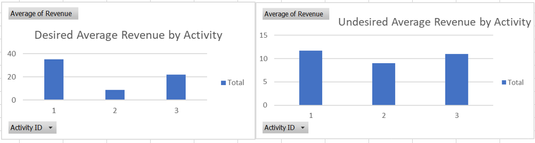
I have tried a lot of function with SumX, Summarize etc.. I am getting diffent results compared to the alternative fasion using a spreadsheet. I suppose I have learned a lot in the process between tables vs Measures, graphics interface etc. but I am still learning.
Can anway advise please how I make the average Revenue data in a Measure reference the activity..... at least I think that is the issue.
Kind regards
Alex
Solved! Go to Solution.
Hello,
I managed to figure this our myself. I should have used this forum to start with rather than using a search browser. So thanks to everyone for contributing to this forum.
So to change the calculated average Price per something else I suppose the logic is simple.
Sum all the Prices together in a Calculate(Sum( Table2[Revenue])) then average them out over a different parameter using AverageX(Values('new parameter',Sum) so the total expression will look like this:
AverageX(Values(Table1[Activity],Calculate(Sum( Table2[Revenue])))
Thanks and regards
Alex
Hello,
I managed to figure this our myself. I should have used this forum to start with rather than using a search browser. So thanks to everyone for contributing to this forum.
So to change the calculated average Price per something else I suppose the logic is simple.
Sum all the Prices together in a Calculate(Sum( Table2[Revenue])) then average them out over a different parameter using AverageX(Values('new parameter',Sum) so the total expression will look like this:
AverageX(Values(Table1[Activity],Calculate(Sum( Table2[Revenue])))
Thanks and regards
Alex
If you have recently started exploring Fabric, we'd love to hear how it's going. Your feedback can help with product improvements.
A new Power BI DataViz World Championship is coming this June! Don't miss out on submitting your entry.
| User | Count |
|---|---|
| 46 | |
| 43 | |
| 39 | |
| 19 | |
| 15 |
| User | Count |
|---|---|
| 68 | |
| 67 | |
| 31 | |
| 27 | |
| 24 |