Join us at FabCon Atlanta from March 16 - 20, 2026, for the ultimate Fabric, Power BI, AI and SQL community-led event. Save $200 with code FABCOMM.
Register now!The Power BI Data Visualization World Championships is back! It's time to submit your entry. Live now!
Hi Dears,
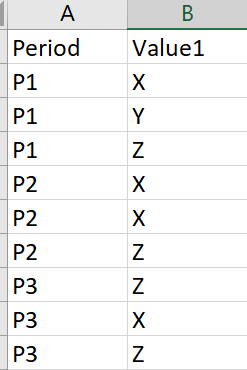
I have the following Table
I have the following formula
Count X = CALCULATE(COUNT('table1'[Value1]),FILTER(table1','table1'[Value1]="X"))
How can I create a new table, that return in Column1 the Period (P1, P2, ...) and Column2, the value of (Count X P3 - Count X P2)
so P3 will be (Count X P3 - Count X P2) and so on
Solved! Go to Solution.
This probably isn't the cleanest way (I was trying to do it in one DAX expression initially), but you can create a summary table and then add a calculated column on top of it.
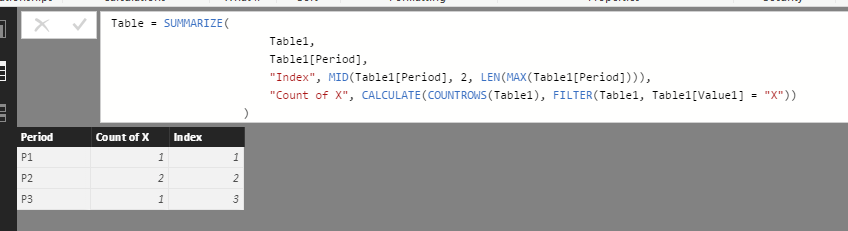
First step would be to summarize your data table by Period and Count of X. I went ahead and added an "Index" column - this assumes that your periods will always be incrementing (P1, P2, ... P5, P6, .. Pn).
SummaryTable = SUMMARIZE(
Table1,
Table1[Period],
"Index", MID( Table1[Period], 2, LEN( MAX(Table1[Period]) ) ),
"Count of X", CALCULATE( COUNTROWS(Table1), FILTER(Table1, Table1[Value] = "X"))
)
This will give us a table that looks like:
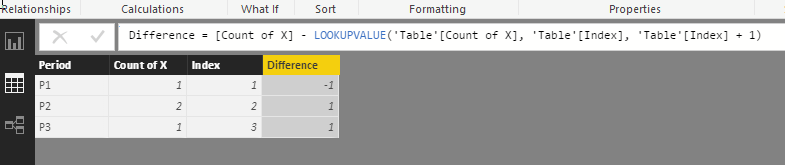
From here, we can add a "Difference" column using the following formula:
Difference = [Count of X] - LOOKUPVALUE('Table'[Count of X], 'Table'[Index], 'Table'[Index] + 1)
Note: If you receive an error on this last step, you need to change the Data Type for the [Index] column to a Whole Number instead of Text.
Can you show what you want the resulting table to look like? I'm having a hard time following your explanation.
It sounds like your case would be a good use of the SUMMARIZE function. You can group by the Period, and then define your calculated columns with whatever formula you please (this is where I was lost in your explanation).
Thanks for your support, In fact I want to generate 2 columns,
Period Difference
P1 Count of X in P1 - Count of X in P2
P2 Count of X in P2 - Count of X in P3
P3 Count of X in P4 - Count of X in P5
P4 Count of X in P5 - Count of X in P6
I want to generate how much we had an increment in X count between the periods.
This probably isn't the cleanest way (I was trying to do it in one DAX expression initially), but you can create a summary table and then add a calculated column on top of it.
First step would be to summarize your data table by Period and Count of X. I went ahead and added an "Index" column - this assumes that your periods will always be incrementing (P1, P2, ... P5, P6, .. Pn).
SummaryTable = SUMMARIZE(
Table1,
Table1[Period],
"Index", MID( Table1[Period], 2, LEN( MAX(Table1[Period]) ) ),
"Count of X", CALCULATE( COUNTROWS(Table1), FILTER(Table1, Table1[Value] = "X"))
)
This will give us a table that looks like:
From here, we can add a "Difference" column using the following formula:
Difference = [Count of X] - LOOKUPVALUE('Table'[Count of X], 'Table'[Index], 'Table'[Index] + 1)
Note: If you receive an error on this last step, you need to change the Data Type for the [Index] column to a Whole Number instead of Text.
Thank you! It was exactly what I need.
One last thing please, what is the logic of that lockupvalue function?
The Power BI Data Visualization World Championships is back! It's time to submit your entry.
Check out the January 2026 Power BI update to learn about new features.
| User | Count |
|---|---|
| 56 | |
| 41 | |
| 39 | |
| 21 | |
| 20 |
| User | Count |
|---|---|
| 148 | |
| 110 | |
| 63 | |
| 37 | |
| 35 |