
cancel
Showing results for 
Search instead for 
Did you mean: 

We've captured the moments from FabCon & SQLCon that everyone is talking about, and we are bringing them to the community, live and on-demand. Starts on April 14th. Register now

Reply
levih
Frequent Visitor

Calculated Table from Transaction table (Advanced)

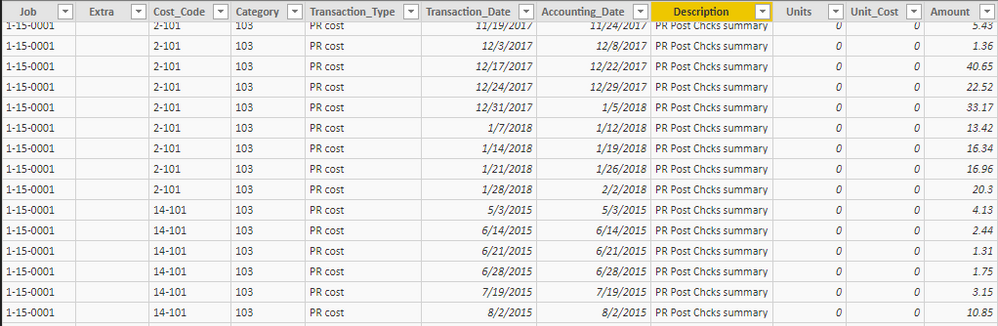
I have a table of transaction data. PowerBI has done great for totalling by rows. But now I need totals to get my visualizations done correctly to be able to show totals of transaction types as of X/XX/XXXX. 

Capture.PNG

I believe I need a running totals table based on the date,job and Cost code. Or maybe a calculated column. I'm not sure. 

The thought process I had was:

Each row will be the totals for a date, job and cost code. 

Each totals column will be a total of  various Transaction types for that job & cost code as of the date in the row.

In the example below Job 15-0011 incured a total of 15,000 for cost code 2-104. As of 5/21 we got a -9000 transaction bringing the total to 6000. 

Capture2.PNG

Hope everything I provided makes sense. 

This has been a fun challenge for me to work with but I'm at a wall. 


2 REPLIES 2
Stachu
Community Champion
Community Champion

if you just want to see the total Amount per Job then all you need to do is to drag the Job into table visual and then do the same with Amount although it is better to create a simple measure such as:

SumOfAmount = SUM(Table[Amount])

basically the same behaviour you would have in a pivot in Excel, creating new table is much closer to SQL like thinking but it's definitely not a good solution here. 


so in short - create a visual table, not a calculated table


Did I answer your question? Mark my post as a solution!
Thank you for the kudos 🙂

levih
Frequent Visitor

Totally over thought this and scrapped this direction. Thanks for the reply though. 

Helpful resources

Announcements
New to Fabric survey Carousel

New to Fabric Survey

If you have recently started exploring Fabric, we'd love to hear how it's going. Your feedback can help with product improvements.

Power BI DataViz World Championships carousel

Power BI DataViz World Championships - June 2026

A new Power BI DataViz World Championship is coming this June! Don't miss out on submitting your entry.

Join our Fabric User Panel

Join our Fabric User Panel

Share feedback directly with Fabric product managers, participate in targeted research studies and influence the Fabric roadmap.

March Power BI Update Carousel

Power BI Community Update - March 2026

Check out the March 2026 Power BI update to learn about new features.