Join us at FabCon Atlanta from March 16 - 20, 2026, for the ultimate Fabric, Power BI, AI and SQL community-led event. Save $200 with code FABCOMM.
Register now!The Power BI Data Visualization World Championships is back! Get ahead of the game and start preparing now! Learn more
I have a table like this :
| Date | Num return |
| 22/1/2022 | 14 |
| 21/1/2022 | 20 |
| 21/1/2022 | 15 |
| 20/1/2022 | 20 |
How do I create a measure that shows the number of return for the most recent date.
The measure should have a value of 35 on 21/2022 and 14 on 22/1/2022
Solved! Go to Solution.
@gancw1 , Most recent or two most recent, based on selection or over all
You can try like
measure =
var _max = maxx(allselected(Table), Table[Date])
return
calculate(sum(Table[Num return]), filter(Table, Table[Date] =_max))
Hi @gancw1 ,
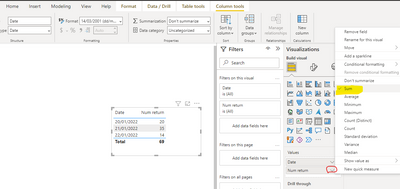
You could simply use the "Sum" type of summarization for [Num Return]
Or use :
Measure = CALCULATE(SUM('Table'[Num return]),ALLEXCEPT('Table','Table'[Date]))
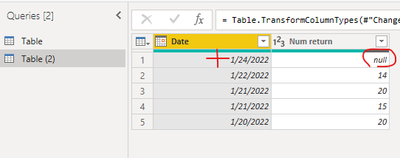
Based on the keyword ——" the most recent date", I used another table by adding 1/24/2022
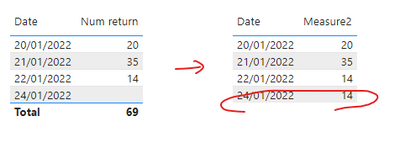
Since 1/24/2022 has no value ,it should get sum from the most recent date=2022/1/22 =14
Measure2 =
var _max= MAXX(FILTER(ALL('Table (2)'),[Date]<=MAX('Table (2)'[Date]) && [Num return]<>BLANK() ),[Date])
return CALCULATE(SUM('Table (2)'[Num return]),FILTER(ALL('Table (2)'),[Date]=_max))
Output:
Best Regards,
Eyelyn Qin
If this post helps, then please consider Accept it as the solution to help the other members find it more quickly.
Hi @gancw1 ,
You could simply use the "Sum" type of summarization for [Num Return]
Or use :
Measure = CALCULATE(SUM('Table'[Num return]),ALLEXCEPT('Table','Table'[Date]))
Based on the keyword ——" the most recent date", I used another table by adding 1/24/2022
Since 1/24/2022 has no value ,it should get sum from the most recent date=2022/1/22 =14
Measure2 =
var _max= MAXX(FILTER(ALL('Table (2)'),[Date]<=MAX('Table (2)'[Date]) && [Num return]<>BLANK() ),[Date])
return CALCULATE(SUM('Table (2)'[Num return]),FILTER(ALL('Table (2)'),[Date]=_max))
Output:
Best Regards,
Eyelyn Qin
If this post helps, then please consider Accept it as the solution to help the other members find it more quickly.
@gancw1 , Most recent or two most recent, based on selection or over all
You can try like
measure =
var _max = maxx(allselected(Table), Table[Date])
return
calculate(sum(Table[Num return]), filter(Table, Table[Date] =_max))
The Power BI Data Visualization World Championships is back! Get ahead of the game and start preparing now!
| User | Count |
|---|---|
| 39 | |
| 37 | |
| 33 | |
| 32 | |
| 29 |
| User | Count |
|---|---|
| 133 | |
| 88 | |
| 85 | |
| 68 | |
| 64 |