cancel
Showing results for 
Search instead for 
Did you mean: 

Data Days is here! Join us now for 60+ days of learning, challenges, and connection. Learn more

Reply
gancw1
Resolver II
Resolver II

Calculated Measure

I have a table like this :


DateNum return
22/1/2022  14
21/1/2022  20
21/1/2022  15
20/1/2022  20


How do I create a measure that shows the number of return for the most recent date.

The measure should have a value of 35 on 21/2022 and 14 on 22/1/2022


2 ACCEPTED SOLUTIONS
amitchandak
Super User
Super User

@gancw1 , Most recent or two most recent, based on selection or over all


You can try like

measure =

var _max = maxx(allselected(Table), Table[Date])

return

calculate(sum(Table[Num return]), filter(Table, Table[Date] =_max))

Share with Power BI Enthusiasts: Full Power BI Video (20 Hours) YouTube
Microsoft Fabric Series 60+ Videos YouTube
Microsoft Fabric Hindi End to End YouTube

View solution in original post

Anonymous
Not applicable

Hi @gancw1 ,


  • Condition1: Every date has Num:

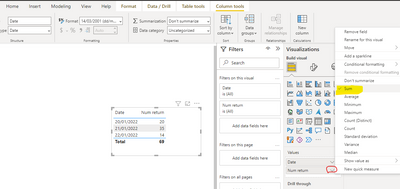
You could simply use the "Sum" type of summarization for [Num Return]

Eyelyn9_0-1647326835305.png

Or use :

Measure = CALCULATE(SUM('Table'[Num return]),ALLEXCEPT('Table','Table'[Date]))

Eyelyn9_4-1647327788897.png


  • Condition2: There are blank values in Table:

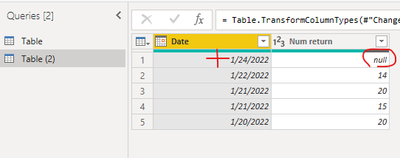
Based on the keyword ——" the most recent date", I used another table by adding 1/24/2022 

Eyelyn9_2-1647327522620.png


Since 1/24/2022 has no value ,it should get sum from the most recent date=2022/1/22  =14

Measure2 = 
var _max= MAXX(FILTER(ALL('Table (2)'),[Date]<=MAX('Table (2)'[Date]) && [Num return]<>BLANK()  ),[Date])
return CALCULATE(SUM('Table (2)'[Num return]),FILTER(ALL('Table (2)'),[Date]=_max))

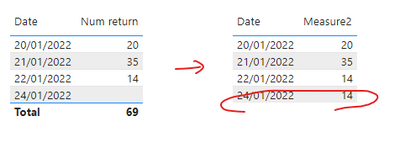
Output:

Eyelyn9_5-1647327806112.png


Best Regards,
Eyelyn Qin
If this post helps, then please consider Accept it as the solution to help the other members find it more quickly.

View solution in original post

2 REPLIES 2
Anonymous
Not applicable

Hi @gancw1 ,


  • Condition1: Every date has Num:

You could simply use the "Sum" type of summarization for [Num Return]

Eyelyn9_0-1647326835305.png

Or use :

Measure = CALCULATE(SUM('Table'[Num return]),ALLEXCEPT('Table','Table'[Date]))

Eyelyn9_4-1647327788897.png


  • Condition2: There are blank values in Table:

Based on the keyword ——" the most recent date", I used another table by adding 1/24/2022 

Eyelyn9_2-1647327522620.png


Since 1/24/2022 has no value ,it should get sum from the most recent date=2022/1/22  =14

Measure2 = 
var _max= MAXX(FILTER(ALL('Table (2)'),[Date]<=MAX('Table (2)'[Date]) && [Num return]<>BLANK()  ),[Date])
return CALCULATE(SUM('Table (2)'[Num return]),FILTER(ALL('Table (2)'),[Date]=_max))

Output:

Eyelyn9_5-1647327806112.png


Best Regards,
Eyelyn Qin
If this post helps, then please consider Accept it as the solution to help the other members find it more quickly.

amitchandak
Super User
Super User

@gancw1 , Most recent or two most recent, based on selection or over all


You can try like

measure =

var _max = maxx(allselected(Table), Table[Date])

return

calculate(sum(Table[Num return]), filter(Table, Table[Date] =_max))

Share with Power BI Enthusiasts: Full Power BI Video (20 Hours) YouTube
Microsoft Fabric Series 60+ Videos YouTube
Microsoft Fabric Hindi End to End YouTube

Helpful resources

Announcements
Fabric Data Days is here Carousel

Fabric Data Days 2026

Don't miss out on Data Days, June 15 through August 7. Learn Fabric, Power BI, SQL, AI and more.

May Power BI Update Carousel

Power BI Monthly Update - May 2026

Check out the May 2026 Power BI update to learn about new features.

Power BI DataViz World Championships carousel

Power BI DataViz World Championships - June 2026

A new Power BI DataViz World Championship is coming this June! Don't miss out on submitting your entry.