Don't miss your chance to take the Fabric Data Engineer (DP-600) exam for FREE! Find out how by watching the DP-600 session on-demand now through April 28th.
Learn moreJoin the FabCon + SQLCon recap series. Up next: Power BI, Real-Time Intelligence, IQ and AI, and Data Factory take center stage. All sessions are available on-demand after the live show. Register now
Hi there,
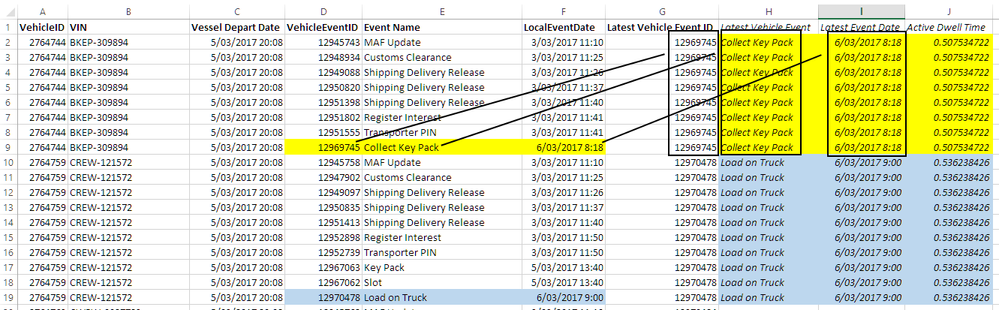
I am a little stuck in creating Calculated Columns which are column H and column I in screenshot below for any given VehicleID (Column A).
I currently have Columns A:G in my 'VMS VehicleEvent' data table.
Can someone kindly provide me the DAX formula I need to calculate:
1) Column H, which takes the Event Name (column E) of the Latest Vehicle Event ID (column G)
2) Column I, which take the LocalEventDate (column F) of the Latest Vehicle Event ID (column G)
Once I have column I, I can then calculate a measure Active Dwell Time (column J) which is column I minus column C.
Thanks in advance for your help
Wes
Solved! Go to Solution.
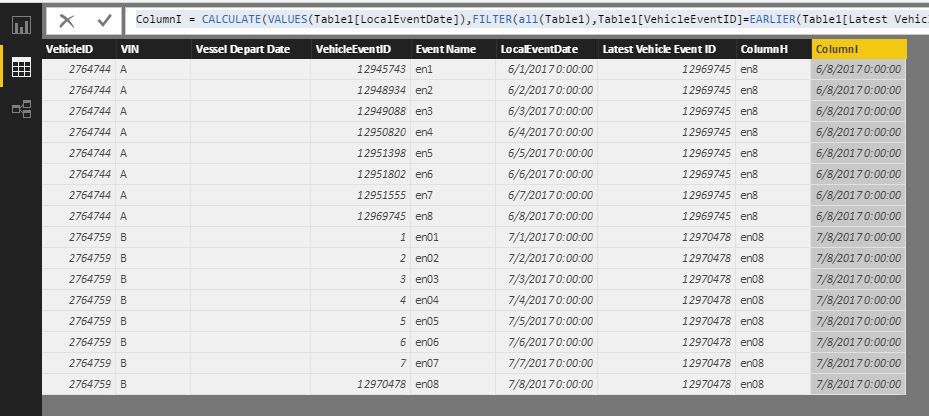
You could try these two formulas as calculated columns. (The VehicleEventID should be unique)
ColumnH = CALCULATE ( VALUES ( Table1[Event Name] ), FILTER ( ALL ( Table1 ), 'Table1'[VehicleEventID] = EARLIER ( 'Table1'[Latest Vehicle Event ID] ) ) )
ColumnI = CALCULATE ( VALUES ( Table1[LocalEventDate] ), FILTER ( ALL ( Table1 ), Table1[VehicleEventID] = EARLIER ( Table1[Latest Vehicle Event ID] ) ) )
Best Regards!
Dale
@wes-shen-poal if you calculating it at a column level then you should just be able to do a date diff? maybe i am not understanding why you need to find column i, are they not in the same row?
Proud to be a Super User!
Hi @vanessafvg
Thanks for looking into this for me.
I need to find column I because once I can isolate the Latest Event Date from the other Event Dates within a column (i.e. column I) for each Vehicle ID, I will calculate the Dwell Time (which = Latest Event Date minus Vessel Depart Date) for each Vehicle ID. And then I can calculate the average Dwell Time of all Vehicle IDs.
Hope that makes sense.
Thanks,
Wes
You could try these two formulas as calculated columns. (The VehicleEventID should be unique)
ColumnH = CALCULATE ( VALUES ( Table1[Event Name] ), FILTER ( ALL ( Table1 ), 'Table1'[VehicleEventID] = EARLIER ( 'Table1'[Latest Vehicle Event ID] ) ) )
ColumnI = CALCULATE ( VALUES ( Table1[LocalEventDate] ), FILTER ( ALL ( Table1 ), Table1[VehicleEventID] = EARLIER ( Table1[Latest Vehicle Event ID] ) ) )
Best Regards!
Dale
Check out the April 2026 Power BI update to learn about new features.
If you have recently started exploring Fabric, we'd love to hear how it's going. Your feedback can help with product improvements.
A new Power BI DataViz World Championship is coming this June! Don't miss out on submitting your entry.
| User | Count |
|---|---|
| 48 | |
| 40 | |
| 38 | |
| 20 | |
| 17 |
| User | Count |
|---|---|
| 68 | |
| 65 | |
| 30 | |
| 26 | |
| 25 |