Don't miss your chance to take the Fabric Data Engineer (DP-700) exam on us!
Learn moreWe've captured the moments from FabCon & SQLCon that everyone is talking about, and we are bringing them to the community, live and on-demand. Starts on April 14th. Register now
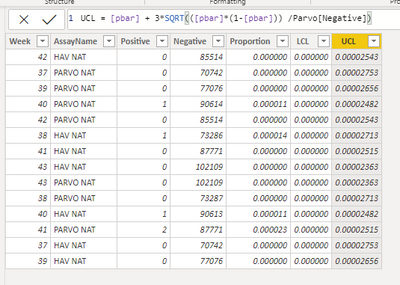
I am working on creating a p-chart for process monitoring. I was able to create a working line chart with a very simple dataset as a way of getting familiar with calculated columns. The larger dataset that I would like to use contains data from multiple process that are identified in a text column within my dataset. When I added a slicer, most of the data updates automatically. The following formula unfortunately, does not:
UCL = [pbar] + 3*SQRT(([pbar]*(1-[pbar])) /Parvo[Negative])
I need to use the Parvo[Negative] column within the formula, however, I cannot figure out how to apply a filter to this data set so it will ignore the rows within the Parvo[AssayName] column when the slicer is applied.
Thank you for any help.
Nick
Solved! Go to Solution.
Hi, @npowers2
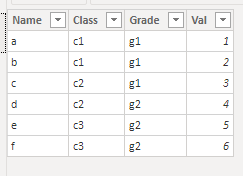
Calculated columns are only calculated when Power BI Desktop loads and refresh data. It will not be affected by slicers or filters. While measures are changed with user's interactions. DAX Measures are usually preferred to calculated columns. I created data to reproduce your scenario.
Table:
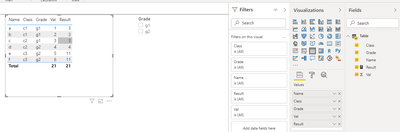
You may create a measure like below to ignore the filter of 'Name' column when slicers are applied.
Result =
CALCULATE(
SUM('Table'[Val]),
ALL('Table'[Name])
)
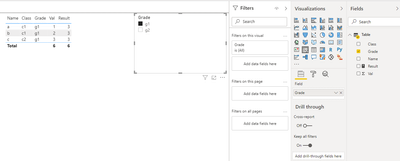
Result:
Best Regards
Allan
If this post helps, then please consider Accept it as the solution to help the other members find it more quickly.
Hi, @npowers2
Calculated columns are only calculated when Power BI Desktop loads and refresh data. It will not be affected by slicers or filters. While measures are changed with user's interactions. DAX Measures are usually preferred to calculated columns. I created data to reproduce your scenario.
Table:
You may create a measure like below to ignore the filter of 'Name' column when slicers are applied.
Result =
CALCULATE(
SUM('Table'[Val]),
ALL('Table'[Name])
)
Result:
Best Regards
Allan
If this post helps, then please consider Accept it as the solution to help the other members find it more quickly.
Are you trying to use a slicer to filter rows in a table (Data tab)? Slicers filter only visuals (Report tab). Also, calculated columns are not affected by slicers.
Proud to be a Super User!
If you have recently started exploring Fabric, we'd love to hear how it's going. Your feedback can help with product improvements.
A new Power BI DataViz World Championship is coming this June! Don't miss out on submitting your entry.
Share feedback directly with Fabric product managers, participate in targeted research studies and influence the Fabric roadmap.
| User | Count |
|---|---|
| 57 | |
| 40 | |
| 36 | |
| 18 | |
| 18 |
| User | Count |
|---|---|
| 70 | |
| 67 | |
| 38 | |
| 34 | |
| 23 |