This is best Fabric, Power BI, SQL and AI community event. How do we know? The last event sold out! Save €200 with code FABCMTY200.
Register nowThe Fabric community is upgrading! Read all of the details including the timeline and what you can expect. Learn more
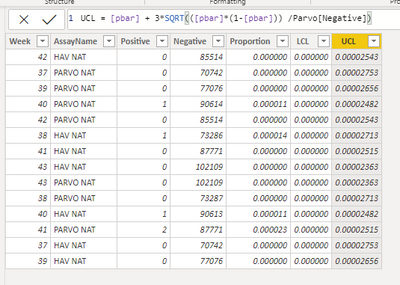
I am working on creating a p-chart for process monitoring. I was able to create a working line chart with a very simple dataset as a way of getting familiar with calculated columns. The larger dataset that I would like to use contains data from multiple process that are identified in a text column within my dataset. When I added a slicer, most of the data updates automatically. The following formula unfortunately, does not:
UCL = [pbar] + 3*SQRT(([pbar]*(1-[pbar])) /Parvo[Negative])
I need to use the Parvo[Negative] column within the formula, however, I cannot figure out how to apply a filter to this data set so it will ignore the rows within the Parvo[AssayName] column when the slicer is applied.
Thank you for any help.
Nick
Solved! Go to Solution.
Hi, @npowers2
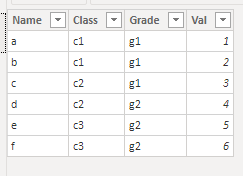
Calculated columns are only calculated when Power BI Desktop loads and refresh data. It will not be affected by slicers or filters. While measures are changed with user's interactions. DAX Measures are usually preferred to calculated columns. I created data to reproduce your scenario.
Table:
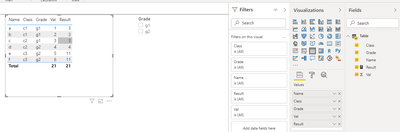
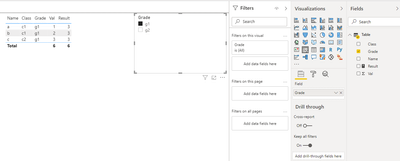
You may create a measure like below to ignore the filter of 'Name' column when slicers are applied.
Result =
CALCULATE(
SUM('Table'[Val]),
ALL('Table'[Name])
)
Result:
Best Regards
Allan
If this post helps, then please consider Accept it as the solution to help the other members find it more quickly.
Hi, @npowers2
Calculated columns are only calculated when Power BI Desktop loads and refresh data. It will not be affected by slicers or filters. While measures are changed with user's interactions. DAX Measures are usually preferred to calculated columns. I created data to reproduce your scenario.
Table:
You may create a measure like below to ignore the filter of 'Name' column when slicers are applied.
Result =
CALCULATE(
SUM('Table'[Val]),
ALL('Table'[Name])
)
Result:
Best Regards
Allan
If this post helps, then please consider Accept it as the solution to help the other members find it more quickly.
Are you trying to use a slicer to filter rows in a table (Data tab)? Slicers filter only visuals (Report tab). Also, calculated columns are not affected by slicers.
Proud to be a Super User!
Join us in Barcelona for FabCon and SQLCon, the Fabric, Power BI, SQL, and AI community event. Save €200 with code FABCMTY200.
| User | Count |
|---|---|
| 27 | |
| 22 | |
| 20 | |
| 18 | |
| 14 |
| User | Count |
|---|---|
| 25 | |
| 20 | |
| 20 | |
| 20 | |
| 20 |