cancel
Showing results for 
Search instead for 
Did you mean: 

We've captured the moments from FabCon & SQLCon that everyone is talking about, and we are bringing them to the community, live and on-demand. Starts on April 14th. Register now

Reply
Anonymous
Not applicable

Calculated Column

Hi,


I have created the following calculated column:

ActualValueW =  [ActualValue]*Indicator[weight]

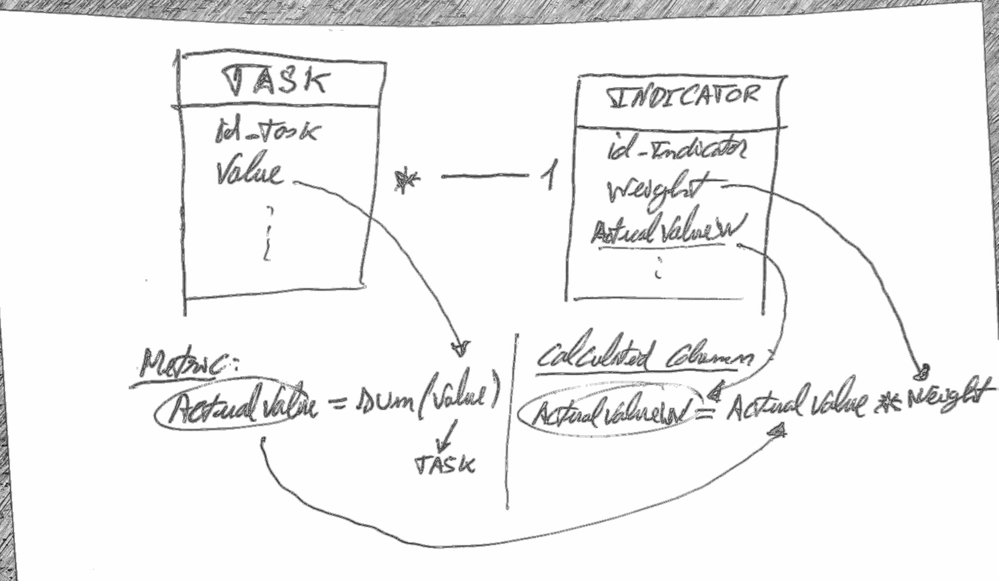
ActualValue is a metric that sums values from the table Tasks, each Indicator has one or many Taks 1-*.

The problem is that i want that the ActualValueW gives me ActualValue for the tasks linked the each indicator (each row of table Indicator), but it is giving me diferent values from the expected values.


Task-Indicator 2.png


Can you tell what am i doing wrong? Which is the correct way to do this?


Thanks,

ROCO

6 REPLIES 6
Anonymous
Not applicable

HI @Anonymous ,

You can add filter conditions to task table based on current Indicator id:


ActualW =
CALCULATE (
    SUM ( Task[ActualValue] ),
    FILTER (
        ALL ( Task ),
        TASK[id_Indicator] = EARLIER ( Indicator[id_Indicator] )
    )
) * Indicator[weight]

Regards,

Xiaoxin Sheng

Anonymous
Not applicable

@Anonymous thanks for the answer, but it didn't solve the problem yet, the values are still not correct.

I noticed that the metric ActualValue in Power BI is giving me the corret value by indicator (when i filter), but when i put the metric in the calculated column AtualValueW it gives me a diferent value (greater). I get the same value (greater) when i use the formula you suggested:

ActualW =
CALCULATE (
    SUM ( Task[ActualValue] ),
    FILTER (
        ALL ( Task ),
        TASK[id_Indicator] = EARLIER ( Indicator[id_Indicator] )
    )
) * Indicator[weight]

Why would that happen?

When i do the same operation with anonther value (column) of the table task it gives me correct results in the table Indicator...

Anonymous
Not applicable

I just noticed what the problem is, i want to filter the Calculated Column :

ActualValueW

in the report by Task[date], and it's not filtering (this column comes from SSAS).


Is it possible to filter a Calculated Column from SSAS in Power BI?

Anonymous
Not applicable

Hi @Anonymous ,

You can't use slicer/filter to dynamic change calculated column result, please use measure to instead.

Regards,

Xiaoxin Sheng

Zubair_Muhammad
Community Champion
Community Champion

@Anonymous 


Try following


=
SUMX ( RELATEDTABLE ( TASK ), TASK[VALUE] ) * [Weight]
Anonymous
Not applicable

@Zubair_Muhammad 


thanks, but it's giving me the same result, i think i need to filter by id_Indicator, like this:


where TASK[id_Indicator]=INDICATOR[id_Indicator]


but i don't know how....

Helpful resources

Announcements
New to Fabric survey Carousel

New to Fabric Survey

If you have recently started exploring Fabric, we'd love to hear how it's going. Your feedback can help with product improvements.

Power BI DataViz World Championships carousel

Power BI DataViz World Championships - June 2026

A new Power BI DataViz World Championship is coming this June! Don't miss out on submitting your entry.

Join our Fabric User Panel

Join our Fabric User Panel

Share feedback directly with Fabric product managers, participate in targeted research studies and influence the Fabric roadmap.

March Power BI Update Carousel

Power BI Community Update - March 2026

Check out the March 2026 Power BI update to learn about new features.