Don't miss your chance to take the Fabric Data Engineer (DP-600) exam for FREE! Find out how by attending the DP-600 session on April 23rd (pacific time), live or on-demand.
Learn moreJoin the FabCon + SQLCon recap series. Up next: Power BI, Real-Time Intelligence, IQ and AI, and Data Factory take center stage. All sessions are available on-demand after the live show. Register now
Hi,
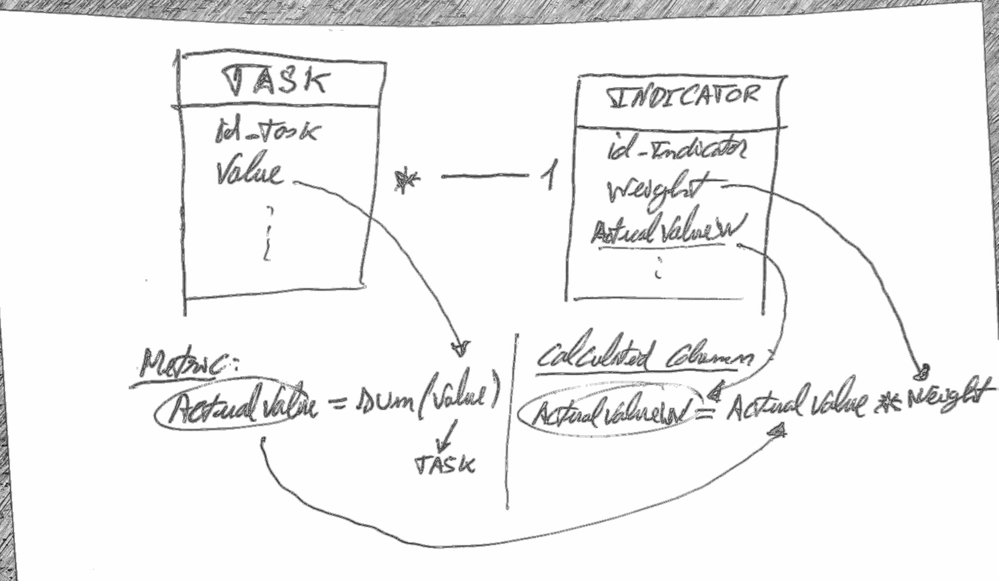
I have created the following calculated column:
ActualValueW = [ActualValue]*Indicator[weight]
ActualValue is a metric that sums values from the table Tasks, each Indicator has one or many Taks 1-*.
The problem is that i want that the ActualValueW gives me ActualValue for the tasks linked the each indicator (each row of table Indicator), but it is giving me diferent values from the expected values.
Can you tell what am i doing wrong? Which is the correct way to do this?
Thanks,
ROCO
HI @Anonymous ,
You can add filter conditions to task table based on current Indicator id:
ActualW =
CALCULATE (
SUM ( Task[ActualValue] ),
FILTER (
ALL ( Task ),
TASK[id_Indicator] = EARLIER ( Indicator[id_Indicator] )
)
) * Indicator[weight]
Regards,
Xiaoxin Sheng
@Anonymous thanks for the answer, but it didn't solve the problem yet, the values are still not correct.
I noticed that the metric ActualValue in Power BI is giving me the corret value by indicator (when i filter), but when i put the metric in the calculated column AtualValueW it gives me a diferent value (greater). I get the same value (greater) when i use the formula you suggested:
ActualW =
CALCULATE (
SUM ( Task[ActualValue] ),
FILTER (
ALL ( Task ),
TASK[id_Indicator] = EARLIER ( Indicator[id_Indicator] )
)
) * Indicator[weight]Why would that happen?
When i do the same operation with anonther value (column) of the table task it gives me correct results in the table Indicator...
I just noticed what the problem is, i want to filter the Calculated Column :
ActualValueW
in the report by Task[date], and it's not filtering (this column comes from SSAS).
Is it possible to filter a Calculated Column from SSAS in Power BI?
Hi @Anonymous ,
You can't use slicer/filter to dynamic change calculated column result, please use measure to instead.
Regards,
Xiaoxin Sheng
@Anonymous
Try following
= SUMX ( RELATEDTABLE ( TASK ), TASK[VALUE] ) * [Weight]
thanks, but it's giving me the same result, i think i need to filter by id_Indicator, like this:
where TASK[id_Indicator]=INDICATOR[id_Indicator]
but i don't know how....
Check out the April 2026 Power BI update to learn about new features.
If you have recently started exploring Fabric, we'd love to hear how it's going. Your feedback can help with product improvements.
A new Power BI DataViz World Championship is coming this June! Don't miss out on submitting your entry.
| User | Count |
|---|---|
| 48 | |
| 46 | |
| 41 | |
| 20 | |
| 17 |
| User | Count |
|---|---|
| 70 | |
| 69 | |
| 32 | |
| 27 | |
| 26 |