Join us at FabCon Atlanta from March 16 - 20, 2026, for the ultimate Fabric, Power BI, AI and SQL community-led event. Save $200 with code FABCOMM.
Register now!The Power BI Data Visualization World Championships is back! It's time to submit your entry. Live now!
I have a calculated column, that I would like to implement as measure:
Rank =
RANKX (
FILTER (
Boston_All,
EARLIER (Boston_All[Cat]) = Boston_All[Cat]
),
Boston_All[Index],
,
ASC
)-1
And for calculated columns this does the following:
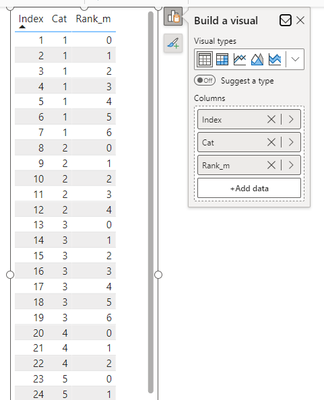
INDEX Cat Rank
1 1 0
2 1 1
3 1 2
4 1 3
5 1 4
6 2 0
7 2 1
8 2 2
9 3 0
10 3 1
Now if a filter on a visual is applied, I would like it to recalculate the ranking, something a Calculated Column does not do. Measures do do this, but it has issues with EARLIER. Now in the article below somebody has found a way around it using a SUMX example, but I fail to modify it so it can be used for my RANKX example.
https://javierguillen.wordpress.com/2012/02/06/can-earlier-be-used-in-dax-measures/
Anybody any ideas?
Thanks, Norbert
Solved! Go to Solution.
@nwesterhuijs
You can use the following measure:
Rank =
VAR __Source = ALLSELECTED( Boston_All[Index] , Boston_All[Cat] )
VAR __Result =
RANK(
DENSE,
__Source,
ORDERBY( Boston_All[Index],ASC , Boston_All[Cat], ASC ),,
PARTITIONBY( Boston_All[Cat] )
) - 1
RETURN
IF( ISINSCOPE(Boston_All[Index] ) , __Result )
⭕ Subscribe and learn Power BI from these videos
⚪ Website ⚪ LinkedIn ⚪ PBI User Group
@nwesterhuijs
You can use the following measure:
Rank =
VAR __Source = ALLSELECTED( Boston_All[Index] , Boston_All[Cat] )
VAR __Result =
RANK(
DENSE,
__Source,
ORDERBY( Boston_All[Index],ASC , Boston_All[Cat], ASC ),,
PARTITIONBY( Boston_All[Cat] )
) - 1
RETURN
IF( ISINSCOPE(Boston_All[Index] ) , __Result )
⭕ Subscribe and learn Power BI from these videos
⚪ Website ⚪ LinkedIn ⚪ PBI User Group
@Fowmy Thank you for your shift reply.
Although I do not get an error, it also does not seem to calculate anything either.
I do not have the rights to link a file here, so I have dropped a test file containing the calculated column as well as the measure on my OneDrive (link below).
Test_Rank_Measure.pbix
Your assistance is highly appreciated as well as any further suggestions that I can try to resolve it.
Thanks, Norbert
@nwesterhuijs
You need to add the Index column to the table visual:
⭕ Subscribe and learn Power BI from these videos
⚪ Website ⚪ LinkedIn ⚪ PBI User Group
The Power BI Data Visualization World Championships is back! It's time to submit your entry.
Check out the January 2026 Power BI update to learn about new features.
| User | Count |
|---|---|
| 61 | |
| 47 | |
| 39 | |
| 23 | |
| 23 |
| User | Count |
|---|---|
| 144 | |
| 106 | |
| 63 | |
| 38 | |
| 31 |