cancel
Showing results for 
Search instead for 
Did you mean: 

Learn from the best! Meet the four finalists headed to the FINALS of the Power BI Dataviz World Championships! Register now

Reply
nwesterhuijs
Regular Visitor

Calculated Column to Measure - RANKX & EARLIER

I have a calculated column, that I would like to implement as measure: 


Rank = 
RANKX (
    FILTER (
        Boston_All,
        EARLIER (Boston_All[Cat]) = Boston_All[Cat]
    ),
    Boston_All[Index],
    ,
    ASC
)-1


And for calculated columns this does the following: 


INDEX         Cat         Rank

1                   1             0

2                   1             1

3                   1             2

4                   1             3

5                   1             4

6                   2             0

7                   2             1

8                   2             2

9                   3             0

10                 3             1


Now if a filter on a visual is applied, I would like it to recalculate the ranking, something a Calculated Column does not do. Measures do do this, but it has issues with EARLIER. Now in the article below somebody has found a way around it using a SUMX example, but I fail to modify it so it can be used for my RANKX example. 


https://javierguillen.wordpress.com/2012/02/06/can-earlier-be-used-in-dax-measures/

Anybody any ideas?

Thanks, Norbert 

1 ACCEPTED SOLUTION
Fowmy
Super User
Super User

@nwesterhuijs 

You can use the following measure:

Rank = 

VAR __Source = ALLSELECTED( Boston_All[Index] , Boston_All[Cat] )
VAR __Result = 
    RANK(
        DENSE,
        __Source,
        ORDERBY( Boston_All[Index],ASC , Boston_All[Cat], ASC ),,
        PARTITIONBY( Boston_All[Cat] )
    ) - 1
RETURN
   IF( ISINSCOPE(Boston_All[Index] ) ,  __Result )

Did I answer your question? Mark my post as a solution! and hit thumbs up


Subscribe and learn Power BI from these videos

Website LinkedIn PBI User Group

View solution in original post

4 REPLIES 4
Fowmy
Super User
Super User

@nwesterhuijs 

You can use the following measure:

Rank = 

VAR __Source = ALLSELECTED( Boston_All[Index] , Boston_All[Cat] )
VAR __Result = 
    RANK(
        DENSE,
        __Source,
        ORDERBY( Boston_All[Index],ASC , Boston_All[Cat], ASC ),,
        PARTITIONBY( Boston_All[Cat] )
    ) - 1
RETURN
   IF( ISINSCOPE(Boston_All[Index] ) ,  __Result )

Did I answer your question? Mark my post as a solution! and hit thumbs up


Subscribe and learn Power BI from these videos

Website LinkedIn PBI User Group

@Fowmy Thank you for your shift reply.

Although I do not get an error, it also does not seem to calculate anything either.


I do not have the rights to link a file here, so I have dropped a test file containing the calculated column as well as the measure on my OneDrive (link below). 


Test_Rank_Measure.pbix

Your assistance is highly appreciated as well as any further suggestions that I can try to resolve it.   

Thanks, Norbert 

@nwesterhuijs 

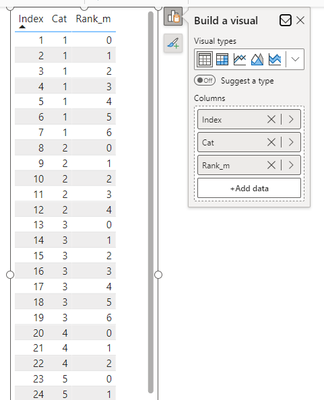
You need to add the Index column to the table visual:

Fowmy_0-1701695625948.png


Did I answer your question? Mark my post as a solution! and hit thumbs up


Subscribe and learn Power BI from these videos

Website LinkedIn PBI User Group

@Fowmy Thanks for all your help!

Helpful resources

Announcements
Join our Fabric User Panel

Join our Fabric User Panel

Share feedback directly with Fabric product managers, participate in targeted research studies and influence the Fabric roadmap.

February Power BI Update Carousel

Power BI Monthly Update - February 2026

Check out the February 2026 Power BI update to learn about new features.

FabCon Atlanta 2026 carousel

FabCon Atlanta 2026

Join us at FabCon Atlanta, March 16-20, for the ultimate Fabric, Power BI, AI and SQL community-led event. Save $200 with code FABCOMM.