cancel
Showing results for 
Search instead for 
Did you mean: 

The Power BI Data Visualization World Championships is back! Get ahead of the game and start preparing now! Learn more

Reply
ed7
Microsoft Employee
Microsoft Employee

Calculated Column: net new over last day for each category

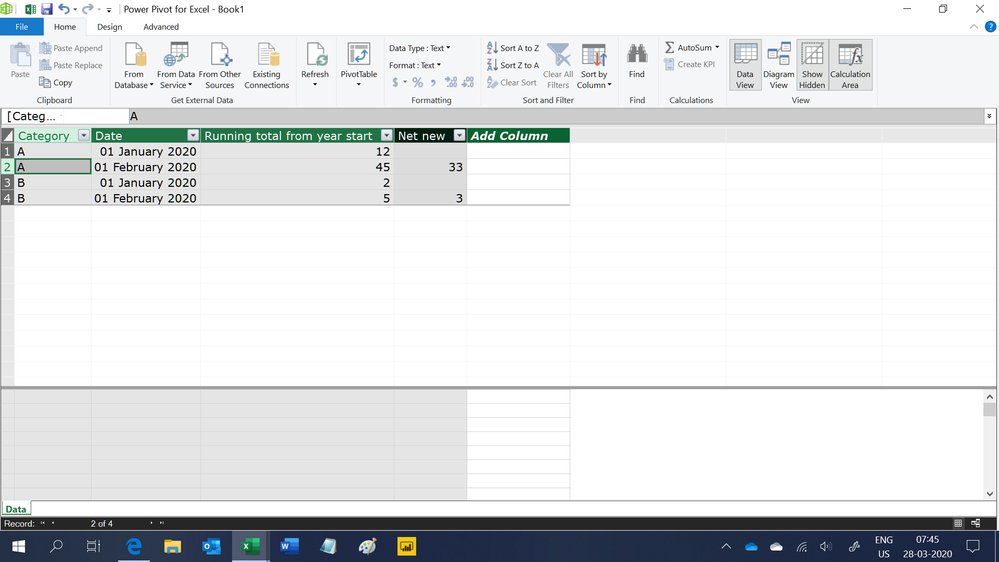
I have a table that has data similiar to the table below, I need to calculate net new for each date per category. For example second line would show net new of 33, fourth line net new is 3. I would prefer to use  a Calculated column not Measure. Tried different recommendation, nothing worked for Calculated Column (but some formulas worked to create Measure). How can I create a calc column for Net New?

CategoryDateRunning total from year start
A01/01/202012
A01/02/202045
B01/01/20202
B01/02/20205
1 ACCEPTED SOLUTION
Ashish_Mathur
Super User
Super User

Hi,

Try this calculated column formula

=if(ISBLANK(CALCULATE(MAX(Data[Date]),FILTER(Data,Data[Category]=EARLIER(Data[Category])&&Data[Date]<EARLIER(Data[Date])))),BLANK(),Data[Running total from year start]-LOOKUPVALUE(Data[Running total from year start],Data[Date],CALCULATE(MAX(Data[Date]),FILTER(Data,Data[Category]=EARLIER(Data[Category])&&Data[Date]<EARLIER(Data[Date]))),Data[Category],Data[Category]))

Hope this helps.

Untitled.png


Regards,
Ashish Mathur
http://www.ashishmathur.com
https://www.linkedin.com/in/excelenthusiasts/

View solution in original post

2 REPLIES 2
Anonymous
Not applicable

@ed7 

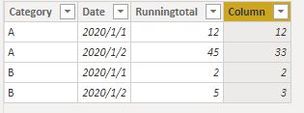
I believe EARLIER is best for you if you want a calculated column.


Column = 
var current_day  = CALCULATE(SUM('Table'[Runningtotal]),FILTER('Table','Table'[Date] = EARLIER('Table'[Date]) && 'Table'[Category]=EARLIER('Table'[Category])))

var previous_day = CALCULATE(SUM('Table'[Runningtotal]),FILTER('Table','Table'[Date] = EARLIER('Table'[Date])-1 &&'Table'[Category]=EARLIER('Table'[Category])))

Return current_day - previous_day


net new.JPG


Paul Zheng
If this post helps, then please consider Accept it as the solution to help the other members find it more quickly.

Ashish_Mathur
Super User
Super User

Hi,

Try this calculated column formula

=if(ISBLANK(CALCULATE(MAX(Data[Date]),FILTER(Data,Data[Category]=EARLIER(Data[Category])&&Data[Date]<EARLIER(Data[Date])))),BLANK(),Data[Running total from year start]-LOOKUPVALUE(Data[Running total from year start],Data[Date],CALCULATE(MAX(Data[Date]),FILTER(Data,Data[Category]=EARLIER(Data[Category])&&Data[Date]<EARLIER(Data[Date]))),Data[Category],Data[Category]))

Hope this helps.

Untitled.png


Regards,
Ashish Mathur
http://www.ashishmathur.com
https://www.linkedin.com/in/excelenthusiasts/

Helpful resources

Announcements
November Power BI Update Carousel

Power BI Monthly Update - November 2025

Check out the November 2025 Power BI update to learn about new features.

Fabric Data Days Carousel

Fabric Data Days

Advance your Data & AI career with 50 days of live learning, contests, hands-on challenges, study groups & certifications and more!

FabCon Atlanta 2026 carousel

FabCon Atlanta 2026

Join us at FabCon Atlanta, March 16-20, for the ultimate Fabric, Power BI, AI and SQL community-led event. Save $200 with code FABCOMM.

Top Solution Authors
Top Kudoed Authors