This time we’re going bigger than ever. Fabric, Power BI, SQL, AI and more. We're covering it all. You won't want to miss it.
Learn moreLevel up your Power BI skills this month - build one visual each week and tell better stories with data! Get started
Hi All,
I have a table with two columns.
| City | Profit |
| Chicago | 60 |
| Los Vegas | 80 |
| New York | 40 |
| Los Angeles | 90 |
| Houston | 10 |
| Total Profit | 280 |
I need to add one more column "Percentage %". and insert values for "Profit/Total Profit" in th new column.
Any help will be appreciated. I want to done this on Power Bi. Thanks
Solved! Go to Solution.
Hi @sdhn ,
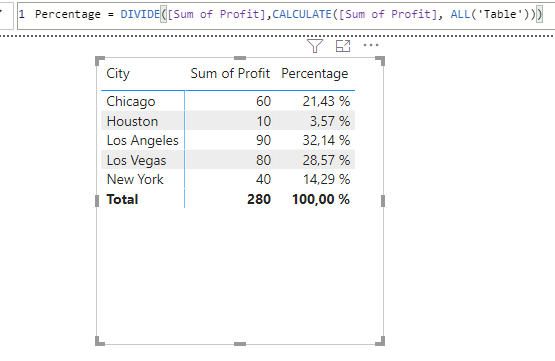
you can do it like this:
Sum of Profit = SUM('Table'[Profit])
Percentage = DIVIDE([Sum of Profit],CALCULATE([Sum of Profit], ALL('Table')))
With kind regards from the town where the legend of the 'Pied Piper of Hamelin' is at home
FrankAT (Proud to be a Datanaut)
Hi @sdhn ,
you can do it like this:
Sum of Profit = SUM('Table'[Profit])
Percentage = DIVIDE([Sum of Profit],CALCULATE([Sum of Profit], ALL('Table')))
With kind regards from the town where the legend of the 'Pied Piper of Hamelin' is at home
FrankAT (Proud to be a Datanaut)
Table real name is MailPackage and Column name is MAIL COUNT instaed of Profit.
I am getting following message.
I right clicked on Table and choose New Column and insert following code:
The syntax for 'sum' is incorrect. (DAX(DIVIDE(MailPackage[MAIL COUNT]sum(MailPackage[MAIL COUNT])))).
Your help will appreciaed again. Thanks
I added "," before sum and its work BUT
Please note:
I have a total of mail count (Profit in above example) in the last row.
It is 280 in above example.
I want to get result of percentage as mail counts/total mail counts * 100 for each row in the newly percentage column as below:
60/280*100
80/280*100
40/280*100
90/280*100
10/280*100
Thanks
It is ok. I removed the total from the source file. I appreciate your help. thx
Try Column = DIVIDE( MailPackage[MAIL COUNT], SUM(MailPackage[MAIL COUNT] )
No DAX required.
Check out the April 2026 Power BI update to learn about new features.
Sign up to receive a private message when registration opens and key events begin.
If you have recently started exploring Fabric, we'd love to hear how it's going. Your feedback can help with product improvements.
| User | Count |
|---|---|
| 35 | |
| 32 | |
| 26 | |
| 21 | |
| 18 |
| User | Count |
|---|---|
| 68 | |
| 37 | |
| 32 | |
| 25 | |
| 23 |