Join us at FabCon Atlanta from March 16 - 20, 2026, for the ultimate Fabric, Power BI, AI and SQL community-led event. Save $200 with code FABCOMM.
Register now!The Power BI Data Visualization World Championships is back! Get ahead of the game and start preparing now! Learn more
Hi All,
I have a table with two columns.
| City | Profit |
| Chicago | 60 |
| Los Vegas | 80 |
| New York | 40 |
| Los Angeles | 90 |
| Houston | 10 |
| Total Profit | 280 |
I need to add one more column "Percentage %". and insert values for "Profit/Total Profit" in th new column.
Any help will be appreciated. I want to done this on Power Bi. Thanks
Solved! Go to Solution.
Hi @sdhn ,
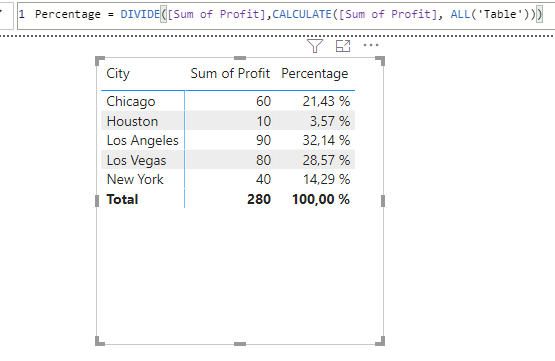
you can do it like this:
Sum of Profit = SUM('Table'[Profit])
Percentage = DIVIDE([Sum of Profit],CALCULATE([Sum of Profit], ALL('Table')))
With kind regards from the town where the legend of the 'Pied Piper of Hamelin' is at home
FrankAT (Proud to be a Datanaut)
Hi @sdhn ,
you can do it like this:
Sum of Profit = SUM('Table'[Profit])
Percentage = DIVIDE([Sum of Profit],CALCULATE([Sum of Profit], ALL('Table')))
With kind regards from the town where the legend of the 'Pied Piper of Hamelin' is at home
FrankAT (Proud to be a Datanaut)
Table real name is MailPackage and Column name is MAIL COUNT instaed of Profit.
I am getting following message.
I right clicked on Table and choose New Column and insert following code:
The syntax for 'sum' is incorrect. (DAX(DIVIDE(MailPackage[MAIL COUNT]sum(MailPackage[MAIL COUNT])))).
Your help will appreciaed again. Thanks
I added "," before sum and its work BUT
Please note:
I have a total of mail count (Profit in above example) in the last row.
It is 280 in above example.
I want to get result of percentage as mail counts/total mail counts * 100 for each row in the newly percentage column as below:
60/280*100
80/280*100
40/280*100
90/280*100
10/280*100
Thanks
It is ok. I removed the total from the source file. I appreciate your help. thx
Try Column = DIVIDE( MailPackage[MAIL COUNT], SUM(MailPackage[MAIL COUNT] )
No DAX required.
The Power BI Data Visualization World Championships is back! Get ahead of the game and start preparing now!
| User | Count |
|---|---|
| 39 | |
| 37 | |
| 33 | |
| 32 | |
| 29 |
| User | Count |
|---|---|
| 132 | |
| 88 | |
| 82 | |
| 68 | |
| 64 |