cancel
Showing results for 
Search instead for 
Did you mean: 

The Power BI Data Visualization World Championships is back! Get ahead of the game and start preparing now! Learn more

Reply
T2WAII
Regular Visitor

Calculate with conditions and MIN

Hi there,


I am searching for a solution for the following use-case:


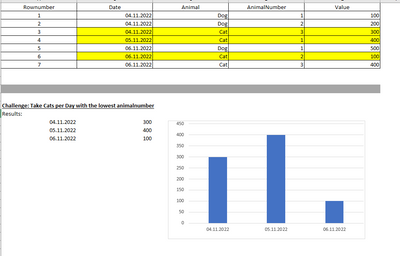
I have a table that has to be filtered before I want to select the related value of the MIN-Value out of Column XY. 

It should be clear with this example:
T2WAII_0-1668726663711.png


First of all, I only want to consider only 'Cats', no 'Dogs'. 

After that, I want to choose the row with the lowest 'AnimalNumber' for each day, to get a list with 'Date' + 'Value' for the selected row. 

These information should be visualized in the chart. 

Unfortunately, I was not able to create a Measure-Statement, that delivers the desired result. In my dataset I have a Calendar-Table, that is related to my Fact-Table. The Dates are shown on the x-axis like in my example. 


= CALCULATE (
    VALUES ( FactAnimals[Value]),
    FILTER ( ALL ( FactAnimals[AnimalNumber] ), FactAnimals[AnimalNumber] = MIN( ( FactAnimals[AnimalNumber] ) ) )
)


This is my code sample, but ofc it does not care about 'Cat' or 'Dog'. How can I add the condition, that I will only receive 'Cat'-Values?


Thank you very much! 


1 ACCEPTED SOLUTION

Hi,

Thank you for your reply.

In the meantime, I was able to find a solution for my problem. I processed my data in the DWH in another way, so the DAX-solution was not necessary anymore. 

Thank you for your help, next time I will upload a Sample-Dataset directly! 

Have a nice day, best regards


T2WAII

View solution in original post

2 REPLIES 2
Anonymous
Not applicable

Hi @T2WAII ,


Please share some sample data so that we could test the formula.


Best Regards,

Jay

Hi,

Thank you for your reply.

In the meantime, I was able to find a solution for my problem. I processed my data in the DWH in another way, so the DAX-solution was not necessary anymore. 

Thank you for your help, next time I will upload a Sample-Dataset directly! 

Have a nice day, best regards


T2WAII

Helpful resources

Announcements
November Power BI Update Carousel

Power BI Monthly Update - November 2025

Check out the November 2025 Power BI update to learn about new features.

Fabric Data Days Carousel

Fabric Data Days

Advance your Data & AI career with 50 days of live learning, contests, hands-on challenges, study groups & certifications and more!

FabCon Atlanta 2026 carousel

FabCon Atlanta 2026

Join us at FabCon Atlanta, March 16-20, for the ultimate Fabric, Power BI, AI and SQL community-led event. Save $200 with code FABCOMM.

Top Solution Authors
Top Kudoed Authors