Don't miss your chance to take the Fabric Data Engineer (DP-600) exam for FREE! Find out how by watching the DP-600 session on-demand now through April 28th.
Learn moreJoin the FabCon + SQLCon recap series. Up next: Power BI, Real-Time Intelligence, IQ and AI, and Data Factory take center stage. All sessions are available on-demand after the live show. Register now
Hi everyone,
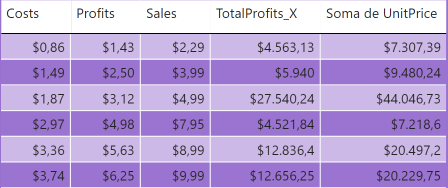
I have a table like the following one:
Now I would like to remove the currency symbols here in the "Report" section, but without affecting the "Data" section.
The problem is that every time I change the format in the "Report" section, it automatically changes on the "Data" section.
Any idea how to handle it?
Thanks in advance.
Best Regards,
Daniel
Solved! Go to Solution.
@Anonymous
Hi,
If you want to keep your Data section coulums as currency and if you need to change columns in report as decimal then best option is creating mesures.
Thank you.
you need to change the data type in Data section.
Data section is like the datasourece for the visuals in the report section, so the change shall take place from its source.
@Anonymous
Hi
Create DAX mesures for these all columns. Then you can change data time of measure without changing data type of Data section. ex.
Costs = Sum(Table Name[Column Name])
Thank you.
Thank you very much, Sir.
So basically my only solution is to create a measure for every single column, in order to change the format to decimal number, without affecting the "data section" that is actually in currency format, is that correct?
I
@Anonymous
Hi,
If you want to keep your Data section coulums as currency and if you need to change columns in report as decimal then best option is creating mesures.
Thank you.
Check out the April 2026 Power BI update to learn about new features.
If you have recently started exploring Fabric, we'd love to hear how it's going. Your feedback can help with product improvements.
A new Power BI DataViz World Championship is coming this June! Don't miss out on submitting your entry.
| User | Count |
|---|---|
| 45 | |
| 38 | |
| 34 | |
| 21 | |
| 17 |
| User | Count |
|---|---|
| 66 | |
| 65 | |
| 31 | |
| 26 | |
| 26 |