Join us in Barcelona for FabCon and SQLCon, September 28 - October 1, 2026.
This is best Fabric, Power BI, SQL and AI community event. How do we know? The last event sold out! Save €200 with code FABCMTY200.
Register now- Power BI forums
- Get Help with Power BI
- Desktop
- Service
- Report Server
- Power Query
- Mobile Apps
- Developer
- DAX Commands and Tips
- Custom Visuals Development Discussion
- Health and Life Sciences
- Power BI Spanish forums
- Translated Spanish Desktop
- Training and Consulting
- Instructor Led Training
- Dashboard in a Day for Women, by Women
- Galleries
- Data Stories Gallery
- Themes Gallery
- Contests Gallery
- QuickViz Gallery
- Quick Measures Gallery
- Visual Calculations Gallery
- Fabric Apps Gallery
- Notebook Gallery
- Translytical Task Flow Gallery
- TMDL Gallery
- R Script Showcase
- Webinars and Video Gallery
- Ideas
- Custom Visuals Ideas (read-only)
- Issues
- Issues
- Events
- Upcoming Events
July 28 - August 9 | Final Round of the Power BI Dataviz World Championships. This is your chance. Learn more
- Power BI forums
- Forums
- Get Help with Power BI
- Desktop
- Re: Calculate value between two dates
- Subscribe to RSS Feed
- Mark Topic as New
- Mark Topic as Read
- Float this Topic for Current User
- Bookmark
- Subscribe
- Printer Friendly Page

- Mark as New
- Bookmark
- Subscribe
- Mute
- Subscribe to RSS Feed
- Permalink
- Report Inappropriate Content
Calculate value between two dates
Hi,
I have the following two tables:
Table A
product cost startdate enddate
A 100 01.01.2019 31.03.2019
A 150 01.04.2019 ......
Table B
product date number of products
A 01.02.2019 1
A 01.05.2019 2
I would like to calculate the value of cost from table A in table B
So it should look like this:
product date number of products cost Cost of goods
A 01.02.2019 1 100 1*100 = 100
A 01.05.2019 2 150 2*150 = 300
Solved! Go to Solution.


- Mark as New
- Bookmark
- Subscribe
- Mute
- Subscribe to RSS Feed
- Permalink
- Report Inappropriate Content
Hi @Anonymous
Please try the below.
Column =
CALCULATE(
    MAX('Table A'[Cost]),
    FILTER(
        RELATEDTABLE('Table A'),
        'Table A'[startDate] <= 'Table B'[date] )
)
Regards,
Mariusz
If this post helps, then please consider Accept it as the solution to help the other members find it more quickly.


- Mark as New
- Bookmark
- Subscribe
- Mute
- Subscribe to RSS Feed
- Permalink
- Report Inappropriate Content
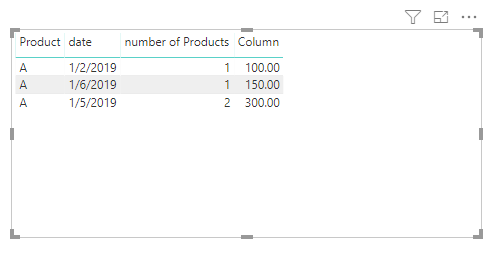
Please try this:
- Mark as New
- Bookmark
- Subscribe
- Mute
- Subscribe to RSS Feed
- Permalink
- Report Inappropriate Content
Hi @Anonymous
You can do it in Query Editor like below
Price table
let
    Source = Table.FromRows(Json.Document(Binary.Decompress(Binary.FromText("i45WclTSUTI0MACSBob6QGRkYGgJ5BgDOcYQTqwOVJUpTJUJTJVSbCwA", BinaryEncoding.Base64), Compression.Deflate)), let _t = ((type text) meta [Serialized.Text = true]) in type table [#"Product Code" = _t, Cost = _t, startDate = _t, endDate = _t]),
    #"Changed Type" = Table.TransformColumnTypes(Source,{{"Product Code", type text}, {"Cost", Int64.Type}, {"startDate", type date}, {"endDate", type date}})
in
    #"Changed Type"
Quantity table
let
    Source = Table.FromRows(Json.Document(Binary.Decompress(Binary.FromText("i45WclTSUTIw1Dcw0jcyMLQEcgyVYnUQwqYwYSMUYTMk1bEA", BinaryEncoding.Base64), Compression.Deflate)), let _t = ((type text) meta [Serialized.Text = true]) in type table [Product = _t, date = _t, #"number of Products" = _t]),
    #"Changed Type" = Table.TransformColumnTypes(Source,{{"Product", type text}, {"date", type date}, {"number of Products", Int64.Type}}),
    #"Added Custom" =Table.AddColumn(#"Changed Type", "Cost", each let d = [date] in Table.SelectRows(ProductPrice, each [startDate] <= d and (if [endDate] <> null then [endDate] >= d else true))[Cost]),
    #"Expanded Custom" = Table.ExpandListColumn(#"Added Custom", "Cost"),
    #"Changed Type1" = Table.TransformColumnTypes(#"Expanded Custom",{{"Cost", type number}})
in
    #"Changed Type1"
Regards,
Mariusz
If this post helps, then please consider Accept it as the solution to help the other members find it more quickly.
- Mark as New
- Bookmark
- Subscribe
- Mute
- Subscribe to RSS Feed
- Permalink
- Report Inappropriate Content
@Mariusz thx for your reply
Looks pretty complicate, is there a way to do it with dax/calculated columns?
- Mark as New
- Bookmark
- Subscribe
- Mute
- Subscribe to RSS Feed
- Permalink
- Report Inappropriate Content
Please try this:
- Mark as New
- Bookmark
- Subscribe
- Mute
- Subscribe to RSS Feed
- Permalink
- Report Inappropriate Content
Hi @Anonymous
Please try the below.
Column =
CALCULATE(
    MAX('Table A'[Cost]),
    FILTER(
        RELATEDTABLE('Table A'),
        'Table A'[startDate] <= 'Table B'[date] )
)
Regards,
Mariusz
If this post helps, then please consider Accept it as the solution to help the other members find it more quickly.
- Mark as New
- Bookmark
- Subscribe
- Mute
- Subscribe to RSS Feed
- Permalink
- Report Inappropriate Content
Hi,
Create a Measure in First table as given below.
Measue = sum(Table1[Cost])
Later create the Calculated column in Second table as given below.
Cost of Goods= Table1[Number of Probucts]*Measure
Please make sure the correct relationships between the two tables.
Thanks,
Hemanth Thota.
- Mark as New
- Bookmark
- Subscribe
- Mute
- Subscribe to RSS Feed
- Permalink
- Report Inappropriate Content
Helpful resources

FabCon & SQLCon – Barcelona 2026
Join us in Barcelona for FabCon and SQLCon, the Fabric, Power BI, SQL, and AI community event. Save €200 with code FABCMTY200.

Fabric Community Sticker Challenge - Barcelona 2026
If you love stickers, then you will definitely want to check out our community sticker challenge, Barcelona edition!

Power BI Monthly Update - July 2026
Check out the July 2026 Power BI update to learn about new features.

Power BI DataViz World Championships - June 2026
A new Power BI DataViz World Championship is coming this June! Don't miss out on submitting your entry.

| User | Count |
|---|---|
| 25 | |
| 23 | |
| 19 | |
| 17 | |
| 14 |


| User | Count |
|---|---|
| 25 | |
| 24 | |
| 20 | |
| 19 | |
| 19 |


