FabCon is coming to Atlanta
Join us at FabCon Atlanta from March 16 - 20, 2026, for the ultimate Fabric, Power BI, AI and SQL community-led event. Save $200 with code FABCOMM.
Register now!- Power BI forums
- Get Help with Power BI
- Desktop
- Service
- Report Server
- Power Query
- Mobile Apps
- Developer
- DAX Commands and Tips
- Custom Visuals Development Discussion
- Health and Life Sciences
- Power BI Spanish forums
- Translated Spanish Desktop
- Training and Consulting
- Instructor Led Training
- Dashboard in a Day for Women, by Women
- Galleries
- Data Stories Gallery
- Themes Gallery
- Contests Gallery
- QuickViz Gallery
- Quick Measures Gallery
- Visual Calculations Gallery
- Notebook Gallery
- Translytical Task Flow Gallery
- TMDL Gallery
- R Script Showcase
- Webinars and Video Gallery
- Ideas
- Custom Visuals Ideas (read-only)
- Issues
- Issues
- Events
- Upcoming Events
The Power BI Data Visualization World Championships is back! Get ahead of the game and start preparing now! Learn more
- Power BI forums
- Forums
- Get Help with Power BI
- Desktop
- Re: Calculate total number of employee in visual b...
- Subscribe to RSS Feed
- Mark Topic as New
- Mark Topic as Read
- Float this Topic for Current User
- Bookmark
- Subscribe
- Printer Friendly Page

- Mark as New
- Bookmark
- Subscribe
- Mute
- Subscribe to RSS Feed
- Permalink
- Report Inappropriate Content
Calculate total number of employee in visual by employee id or name.
hey,
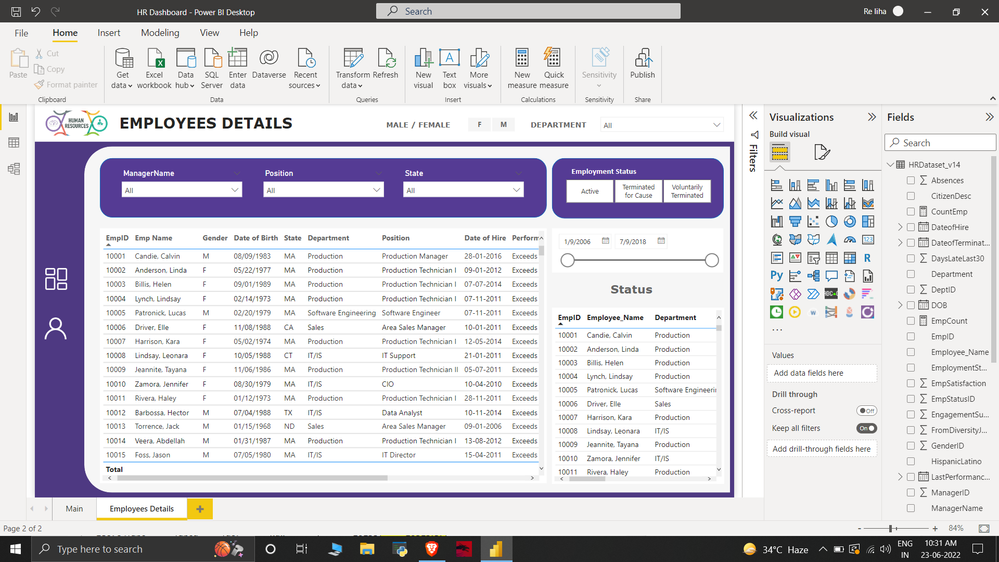
I am trying to calculate total number of employees in the last of row in visual what steps should i follow? Please help me to get rid of this.
Solved! Go to Solution.


- Mark as New
- Bookmark
- Subscribe
- Mute
- Subscribe to RSS Feed
- Permalink
- Report Inappropriate Content
Hi @Kabeerkhan007
You can add the Employee Name Column as a measure:
Employee Name Measure =
IF (
    HASONEVALUE ( TableName[EmpID0 ), SELECTEDVALUE ( TableName[Employee Name] ),
    COUNTROWS ( TableName )
)
- Mark as New
- Bookmark
- Subscribe
- Mute
- Subscribe to RSS Feed
- Permalink
- Report Inappropriate Content
how many tables do you have. please check the relationships if you are connecting 2 tables.
- Mark as New
- Bookmark
- Subscribe
- Mute
- Subscribe to RSS Feed
- Permalink
- Report Inappropriate Content
Incase you have duplicate ID's in the table you csn use the following measure instead of the column [Employee Name] and you shall get the nimber of employees at the bottom as requested
Employee Name Measure =
IF (
    HASONEVALUE ( TableName[EmpID] ), SELECTEDVALUE ( TableName[Employee Name] ),
    DISTINCTCOUNT ( TableName[EmpID] )
)- Mark as New
- Bookmark
- Subscribe
- Mute
- Subscribe to RSS Feed
- Permalink
- Report Inappropriate Content
@tamerj1 Still has the same visual. There is no duplicity for the count, I don't want that column to be seen in the table, but I only want the total count.
- Mark as New
- Bookmark
- Subscribe
- Mute
- Subscribe to RSS Feed
- Permalink
- Report Inappropriate Content
I totally understand your requirement right from the beginning. The measure I proposed should return the name in all row except in the total where you should see the total count. I see no reason it shouldn't work! Would please help me out with a screenshot?
- Mark as New
- Bookmark
- Subscribe
- Mute
- Subscribe to RSS Feed
- Permalink
- Report Inappropriate Content
Hi @Kabeerkhan007
You can add the Employee Name Column as a measure:
Employee Name Measure =
IF (
    HASONEVALUE ( TableName[EmpID0 ), SELECTEDVALUE ( TableName[Employee Name] ),
    COUNTROWS ( TableName )
)- Mark as New
- Bookmark
- Subscribe
- Mute
- Subscribe to RSS Feed
- Permalink
- Report Inappropriate Content
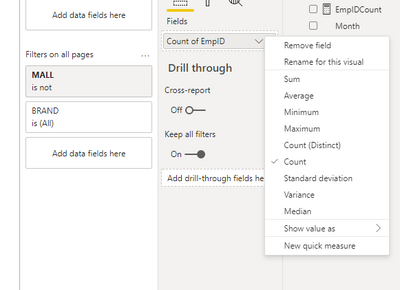
You have 2 options,
1. You can simply drag and drop EmpID in a card visual value field, and change summarization to Count
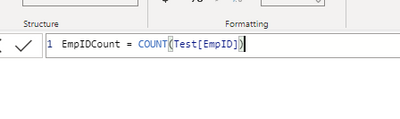
2. OR you can make a new measure :
- Mark as New
- Bookmark
- Subscribe
- Mute
- Subscribe to RSS Feed
- Permalink
- Report Inappropriate Content
@Anonymous Hey thanks for the suggestion. I already have card visual in my main page, I was trying to show in another visual with the help of emp id or name.
I tried your 2 option but its look like this total value is correct but in every column it is showing 1.

- Mark as New
- Bookmark
- Subscribe
- Mute
- Subscribe to RSS Feed
- Permalink
- Report Inappropriate Content
- Mark as New
- Bookmark
- Subscribe
- Mute
- Subscribe to RSS Feed
- Permalink
- Report Inappropriate Content
@tamerj1 Yes, i tried but it's visual are same as @Anonymous said. It is showing 1 in all column, Which i don't want in my table.
- Mark as New
- Bookmark
- Subscribe
- Mute
- Subscribe to RSS Feed
- Permalink
- Report Inappropriate Content
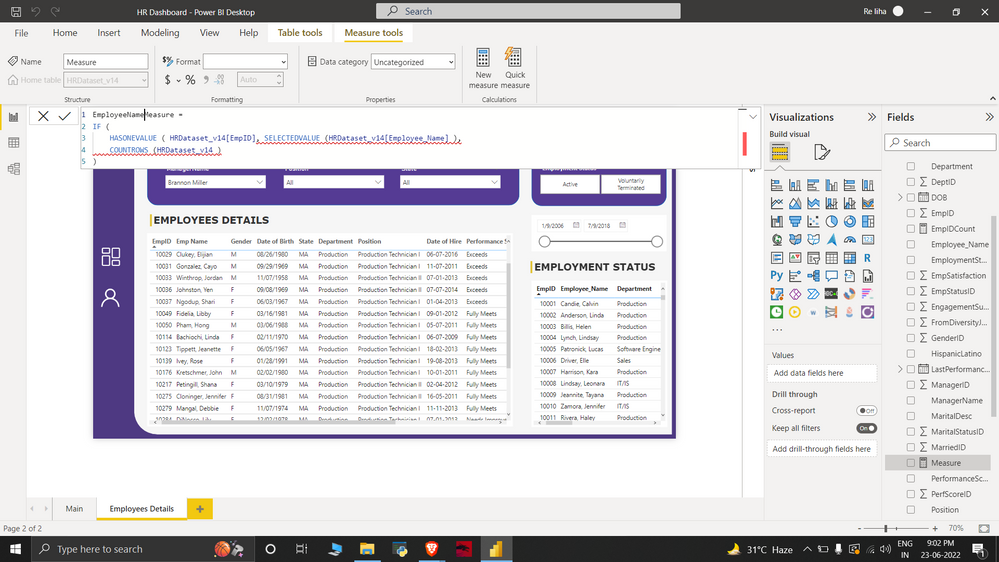
The must be something wrong. Would you please share a screenshot of the code along with the result?
- Mark as New
- Bookmark
- Subscribe
- Mute
- Subscribe to RSS Feed
- Permalink
- Report Inappropriate Content
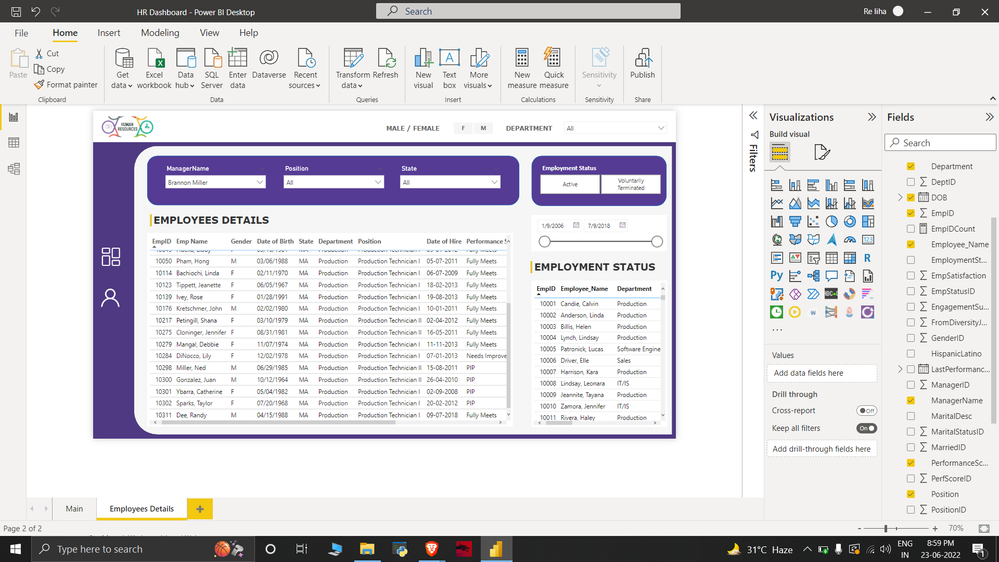
@tamerj1 I just want total number of employee in the last row of table without creating any other column. Is there any method to do with emp id or emp name?
- Mark as New
- Bookmark
- Subscribe
- Mute
- Subscribe to RSS Feed
- Permalink
- Report Inappropriate Content
The closing bracket of HASONEVALUE is missing. Please fix it snd try it in your table. Then you can take the Employee Name column out of the table.
- Mark as New
- Bookmark
- Subscribe
- Mute
- Subscribe to RSS Feed
- Permalink
- Report Inappropriate Content
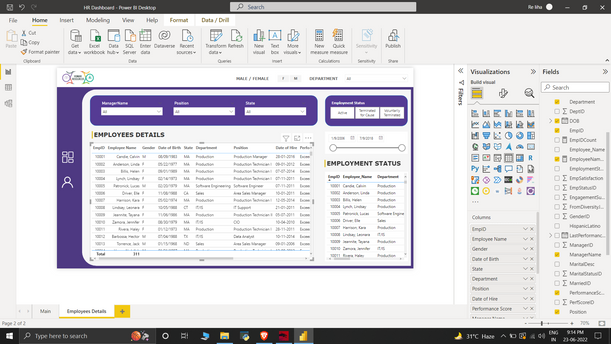
Thankyou so much, Now it works absolute perfect..

- Mark as New
- Bookmark
- Subscribe
- Mute
- Subscribe to RSS Feed
- Permalink
- Report Inappropriate Content
Hey @Kabeerkhan007 ,
You have two options here, either have a column with datatype as whole number that can be summed to show the total or have a separate measure like Countofemployees = Count(EmpID) and show it in a card viusal separately.
- Mark as New
- Bookmark
- Subscribe
- Mute
- Subscribe to RSS Feed
- Permalink
- Report Inappropriate Content
@PC2790 Hey thanks for the help
Datatype is already in the whole number and I tried your second option it work and showed me the correct value but it is showing 1 in all rows.

Helpful resources

Power BI Dataviz World Championships
The Power BI Data Visualization World Championships is back! Get ahead of the game and start preparing now!

Power BI Monthly Update - December 2025
Check out the December 2025 Power BI Holiday Recap!

FabCon Atlanta 2026
Join us at FabCon Atlanta, March 16-20, for the ultimate Fabric, Power BI, AI and SQL community-led event. Save $200 with code FABCOMM.

| User | Count |
|---|---|
| 38 | |
| 38 | |
| 37 | |
| 28 | |
| 28 |


| User | Count |
|---|---|
| 124 | |
| 89 | |
| 73 | |
| 66 | |
| 65 |


