Learn from the best! Meet the four finalists headed to the FINALS of the Power BI Dataviz World Championships! Register now
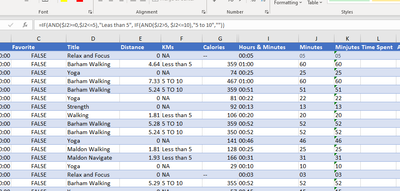
I have a spreadsheet with data in column J for time shown as 05 for 5 min and 60 for 60 minutes. I want to show the data as:
05 or less "Less than 5"
5-10 "5 to 10"
im using IF Statement buts not working as expected. Any suggestions please?
=IF($J2>=0,$J2<=5),"Leas than 5", IF(AND($J2>5,$J2>=10)"5 to 10",""))
TimeHours & MinutesMinutesMinjutes as ValuesTime Spent
| 0:05:32 | 00:05 | 05 | 5 | Over 40 |
| 1:00:18 | 01:00 | 60 | 60 | Over 40 |
| 0:25:42 | 00:25 | 25 | 61 | Over 40 |
| 1:00:12 | 01:00 | 60 | 62 | Over 40 |
| 0:51:05 | 00:51 | 51 | 63 | Over 40 |
| 0:22:50 | 00:22 | 22 | 64 | Over 40 |
Solved! Go to Solution.
hi @littlepatos
it seems your I column is text instead of number, try the following:
=IF(AND(VALUE($I2)>=0,VALUE($I2)<=5),"Leas than 5", IF(AND(VALUE($I2)>5, VALUE($I2)<=10),"5 to 10",""))
p.s. consider @some to continue a discussion.
hi @littlepatos
try like:
=IF(AND($J2>=0,$J2<=5),"Leas than 5", IF(AND($J2>5, $J2<=10),"5 to 10",""))
hi @littlepatos
it seems your I column is text instead of number, try the following:
=IF(AND(VALUE($I2)>=0,VALUE($I2)<=5),"Leas than 5", IF(AND(VALUE($I2)>5, VALUE($I2)<=10),"5 to 10",""))
p.s. consider @some to continue a discussion.
If you have recently started exploring Fabric, we'd love to hear how it's going. Your feedback can help with product improvements.
A new Power BI DataViz World Championship is coming this June! Don't miss out on submitting your entry.
Share feedback directly with Fabric product managers, participate in targeted research studies and influence the Fabric roadmap.
| User | Count |
|---|---|
| 57 | |
| 33 | |
| 33 | |
| 19 | |
| 18 |
| User | Count |
|---|---|
| 68 | |
| 67 | |
| 45 | |
| 30 | |
| 28 |