Share feedback directly with Fabric product managers, participate in targeted research studies and influence the Fabric roadmap.
Sign up nowGet Fabric certified for FREE! Don't miss your chance! Learn more
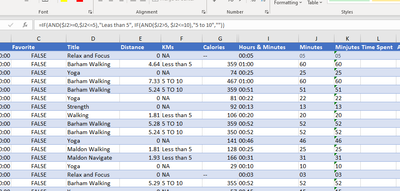
I have a spreadsheet with data in column J for time shown as 05 for 5 min and 60 for 60 minutes. I want to show the data as:
05 or less "Less than 5"
5-10 "5 to 10"
im using IF Statement buts not working as expected. Any suggestions please?
=IF($J2>=0,$J2<=5),"Leas than 5", IF(AND($J2>5,$J2>=10)"5 to 10",""))
TimeHours & MinutesMinutesMinjutes as ValuesTime Spent
| 0:05:32 | 00:05 | 05 | 5 | Over 40 |
| 1:00:18 | 01:00 | 60 | 60 | Over 40 |
| 0:25:42 | 00:25 | 25 | 61 | Over 40 |
| 1:00:12 | 01:00 | 60 | 62 | Over 40 |
| 0:51:05 | 00:51 | 51 | 63 | Over 40 |
| 0:22:50 | 00:22 | 22 | 64 | Over 40 |
Solved! Go to Solution.
hi @littlepatos
it seems your I column is text instead of number, try the following:
=IF(AND(VALUE($I2)>=0,VALUE($I2)<=5),"Leas than 5", IF(AND(VALUE($I2)>5, VALUE($I2)<=10),"5 to 10",""))
p.s. consider @some to continue a discussion.
hi @littlepatos
try like:
=IF(AND($J2>=0,$J2<=5),"Leas than 5", IF(AND($J2>5, $J2<=10),"5 to 10",""))
hi @littlepatos
it seems your I column is text instead of number, try the following:
=IF(AND(VALUE($I2)>=0,VALUE($I2)<=5),"Leas than 5", IF(AND(VALUE($I2)>5, VALUE($I2)<=10),"5 to 10",""))
p.s. consider @some to continue a discussion.
If you love stickers, then you will definitely want to check out our Community Sticker Challenge!
Check out the January 2026 Power BI update to learn about new features.
| User | Count |
|---|---|
| 64 | |
| 63 | |
| 48 | |
| 21 | |
| 18 |
| User | Count |
|---|---|
| 119 | |
| 117 | |
| 38 | |
| 36 | |
| 27 |