
cancel
Showing results for 
Search instead for 
Did you mean: 

The Power BI Data Visualization World Championships is back! Get ahead of the game and start preparing now! Learn more

Reply
Pvargash
Frequent Visitor

Calculate the percentage of the total with respect to a row

Dear any idea how to solve the following:

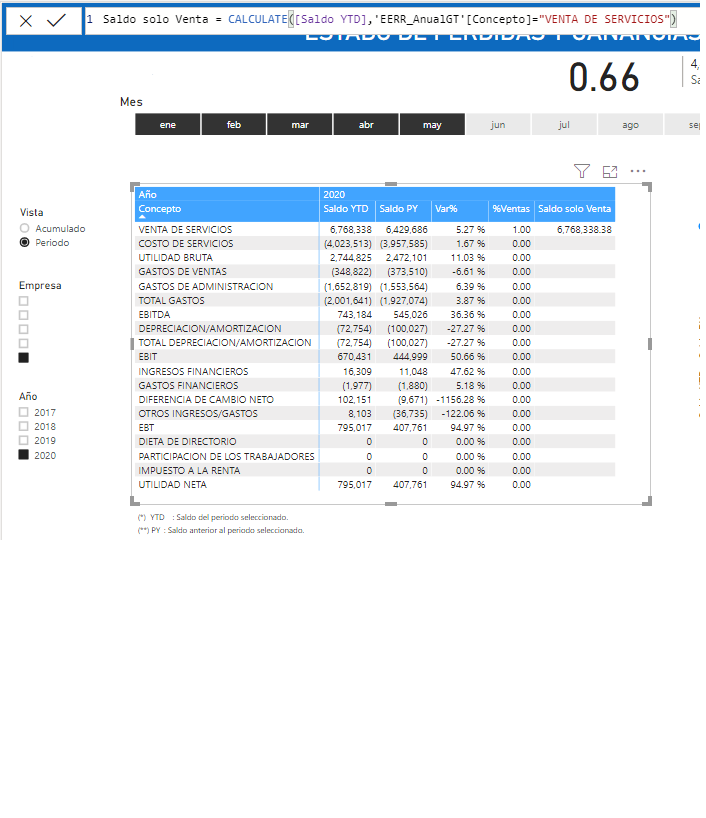
I need the value of the row SALE OF SERVICES (VENTA DE SERVICIOS) to be repeated in the whole column (Sale only balance), as you will see, try to do it using the calculation using the filter, since I am interested in knowing only that value, but it is not repeated. I need it to repeat like that, in order to calculate the% of Sale column, and as you can see, they only calculate me from the first row. The final idea is that each row represents a% of the total of the concept SALE OF SERVICES


(*)Taking into account that to calculate the column: YTD balance (Saldo YTD) I am using the function TOTALYTD (EERR_AnualGT [SumSaldo], Calendar [Date])

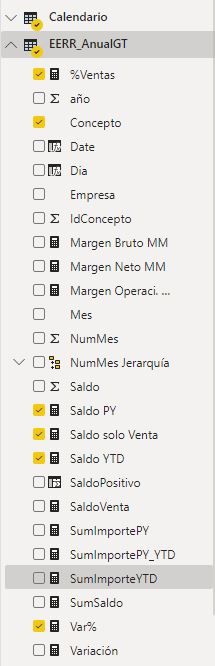
FiltroVenta.pngModeloDatos.JPG


2 ACCEPTED SOLUTIONS
Daniil
Kudo Kingpin
Kudo Kingpin

It feels like the Concepto column is sorted by another column, though I don't know what that column is.

Let's assume it's IdConcepto. Add REMOVEFILTERS(EERR_AnualGT[IdConcepto]) to your formula as a CALCULATE modifier.

If you're interested to know what is happening, see Side effects of the Sort By Column setting in DAX.

View solution in original post

Hi @Pvargash ,


And you should use ALLSELECTED instead of all in your formula.


If this post helps, then please consider Accept it as the solution to help the other members find it more quickly.


Best Regards,

Dedmon Dai

View solution in original post

4 REPLIES 4
Daniil
Kudo Kingpin
Kudo Kingpin

It feels like the Concepto column is sorted by another column, though I don't know what that column is.

Let's assume it's IdConcepto. Add REMOVEFILTERS(EERR_AnualGT[IdConcepto]) to your formula as a CALCULATE modifier.

If you're interested to know what is happening, see Side effects of the Sort By Column setting in DAX.

tex628
Community Champion
Community Champion

I believe all you need to do is add an ALL('EERR_AnualGT') on the yellow mark:

image.png

Br,
J


Connect on LinkedIn

Thank you @tex628 ,

Thanks, applying the recommended solution I have all the rows but not for the correct value, in the image I pose what I need to obtain

FiltroVenta_2.png

Hi @Pvargash ,


And you should use ALLSELECTED instead of all in your formula.


If this post helps, then please consider Accept it as the solution to help the other members find it more quickly.


Best Regards,

Dedmon Dai

Helpful resources

Announcements
Power BI DataViz World Championships

Power BI Dataviz World Championships

The Power BI Data Visualization World Championships is back! Get ahead of the game and start preparing now!

December 2025 Power BI Update Carousel

Power BI Monthly Update - December 2025

Check out the December 2025 Power BI Holiday Recap!

FabCon Atlanta 2026 carousel

FabCon Atlanta 2026

Join us at FabCon Atlanta, March 16-20, for the ultimate Fabric, Power BI, AI and SQL community-led event. Save $200 with code FABCOMM.