cancel
Showing results for 
Search instead for 
Did you mean: 

Get Fabric Certified for FREE during Fabric Data Days. Don't miss your chance! Request now

Reply
Anonymous
Not applicable

Calculate % of total in matrix

Hello.

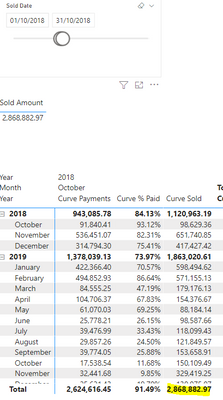
I have a PBI report that looks like the image below. The bottom matrix shows the number of payments made in the period selected by the slicer.

I want to do is calculate the % of payment we recieved against the total sold in that month. So as you can see in the middle visual, between 1/10/2018 and 31/102018 we sold 2868882.97. So I would want the first row in the matrix to show as 3.2% as 91.840.41 is 3.2% of 2868882.97 if that makes sense?

I have created a measure which is paid/sold and you can see this is giving 93.12% which isn't correct.. as I want it as a percentage of the total sold in the selected period.

In my matrix I have the payment date on the left and the sold date across the top. Does anyone have any ideas on how to achieve this?

JD09631_0-1646574060079.png


1 ACCEPTED SOLUTION
Anonymous
Not applicable
3 REPLIES 3
Anonymous
Not applicable

Anonymous
Not applicable

of course, sorry. These are the 2 tables. Relationship is both ways on the contractID. 

JD09631_1-1646584719923.png


littlemojopuppy
Community Champion
Community Champion

@Anonymous can you provide some sample data to work with?

Helpful resources

Announcements
Fabric Data Days Carousel

Fabric Data Days

Advance your Data & AI career with 50 days of live learning, contests, hands-on challenges, study groups & certifications and more!

October Power BI Update Carousel

Power BI Monthly Update - October 2025

Check out the October 2025 Power BI update to learn about new features.

FabCon Atlanta 2026 carousel

FabCon Atlanta 2026

Join us at FabCon Atlanta, March 16-20, for the ultimate Fabric, Power BI, AI and SQL community-led event. Save $200 with code FABCOMM.

Top Solution Authors