cancel
Showing results for 
Search instead for 
Did you mean: 

Get Fabric Certified for FREE during AI Skills Fest. This week only. Secure your voucher now.

Reply
ScORE
Helper I
Helper I

Calculate number of weeks, if date blank automatically calculate from a different date

Calculate number of wees between 2 dates. If a date is blank use 1/1/2017

 [ New ] 


Hello all,


I need help calculating the number of weeks between 2 columns.  The challenge is one of the columns may be blank at times.  If they are blank i'd like to the formula to use another date automatically.  For the purposes pf this example I have the following columns:


Start Date  End Date  # of weeks (need help calculating)
1/1/20175/5/2017 
2/2/20175/5/2017 
6/20/20175/5/2017 
4/15/20175/5/2017 
 5/5/2017 
1/1/2017  5/5/2017 
   
1/1/20175/5/2017 
1/1/2017  
 5/5/2017 


- If the start date is missing, I'd like to use the beginning of the year (1/1/2017) as the start date to calculate the number of weeks.

- If the end date is missing, I'd like to use the current date (today) for the end date.  

- If both dates are present, I'd like to use those dates as is.  

- I will be summing the number of weeks to across different regions and groups to show the total number of weeks active.


I'm not sure if this is a measurement or if I need to add a column.  I'll be using this rolled up at different levels of  a hierarchy and need to calculations to adjust based on the what the user is filtering by.


Any help on this is greatly appreciated.  

ScORE

1 ACCEPTED SOLUTION
Zubair_Muhammad
Community Champion
Community Champion

Hi @ScORE


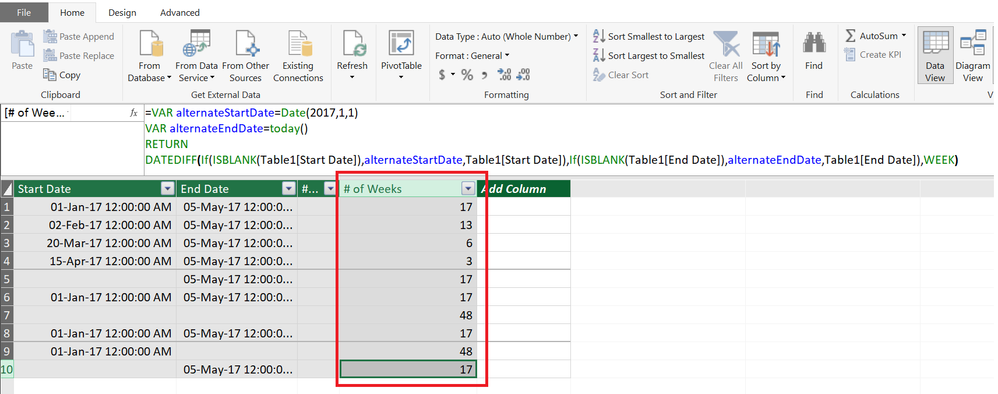
Try this calculated column

# of weeks =
VAR alternateStartDate =
    DATE ( 2017, 1, 1 )
VAR alternateEndDate =
    TODAY ()
RETURN
    DATEDIFF (
        IF ( ISBLANK ( Table1[Start Date] ), alternateStartDate, Table1[Start Date] ),
        IF ( ISBLANK ( Table1[End Date] ), alternateEndDate, Table1[End Date] ),
        WEEK
    )

View solution in original post

5 REPLIES 5
v-ljerr-msft
Microsoft Employee
Microsoft Employee

Hi @ScORE,


Have you tried the solutions provided above? Do they work in your scenario? If some solution works, could you accept it as solution to close this thread?


If you still have any question on this issue, feel free to post here. Smiley Happy


Regards

Zubair_Muhammad
Community Champion
Community Champion

Hi @ScORE


Try this calculated column

# of weeks =
VAR alternateStartDate =
    DATE ( 2017, 1, 1 )
VAR alternateEndDate =
    TODAY ()
RETURN
    DATEDIFF (
        IF ( ISBLANK ( Table1[Start Date] ), alternateStartDate, Table1[Start Date] ),
        IF ( ISBLANK ( Table1[End Date] ), alternateEndDate, Table1[End Date] ),
        WEEK
    )

Thank you!  This worked and is giving me what I need.  The only problem isthe tables are ommitting instances where there should be data; not pulling everything in.  

jthomson
Solution Sage
Solution Sage

Probably a few ways to do this - one would be to alter the data in Power Query, so that you fill in the blanks with your desired alternative outcomes, the other would be to create a couple of measures so that you have something like:


FixedStartDate = if([StartDate]=null, 01/01/2017, [StartDate])

FixedEndDate = if([EndDate]=null, TODAY(), [EndDate])


Syntax might not be exactly right, but it should give you a starting point - you can then take one away from the other and then multiply by 1/7 to get the number of weeks

Helpful resources

Announcements
May Power BI Update Carousel

Power BI Monthly Update - May 2026

Check out the May 2026 Power BI update to learn about new features.

Fabric SQL PBI Data Days

Data Days 2026 coming soon!

Sign up to receive a private message when registration opens and key events begin.

New to Fabric survey Carousel

New to Fabric Survey

If you have recently started exploring Fabric, we'd love to hear how it's going. Your feedback can help with product improvements.

Power BI DataViz World Championships carousel

Power BI DataViz World Championships - June 2026

A new Power BI DataViz World Championship is coming this June! Don't miss out on submitting your entry.