
cancel
Showing results for 
Search instead for 
Did you mean: 

The Power BI Data Visualization World Championships is back! Get ahead of the game and start preparing now! Learn more

Reply
powerbi2srm
Resolver II
Resolver II

Calculate last year sales of same working days

I am trying to calculate the sales for the same working days, but from last year. I mean, for example, February 6, 2023 was the 4th working day of the month; however, the 4th working day of February 2022 was February 4th.


What I'm looking for is a table that compares this year's sales to last year's sales based on the number of working days. However, I'm having the following issue:

duda_2 (1).JPG

The problem comes when I use the DATEADD function (or SAMEPERIODLASTYEAR):


sales_amount_LAST_YEAR = 
CALCULATE(
    [_sales_amount],
    DATEADD(dim_date_M[formatted_date],-1,YEAR)
)


This happens because my measur doesn't detect that the 4th day of the month of the PREVIOS YEAR is February 4th. However, the working_day_of_month column is perfectly calculated as I can see in the image:

duda.JPG


Does anyone know how I could fix it?

1 ACCEPTED SOLUTION

It's likely that it's works properly. However, finally this is that I used in Power Query (M):


añadirDíaLaborableDelMes = Table.AddColumn(#"NoEsDiaLaborable", "Número de día laborable del mes", each
let
CurrentMonth = [Nombre del mes],
CurrentYear = [Año],
CurrentDate = [formatted_date],
díasLaborables = Table.SelectRows(
#"NoEsDiaLaborable",
(row) =>
row[Nombre del mes] = CurrentMonth
and row[Año] = CurrentYear
and row[formatted_date] <= CurrentDate
and not row[no_es_dia_laborable]
)
in
if [no_es_dia_laborable] = false then Table.RowCount(díasLaborables) else null


Thank you!!


View solution in original post

2 REPLIES 2
Kishore_KVN
Super User
Super User

Hello @powerbi2srm ,


I am not sure if I understood your requirement clearly. But see if this works for you. 

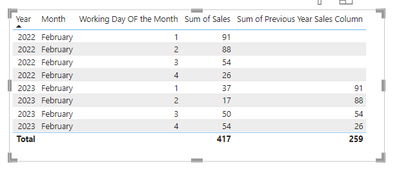
I have created two columns as below and then dragged them into the visual:

Kishore_KVN_0-1685462475881.png


WD_Year = CONCATENATE('Table'[Working Day OF the Month],YEAR('Table'[Date]))
Previous Year Sales Column = LOOKUPVALUE('Table'[Sales],'Table'[WD_Year],'Table'[WD_Year]-1)


Output looks like this:

Kishore_KVN_1-1685462529712.png


If this solves your problem, please make this reply as solution so that others can reach fast and community can note it as solved. Thanks!!


It's likely that it's works properly. However, finally this is that I used in Power Query (M):


añadirDíaLaborableDelMes = Table.AddColumn(#"NoEsDiaLaborable", "Número de día laborable del mes", each
let
CurrentMonth = [Nombre del mes],
CurrentYear = [Año],
CurrentDate = [formatted_date],
díasLaborables = Table.SelectRows(
#"NoEsDiaLaborable",
(row) =>
row[Nombre del mes] = CurrentMonth
and row[Año] = CurrentYear
and row[formatted_date] <= CurrentDate
and not row[no_es_dia_laborable]
)
in
if [no_es_dia_laborable] = false then Table.RowCount(díasLaborables) else null


Thank you!!


Helpful resources

Announcements
Power BI DataViz World Championships

Power BI Dataviz World Championships

The Power BI Data Visualization World Championships is back! Get ahead of the game and start preparing now!

December 2025 Power BI Update Carousel

Power BI Monthly Update - December 2025

Check out the December 2025 Power BI Holiday Recap!

FabCon Atlanta 2026 carousel

FabCon Atlanta 2026

Join us at FabCon Atlanta, March 16-20, for the ultimate Fabric, Power BI, AI and SQL community-led event. Save $200 with code FABCOMM.