Don't miss your chance to take the Fabric Data Engineer (DP-600) exam for FREE! Find out how by attending the DP-600 session on April 23rd (pacific time), live or on-demand.
Learn moreNext up in the FabCon + SQLCon recap series: The roadmap for Microsoft SQL and Maximizing Developer experiences in Fabric. All sessions are available on-demand after the live show. Register now
Hi,
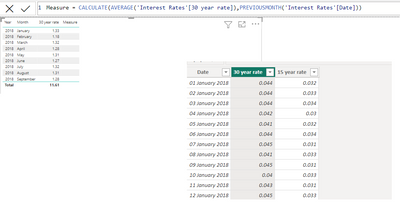
why the calculate function doesn't return any values in the 4th column?
The issue with your CALCULATE function returning blank values is likely due to a problem with the PREVIOUSMONTH function or missing data in the previous month.
Possible Causes & Fixes
Check if the 'Interest Rates' Table Has a Proper Date Column
Ensure that 'Interest Rates'[Date] is recognized as a Date column, not text.
If it's stored as text, convert it using DATEVALUE().
Ensure There Is Data for the Previous Month
If there is no data in the previous month, PREVIOUSMONTH() will return an empty result, leading to BLANK().
Test by checking:
EVALUATE PREVIOUSMONTH('Interest Rates'[Date])
If it returns nothing, you may need to adjust the logic.
Use a Date Table Instead of 'Interest Rates'[Date]
If 'Interest Rates'[Date] is incomplete (e.g., missing some months), use a separate date table connected to your data.
Replace 'Interest Rates'[Date] with 'DateTable'[Date] in your formula.
Alternative Fix Using LOOKUPVALUE for More Control
Instead of PREVIOUSMONTH(), try:
Measure =
VAR PrevMonth = EOMONTH(MAX('Interest Rates'[Date]), -1)
RETURN
CALCULATE(
AVERAGE('Interest Rates'[30 year rate]),
'Interest Rates'[Date] = PrevMonth
)
This manually selects the previous month's data.
Hi @maciejsok ,
Please consider adding a separate date table to your model for built in time intelligence functions.
https://www.datacamp.com/tutorial/how-to-create-date-tables-in-power-bi-tutorial
@maciejsok Probably because it is a single table model that you are working with. You can do a Previous Month calculation using something like this instead:
Value PM =
VAR __Date = MAX('Table'[Date])
VAR __EndDate = EOMONTH(__Date,-1)
VAR __StartDate = DATE(YEAR(__EndDate),MONTH(__EndDate),1)
VAR __Table = FILTER(ALLSELECTED('Table'),[Date]>=__StartDate && [Date]<=__EndDate)
RETURN
SUMX(__Table,[Value])
If you have recently started exploring Fabric, we'd love to hear how it's going. Your feedback can help with product improvements.
A new Power BI DataViz World Championship is coming this June! Don't miss out on submitting your entry.
Share feedback directly with Fabric product managers, participate in targeted research studies and influence the Fabric roadmap.
| User | Count |
|---|---|
| 48 | |
| 45 | |
| 41 | |
| 20 | |
| 17 |
| User | Count |
|---|---|
| 69 | |
| 63 | |
| 32 | |
| 31 | |
| 25 |