Join us at FabCon Atlanta from March 16 - 20, 2026, for the ultimate Fabric, Power BI, AI and SQL community-led event. Save $200 with code FABCOMM.
Register now!View all the Fabric Data Days sessions on demand. View schedule
I have a Power BI model with two tables: one is a "registered user" table and the second is a "user transaction" table. "registered user" table has basic information about a user, e.g. user ID, name, address, phone etc. and the "user transaction" table has rows for each monetary transaction that a user has done, e.g. payment made by users along with the date of the payment. The two tables are joined by the user ID field, which servers as the primary key and has a one-to-many relationship (a user in "registered user" table can have zero or more transactions in the "user transaction" table.)
On a monthly basis, I need to calculate the count of users from the "registered user" table that are non-payers, that is they have no entry in the "user transaction" table. (Or more general would be to define a criteria that they've paid less than some amount.) I am new to power BI and have watched some videos and read some tutorials etc. and am sure that this type of function will require a DAX measure. I'm not sure how to go about it though and can't find a good example that is similar. Any help would be greatly appreciated. Thanks in advance.
Solved! Go to Solution.
Great, thanks for the help. Also, I found this useful link in understanding cumulative measures in DAX:
http://www.daxpatterns.com/cumulative-total/
Then I created the following measure in my model:
Cumulative Participants =
CALCULATE (
DISTINCTCOUNT ( Contributions[Code] ),
FILTER (
ALL ( Contributions[Transaction Date (bins)] ),
Contributions[Transaction Date (bins)] <= MAX ( Contributions[Transaction Date] )
)
)
This allowed me to get the number of payers on a monthly basis, using transaction dates bin.
Hi @messagevector, what about creating two measures. One will be counting total count of Registered users and the second distinctcount of User_ID column in Transactio table. Then by subtracting these two measures you will have count of non payers.
Regards
Pavel
Thank you. That makes sense and seems to work. I created a measure as follows:
NonPayers = COUNT(MemberInfo[Code]) - DISTINCTCOUNT(Contributions[Code])
The problem now is how to plot this over months. It seems to take the NonPayers as a constant value. But I want to identify the number of NonPayers as a running total over months. So basically, I would like to plot the count of NonPayers over months--which should always be trending downward as new members make a payment. Thanks again.
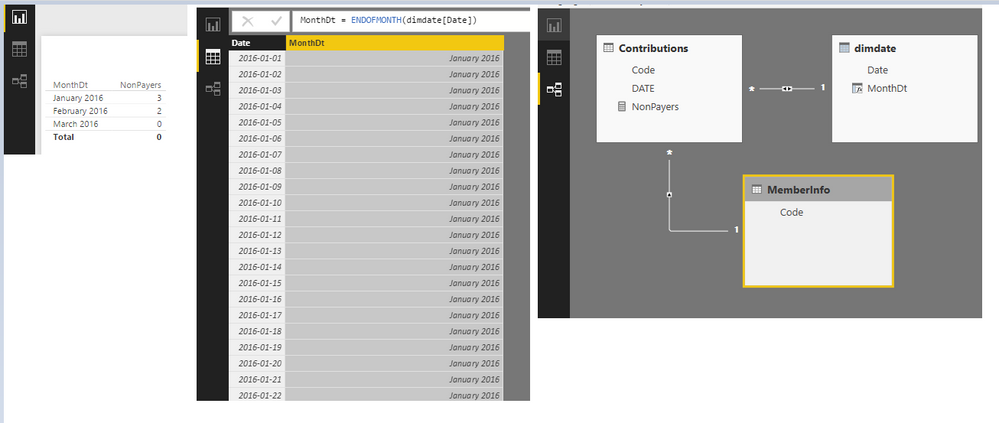
The DAX will work if a proper calendar table is created in your scenario. When saying "running total", I understand it as an constant COUNT(MemberInfo[Code]) - a month specific DISTINCTCOUNT(Contributions[Code]). If I am right, you can check the attached pbix.
NonPayers = COUNTX(ALL(MemberInfo),MemberInfo[Code]) -DISTINCTCOUNT(Contributions[Code])
Great, thanks for the help. Also, I found this useful link in understanding cumulative measures in DAX:
http://www.daxpatterns.com/cumulative-total/
Then I created the following measure in my model:
Cumulative Participants =
CALCULATE (
DISTINCTCOUNT ( Contributions[Code] ),
FILTER (
ALL ( Contributions[Transaction Date (bins)] ),
Contributions[Transaction Date (bins)] <= MAX ( Contributions[Transaction Date] )
)
)
This allowed me to get the number of payers on a monthly basis, using transaction dates bin.
Thank you. That makes sense and seems to work. I created a measure as follows:
NonPayers = COUNT(MemberInfo[Code]) - DISTINCTCOUNT(Contributions[Code])
The problem now is how to plot this over months. It seems to take the NonPayers as a constant value. But I want to identify the number of NonPayers as a running total over months. So basically, I would like to plot the count of NonPayers over months--which should always be trending downward as new members make a payment. Thanks again.
Check out the November 2025 Power BI update to learn about new features.
Advance your Data & AI career with 50 days of live learning, contests, hands-on challenges, study groups & certifications and more!