Join us at FabCon Atlanta from March 16 - 20, 2026, for the ultimate Fabric, Power BI, AI and SQL community-led event. Save $200 with code FABCOMM.
Register now!The Power BI Data Visualization World Championships is back! Get ahead of the game and start preparing now! Learn more
Hi, I need help calculating the average for sales per month so that every day returns the same monthly value.
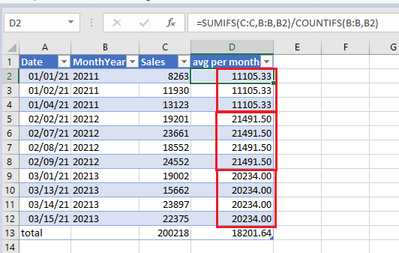
In Excel it looks like this:
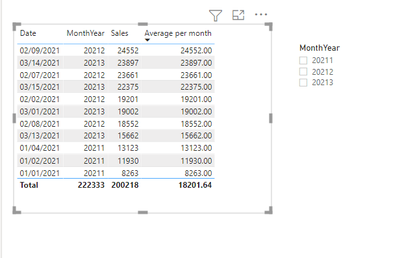
The measure I am using in PBI does not calculate per month, it calculates per row:
How can I create a measure in PBI for the following sample data that calculates the average per month (showing the same values for a month) if the Date field is used in the table?
| Date | MonthYear | Sales |
| 01/01/21 | 20211 | 8263 |
| 01/02/21 | 20211 | 11930 |
| 01/04/21 | 20211 | 13123 |
| 02/02/21 | 20212 | 19201 |
| 02/07/21 | 20212 | 23661 |
| 02/08/21 | 20212 | 18552 |
| 02/09/21 | 20212 | 24552 |
| 03/01/21 | 20213 | 19002 |
| 03/13/21 | 20213 | 15662 |
| 03/14/21 | 20213 | 23897 |
| 03/15/21 | 20213 | 22375 |
Solved! Go to Solution.
@Anonymous , Try a measure like this with a date table
this Daily Avgmonth = CALCULATE(AverageX(values(Date[Date]), calculate(sum(Sales[Sales]))),DATESMTD(ENDOFMONTH('Date'[Date])))
use date from date table in visual
To get the best of the time intelligence function. Make sure you have a date calendar and it has been marked as the date in model view. Also, join it with the date column of your fact/s. Refer :radacad sqlbi My Video Series Appreciate your Kudos.
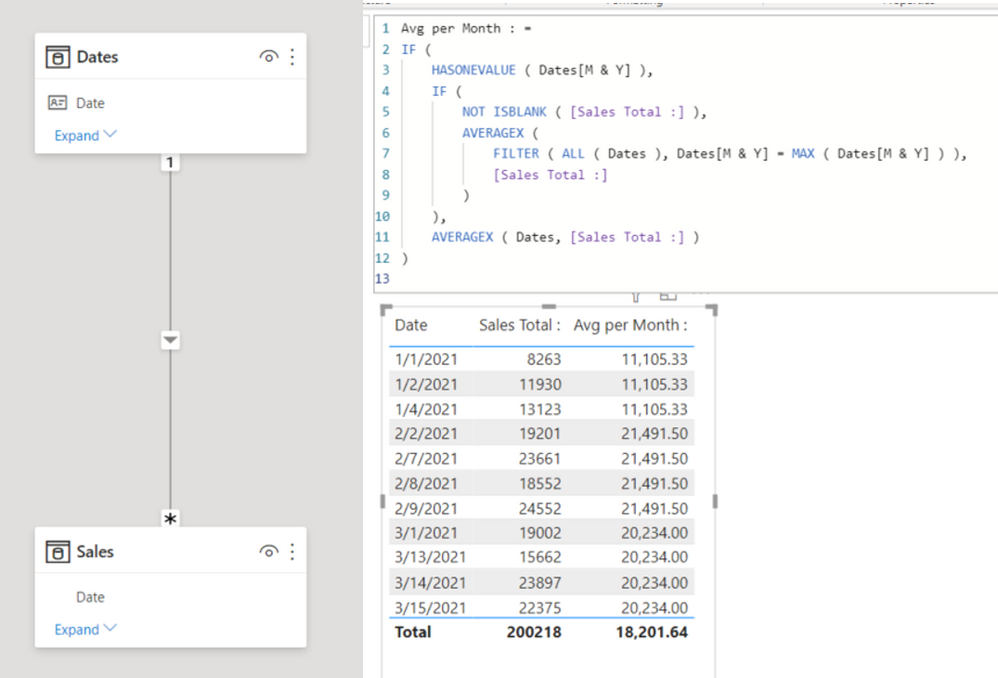
That worked for me too - another way that gave me the same answer is:
Hi @Anonymous
Try this measure. See it all at work in the attached file.
Measure =
CALCULATE(AVERAGE(Table1[Sales]), ALLEXCEPT(Table1,Table1[MonthYear]))
|
|
Please accept the solution when done and consider giving a thumbs up if posts are helpful. Contact me privately for support with any larger-scale BI needs, tutoring, etc. |
@Anonymous , Try a measure like this with a date table
this Daily Avgmonth = CALCULATE(AverageX(values(Date[Date]), calculate(sum(Sales[Sales]))),DATESMTD(ENDOFMONTH('Date'[Date])))
use date from date table in visual
To get the best of the time intelligence function. Make sure you have a date calendar and it has been marked as the date in model view. Also, join it with the date column of your fact/s. Refer :radacad sqlbi My Video Series Appreciate your Kudos.
Thanks, everyone, this helped!
The Power BI Data Visualization World Championships is back! Get ahead of the game and start preparing now!
Check out the November 2025 Power BI update to learn about new features.
| User | Count |
|---|---|
| 59 | |
| 43 | |
| 42 | |
| 23 | |
| 17 |
| User | Count |
|---|---|
| 190 | |
| 122 | |
| 96 | |
| 66 | |
| 47 |