Join us at FabCon Atlanta from March 16 - 20, 2026, for the ultimate Fabric, Power BI, AI and SQL community-led event. Save $200 with code FABCOMM.
Register now!The Power BI Data Visualization World Championships is back! Get ahead of the game and start preparing now! Learn more
Hi, I need help calculating the average for sales per month so that every day returns the same monthly value.
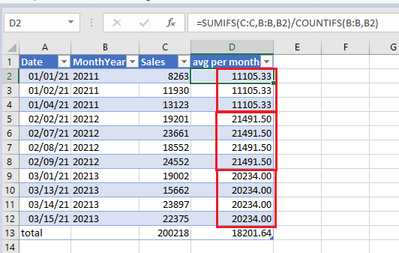
In Excel it looks like this:
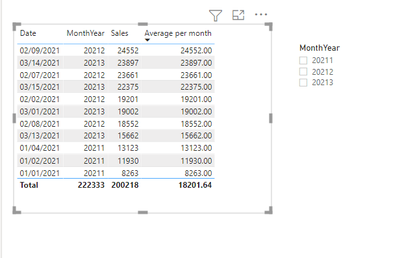
The measure I am using in PBI does not calculate per month, it calculates per row:
How can I create a measure in PBI for the following sample data that calculates the average per month (showing the same values for a month) if the Date field is used in the table?
| Date | MonthYear | Sales |
| 01/01/21 | 20211 | 8263 |
| 01/02/21 | 20211 | 11930 |
| 01/04/21 | 20211 | 13123 |
| 02/02/21 | 20212 | 19201 |
| 02/07/21 | 20212 | 23661 |
| 02/08/21 | 20212 | 18552 |
| 02/09/21 | 20212 | 24552 |
| 03/01/21 | 20213 | 19002 |
| 03/13/21 | 20213 | 15662 |
| 03/14/21 | 20213 | 23897 |
| 03/15/21 | 20213 | 22375 |
Solved! Go to Solution.
@Anonymous , Try a measure like this with a date table
this Daily Avgmonth = CALCULATE(AverageX(values(Date[Date]), calculate(sum(Sales[Sales]))),DATESMTD(ENDOFMONTH('Date'[Date])))
use date from date table in visual
To get the best of the time intelligence function. Make sure you have a date calendar and it has been marked as the date in model view. Also, join it with the date column of your fact/s. Refer :radacad sqlbi My Video Series Appreciate your Kudos.
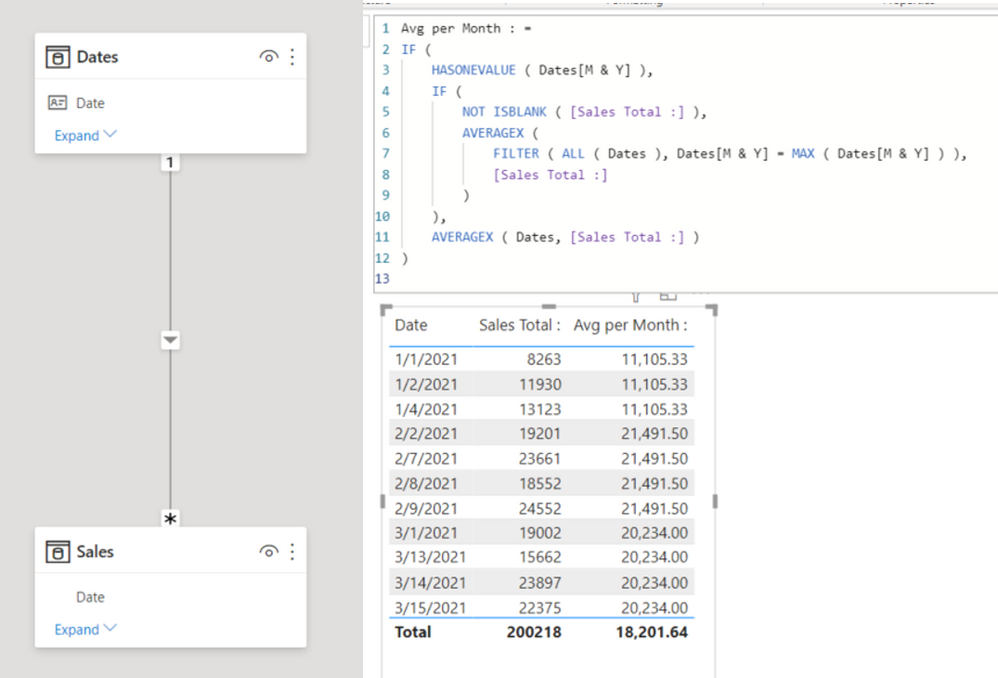
That worked for me too - another way that gave me the same answer is:
Hi @Anonymous
Try this measure. See it all at work in the attached file.
Measure =
CALCULATE(AVERAGE(Table1[Sales]), ALLEXCEPT(Table1,Table1[MonthYear]))
|
|
Please accept the solution when done and consider giving a thumbs up if posts are helpful. Contact me privately for support with any larger-scale BI needs, tutoring, etc. |
@Anonymous , Try a measure like this with a date table
this Daily Avgmonth = CALCULATE(AverageX(values(Date[Date]), calculate(sum(Sales[Sales]))),DATESMTD(ENDOFMONTH('Date'[Date])))
use date from date table in visual
To get the best of the time intelligence function. Make sure you have a date calendar and it has been marked as the date in model view. Also, join it with the date column of your fact/s. Refer :radacad sqlbi My Video Series Appreciate your Kudos.
Thanks, everyone, this helped!
The Power BI Data Visualization World Championships is back! Get ahead of the game and start preparing now!
| User | Count |
|---|---|
| 38 | |
| 38 | |
| 37 | |
| 28 | |
| 28 |
| User | Count |
|---|---|
| 124 | |
| 89 | |
| 73 | |
| 66 | |
| 65 |