Join us at FabCon Atlanta from March 16 - 20, 2026, for the ultimate Fabric, Power BI, AI and SQL community-led event. Save $200 with code FABCOMM.
Register now!The Power BI Data Visualization World Championships is back! Get ahead of the game and start preparing now! Learn more
Hi,
I was wondering if it is possible to calculate YoY%, QoQ% and MoM% changes dynamically in a matrix visualization based on the date hierachy level. More generally speaking I want to calculate the change of a column based on its left neighbour column.
Let's assume I have a data model like:
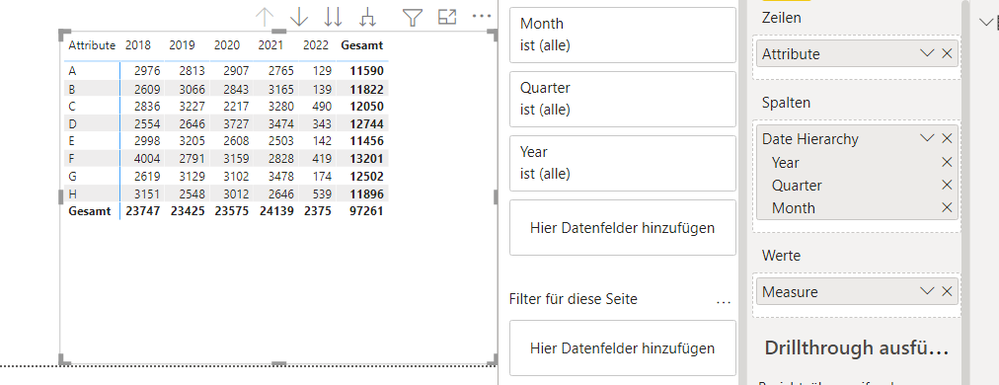
And a matrix like:
Is there a way to calculate a dynamic measure that calculates the corresponding % changes depending on the hierarchy level?
Thanks for your help!
Hi @mwegener Is it possible to extend this measure to work with Week over Week comparisons? I tried to do the following, but it doesn't seem to work - would appreciate your insights:
Note: dim_weeks[id] is a specially created table linked to my date table that increments by 1 every week.
Measure PoP% =
VAR __PREV_YEAR = CALCULATE(SUM('Fact'[Measure]), DATEADD('Date_Dimension'[Date], -1, YEAR))
VAR __YOY = DIVIDE(SUM('Fact'[Measure]) - __PREV_YEAR, __PREV_YEAR)
VAR __PREV_QUARTER = CALCULATE(SUM('Fact'[Measure]), DATEADD('Date_Dimension'[Date], -1, QUARTER))
VAR __QOQ = DIVIDE(SUM('Fact'[Measure]) - __PREV_QUARTER, __PREV_QUARTER)
VAR __PREV_MONTH = CALCULATE(SUM('Fact'[Measure]), DATEADD('Date_Dimension'[Date], -1, MONTH))
VAR __MOM = DIVIDE(SUM('Fact'[Measure]) - __PREV_MONTH, __PREV_MONTH)
VAR __PREV_WEEK = CALCULATE(SUM('Fact'[Measure]), FILTER(ALL('dim_weeks'), dim_weeks[id] = min(dim_weeks[id]) - 1)
VAR __WOW = DIVIDE(SUM('Fact'[Measure]) - __PREV_WEEK, __PREV_WEEK)
RETURN
SWITCH(TRUE(),
HASONEFILTER(Date_Dimension[Week]), __WOW,
HASONEFILTER(Date_Dimension[Month]), __MOM,
HASONEFILTER(Date_Dimension[Quarter]), __QOQ,
HASONEFILTER(Date_Dimension[Year]), __YOY,
BLANK()
)Hi @mase_53 ,
does this solution work for you?
Measure PoP% =
VAR __PREV_YEAR = CALCULATE(SUM('Fact'[Measure]), DATEADD('Date_Dimension'[Date], -1, YEAR))
VAR __YOY = DIVIDE(SUM('Fact'[Measure]) - __PREV_YEAR, __PREV_YEAR)
VAR __PREV_QUARTER = CALCULATE(SUM('Fact'[Measure]), DATEADD('Date_Dimension'[Date], -1, QUARTER))
VAR __QOQ = DIVIDE(SUM('Fact'[Measure]) - __PREV_QUARTER, __PREV_QUARTER)
VAR __PREV_MONTH = CALCULATE(SUM('Fact'[Measure]), DATEADD('Date_Dimension'[Date], -1, MONTH))
VAR __MOM = DIVIDE(SUM('Fact'[Measure]) - __PREV_MONTH, __PREV_MONTH)
VAR __PREV_WEEK = CALCULATE(SUM('Fact'[Measure]), DATEADD('Date_Dimension'[Date], -7, DAY))
VAR __WOW = DIVIDE(SUM('Fact'[Measure]) - __PREV_WEEK, __PREV_WEEK)
RETURN
SWITCH(TRUE(),
HASONEFILTER(Date_Dimension[Week]), __WOW,
HASONEFILTER(Date_Dimension[Month]), __MOM,
HASONEFILTER(Date_Dimension[Quarter]), __QOQ,
HASONEFILTER(Date_Dimension[Year]), __YOY,
BLANK()
)
Marcus Wegener works as Full Stack Power BI Engineer at BI or DIE.
His mission is clear: "Get the most out of data, with Power BI."
twitter - LinkedIn - YouTube - website - podcast - Power BI Tutorials
Hi @Anonymous ,
you can check which level is filtered and return the corresponding calculation.
Measure PoP% =
VAR __PREV_YEAR = CALCULATE(SUM('Fact'[Measure]), DATEADD('Date_Dimension'[Date], -1, YEAR))
VAR __YOY = DIVIDE(SUM('Fact'[Measure]) - __PREV_YEAR, __PREV_YEAR)
VAR __PREV_QUARTER = CALCULATE(SUM('Fact'[Measure]), DATEADD('Date_Dimension'[Date], -1, QUARTER))
VAR __QOQ = DIVIDE(SUM('Fact'[Measure]) - __PREV_QUARTER, __PREV_QUARTER)
VAR __PREV_MONTH = CALCULATE(SUM('Fact'[Measure]), DATEADD('Date_Dimension'[Date], -1, MONTH))
VAR __MOM = DIVIDE(SUM('Fact'[Measure]) - __PREV_MONTH, __PREV_MONTH)
RETURN
SWITCH(TRUE(),
HASONEFILTER(Date_Dimension[Month]), __MOM,
HASONEFILTER(Date_Dimension[Quarter]), __QOQ,
HASONEFILTER(Date_Dimension[Year]), __YOY,
BLANK()
)
Marcus Wegener works as Full Stack Power BI Engineer at BI or DIE.
His mission is clear: "Get the most out of data, with Power BI."
twitter - LinkedIn - YouTube - website - podcast - Power BI Tutorials
The Power BI Data Visualization World Championships is back! Get ahead of the game and start preparing now!
Check out the November 2025 Power BI update to learn about new features.
| User | Count |
|---|---|
| 59 | |
| 46 | |
| 42 | |
| 23 | |
| 18 |
| User | Count |
|---|---|
| 190 | |
| 122 | |
| 96 | |
| 66 | |
| 47 |