Join us at FabCon Atlanta from March 16 - 20, 2026, for the ultimate Fabric, Power BI, AI and SQL community-led event. Save $200 with code FABCOMM.
Register now!The Power BI Data Visualization World Championships is back! Get ahead of the game and start preparing now! Learn more
Hi experts,
I'm new to Power BI annd DAX, but I'm struggling with a simple calculation. I am trying to calculate the rolling active members for a HR Analysis, depending on selected date of a slicer.
Emp ID Start End S Pos Name Max ST Date Act Inact JoinDate LeaveDate
| 1 | 10/01/2011 | 10/01/2015 | 0 | 1001 | Pepe | 11/01/2015 | 0 | 0 | 10/01/2011 | |
| 1 | 11/01/2015 | 01/01/9999 | 3 | 1002 | Pepe | 11/01/2015 | 1 | 0 | 10/01/2011 | |
| 2 | 03/05/2000 | 03/07/2009 | 0 | 1002 | Pedro | 28/10/2016 | 0 | 0 | 03/05/2000 | |
| 2 | 04/07/2009 | 27/10/2016 | 0 | 321 | Pedro | 28/10/2016 | 0 | 0 | 03/05/2000 | |
| 2 | 28/10/2016 | 01/01/9999 | 3 | 1001 | Pedro | 28/10/2016 | 1 | 0 | 03/05/2000 | |
| 3 | 03/06/2019 | 01/01/9999 | 3 | 1001 | Daniel | 03/06/2019 | 1 | 0 | 03/06/2019 | |
| 4 | 07/11/2011 | 07/11/2013 | 0 | 298 | Maria | 07/11/2011 | 0 | 1 | 07/11/2011 | 07/11/2013 |
| 5 | 09/03/2016 | 09/05/2016 | 0 | 1001 | Marta | 10/05/2018 | 0 | 0 | 09/03/2016 | |
| 5 | 10/05/2018 | 01/01/9999 | 3 | 321 | Marta | 10/05/2018 | 1 | 0 | 09/03/2016 |
And the dax formula:
Solved! Go to Solution.
Hi @Anonymous
Create a calendar table
calendar = FILTER(ADDCOLUMNS(CALENDARAUTO(),"year",YEAR([Date]),"month",FORMAT([Date],"mmmm")),DAY([Date])=1)
Don't create any relationship between this calendar table and other table
Create measures in Sheet5
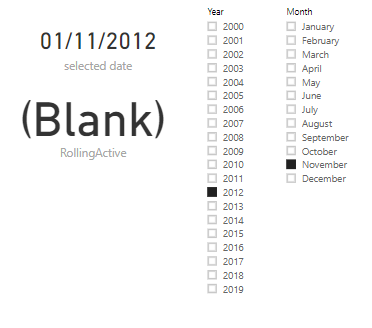
selected = SELECTEDVALUE('calendar'[Date])
RollingActive = CALCULATE(DISTINCTCOUNT(Sheet5[Emp ID]),FILTER(Sheet5,Sheet5[JoinDate]<=[selected]))
Add [year],[month] from "calendar" table to the slicer
Best Regards
Maggie
Community Support Team _ Maggie Li
If this post helps, then please consider Accept it as the solution to help the other members find it more quickly.
Hi @Anonymous
Create a calendar table
calendar = FILTER(ADDCOLUMNS(CALENDARAUTO(),"year",YEAR([Date]),"month",FORMAT([Date],"mmmm")),DAY([Date])=1)
Don't create any relationship between this calendar table and other table
Create measures in Sheet5
selected = SELECTEDVALUE('calendar'[Date])
RollingActive = CALCULATE(DISTINCTCOUNT(Sheet5[Emp ID]),FILTER(Sheet5,Sheet5[JoinDate]<=[selected]))
Add [year],[month] from "calendar" table to the slicer
Best Regards
Maggie
Community Support Team _ Maggie Li
If this post helps, then please consider Accept it as the solution to help the other members find it more quickly.
The Power BI Data Visualization World Championships is back! Get ahead of the game and start preparing now!
| User | Count |
|---|---|
| 38 | |
| 36 | |
| 33 | |
| 30 | |
| 28 |
| User | Count |
|---|---|
| 128 | |
| 88 | |
| 79 | |
| 67 | |
| 62 |