cancel
Showing results for 
Search instead for 
Did you mean: 

The Power BI Data Visualization World Championships is back! Get ahead of the game and start preparing now! Learn more

Reply
Anonymous
Not applicable

Hide visuals using dropdown

Hi,


Is there any way to hide or show visuals from a dropdown selection?

Example

Consider this as a dropdown:

Hiearchy:

Owner

Manager

Staff


On selecting Owner the visual of owner will come up, on selecting manager the visual of manager and so on.

I know it can be done using bookamrk but I want to know whether we can do it using a dropdown or slicer.


1 ACCEPTED SOLUTION
v-xicai
Community Support
Community Support

Hi @Anonymous ,


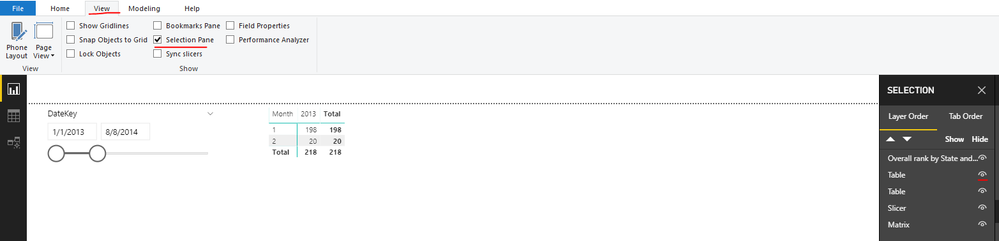
How about using the "Selection Pane"? You can let the visual hide or show.
 

3.png


It is not supported to implement your demand of hide or show visuals from a dropdown selection in Power BI Desktop currently .There is an idea about this issue, please vote it up, https://ideas.powerbi.com/forums/265200-power-bi-ideas/suggestions/36274912-visual-hide-and-visual-show-based-on-selection-sl , to improve the Power BI Desktop.


It is a place for customers provide feedback about Microsoft Office products . What’s more, if a feedback is high voted there by other customers, it will be promising that Microsoft Product Team will take it into consideration when designing the next version in the future.


We also submitted this feedback to the product group internally, so that the product group can pay attention to this problem and speed up the issue repairing.


Best Regards,

Amy


If this post helps, then please consider Accept it as the solution to help the other members find it more quickly.


View solution in original post

2 REPLIES 2
Anonymous
Not applicable

Hi,


Is there any way to hide or show visuals from a dropdown selection?

Example

Consider this as a dropdown:

Hiearchy:

Owner

Manager

Staff


On selecting Owner the visual of owner will come up, on selecting manager the visual of manager and so on.

I know it can be done using bookamrk but I want to know whether we can do it using a dropdown or slicer.


v-xicai
Community Support
Community Support

Hi @Anonymous ,


How about using the "Selection Pane"? You can let the visual hide or show.


3.png


It is not supported to implement your demand of hide or show visuals from a dropdown selection in Power BI Desktop currently .There is an idea about this issue, please vote it up, https://ideas.powerbi.com/forums/265200-power-bi-ideas/suggestions/36274912-visual-hide-and-visual-show-based-on-selection-sl , to improve the Power BI Desktop.


It is a place for customers provide feedback about Microsoft Office products . What’s more, if a feedback is high voted there by other customers, it will be promising that Microsoft Product Team will take it into consideration when designing the next version in the future.


We also submitted this feedback to the product group internally, so that the product group can pay attention to this problem and speed up the issue repairing.


Best Regards,

Amy


If this post helps, then please consider Accept it as the solution to help the other members find it more quickly.


Helpful resources

Announcements
Power BI DataViz World Championships

Power BI Dataviz World Championships

The Power BI Data Visualization World Championships is back! Get ahead of the game and start preparing now!

December 2025 Power BI Update Carousel

Power BI Monthly Update - December 2025

Check out the December 2025 Power BI Holiday Recap!

FabCon Atlanta 2026 carousel

FabCon Atlanta 2026

Join us at FabCon Atlanta, March 16-20, for the ultimate Fabric, Power BI, AI and SQL community-led event. Save $200 with code FABCOMM.