cancel
Showing results for 
Search instead for 
Did you mean: 

The Power BI Data Visualization World Championships is back! Get ahead of the game and start preparing now! Learn more

Reply
jorio
Frequent Visitor

Calculate Number of Periods of Consecutive Increase/Decrease

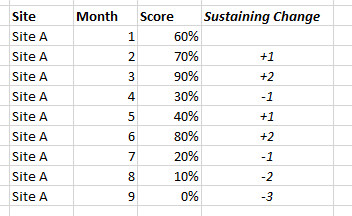
I have data that looks like the first three columns here:change.png

I am wanting to calculate the fourth column, in italics. This number represents the number of consecutive months that the score has increased or decreased leading up to that point: for example, in September, Site A's score had decreased for three months in a row (80% -> 20% -> 10% -> 0%), so its sustaining change was -3. In February, meanwhile, its score had increased for just one month (60% -> 70%) so its sustaining change was +1.


I have spent quite some time playing around with DAX functions and table variables trying to find a solution to do this but am finding it a bit too complicated - any suggestions?


(If relevant, I do have a Date table linked to my table via a "First Day of Month" column)

1 ACCEPTED SOLUTION
Zubair_Muhammad
Community Champion
Community Champion

@jorio 


Can we do it in 2 steps


First this supporting calculated column


EachMonthChange =
VAR Mymonth = [Month]
RETURN
IF (
[Score]
> CALCULATE (
MIN ( Table1[Score] ),
FILTER ( Table1, Table1[Month] = Mymonth - 1 && [Site] = EARLIER ( [Site] ) )
),
1,
-1
)

Then the desired one

Sustaining Change =
VAR mychange = [EachMonthChange]
VAR result =
    MINX (
        TOPN (
            1,
            FILTER (
                Table1,
                [Month] < EARLIER ( [Month] )
                    && [EachMonthChange] <> mychange
                    && [Site] = EARLIER ( [Site] )
            ),
            [Month], DESC
        ),
        [Month]
    )
RETURN
    ( [Month] - IF ( ISBLANK ( result ), 1, result ) ) * [EachMonthChange]


View solution in original post

3 REPLIES 3
Zubair_Muhammad
Community Champion
Community Champion

@jorio 


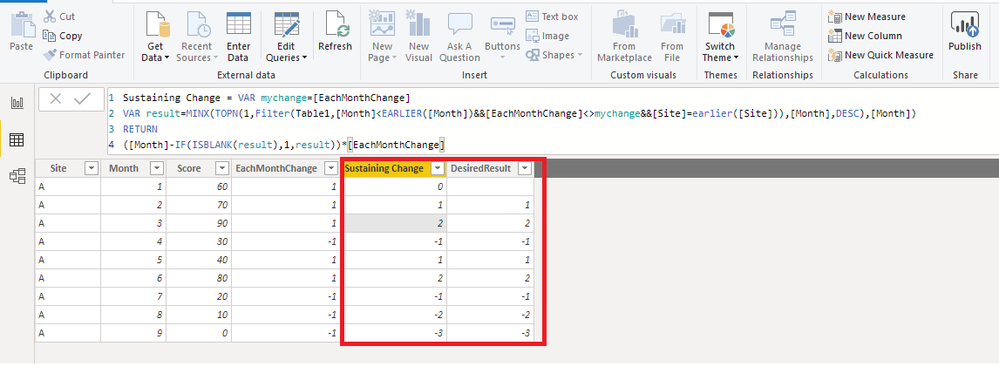
Attaching the pbix file as well with your sample data

canumber.png

Zubair_Muhammad
Community Champion
Community Champion

@jorio 


Can we do it in 2 steps


First this supporting calculated column


EachMonthChange =
VAR Mymonth = [Month]
RETURN
IF (
[Score]
> CALCULATE (
MIN ( Table1[Score] ),
FILTER ( Table1, Table1[Month] = Mymonth - 1 && [Site] = EARLIER ( [Site] ) )
),
1,
-1
)

Then the desired one

Sustaining Change =
VAR mychange = [EachMonthChange]
VAR result =
    MINX (
        TOPN (
            1,
            FILTER (
                Table1,
                [Month] < EARLIER ( [Month] )
                    && [EachMonthChange] <> mychange
                    && [Site] = EARLIER ( [Site] )
            ),
            [Month], DESC
        ),
        [Month]
    )
RETURN
    ( [Month] - IF ( ISBLANK ( result ), 1, result ) ) * [EachMonthChange]


Hi,

I am really interested in this for an SPC chart when looking to plot runs of increases/decreases. However, I currently have more than just "Site" to filter to. I would also like to be able to slice on the following fields: Site, Specialty, POD.

Because my visuals and the SPC chart are driven by those slicers, is it possible to come up with a calculated measure for this?

For example, chart for Site A, all Specs, all POD's may show sequences of increases/decreases but slicing the the Spec to 130 and POD to 1st Attendance would need to re-calculate the sequences.

Also, I am not working with month numbers but MonthDateStart (01/01/2000, 01/02/2000 etc)

Helpful resources

Announcements
Power BI DataViz World Championships

Power BI Dataviz World Championships

The Power BI Data Visualization World Championships is back! Get ahead of the game and start preparing now!

December 2025 Power BI Update Carousel

Power BI Monthly Update - December 2025

Check out the December 2025 Power BI Holiday Recap!

FabCon Atlanta 2026 carousel

FabCon Atlanta 2026

Join us at FabCon Atlanta, March 16-20, for the ultimate Fabric, Power BI, AI and SQL community-led event. Save $200 with code FABCOMM.