Join us in Barcelona for FabCon and SQLCon, September 28 - October 1, 2026.
This is best Fabric, Power BI, SQL and AI community event. How do we know? The last event sold out! Save €200 with code FABCMTY200.
Register now- Power BI forums
- Get Help with Power BI
- Desktop
- Service
- Report Server
- Power Query
- Mobile Apps
- Developer
- DAX Commands and Tips
- Custom Visuals Development Discussion
- Health and Life Sciences
- Power BI Spanish forums
- Translated Spanish Desktop
- Training and Consulting
- Instructor Led Training
- Dashboard in a Day for Women, by Women
- Galleries
- Data Stories Gallery
- Themes Gallery
- Contests Gallery
- QuickViz Gallery
- Quick Measures Gallery
- Visual Calculations Gallery
- Fabric Apps Gallery
- Notebook Gallery
- Translytical Task Flow Gallery
- TMDL Gallery
- R Script Showcase
- Webinars and Video Gallery
- Ideas
- Custom Visuals Ideas (read-only)
- Issues
- Issues
- Events
- Upcoming Events
The Fabric community is now in read-only for platform upgrade. Learn more
- Power BI forums
- Forums
- Get Help with Power BI
- Desktop
- Re: Calculate Mean using Measure
- Subscribe to RSS Feed
- Mark Topic as New
- Mark Topic as Read
- Float this Topic for Current User
- Bookmark
- Subscribe
- Printer Friendly Page

- Mark as New
- Bookmark
- Subscribe
- Mute
- Subscribe to RSS Feed
- Permalink
Calculate Mean using Measure
Hi all,
I want to calculate the mean for following values shows in picture.
I am filtering data Using Program Manager Name.

I used following measure to calculate mean :
Mean = CALCULATE(AVERAGE(' Project Rank'[Score]))
But it giving me wrong values...same thing happen with my Standard deviation measure.
I need to calculate Zscore using this.
Plz suggest me regarding above,
Solved! Go to Solution.


- Mark as New
- Bookmark
- Subscribe
- Mute
- Subscribe to RSS Feed
- Permalink
I see now.
What you want is this :
Mean2 = DIVIDE('Project Rank'[Score];CALCULATE(COUNT('Project Rank'[Score]);ALL('Project Rank')))
(Isn't your mean supposed to be more something like 'Score / Total of score' ? It just seems strange that you divide the score by the count of your table ... Maybe it's just me and I'm stupid today ahah)
If it worked, don't forget to mark your topic as solved
- Quentin
- Mark as New
- Bookmark
- Subscribe
- Mute
- Subscribe to RSS Feed
- Permalink
Hi @supriyad
You want the mean per Month & Year or per Project ID for each line ?
What I want to know is : What result do you expect from your Mean column ?
- Quentin
- Mark as New
- Bookmark
- Subscribe
- Mute
- Subscribe to RSS Feed
- Permalink
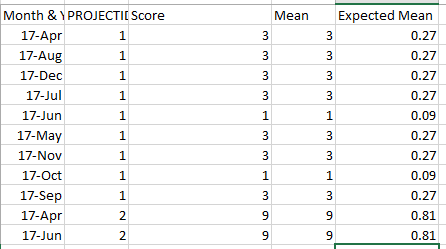
I have added expected mean column in my table.
I need Project wise Zscore in that particuler Month Year
- Mark as New
- Bookmark
- Subscribe
- Mute
- Subscribe to RSS Feed
- Permalink
What is the formula that you used for you expected mean? (Like what is the calculation you need me to translate to dax)
- Quentin
- Mark as New
- Bookmark
- Subscribe
- Mute
- Subscribe to RSS Feed
- Permalink
@quentin_vigne Currently I calculated Expected mean values manually to show you..
But I am expecteing My measure should give me values like this..
- Mark as New
- Bookmark
- Subscribe
- Mute
- Subscribe to RSS Feed
- Permalink
Suppose Project 1 having score 3 then mean should 3/11 i.e total count of projects according to Month Year.
- Mark as New
- Bookmark
- Subscribe
- Mute
- Subscribe to RSS Feed
- Permalink
I see now.
What you want is this :
Mean2 = DIVIDE('Project Rank'[Score];CALCULATE(COUNT('Project Rank'[Score]);ALL('Project Rank')))
(Isn't your mean supposed to be more something like 'Score / Total of score' ? It just seems strange that you divide the score by the count of your table ... Maybe it's just me and I'm stupid today ahah)
If it worked, don't forget to mark your topic as solved
- Quentin

Helpful resources

FabCon & SQLCon – Barcelona 2026
Join us in Barcelona for FabCon and SQLCon, the Fabric, Power BI, SQL, and AI community event. Save €200 with code FABCMTY200.

Power BI DataViz World Championships - June 2026
A new Power BI DataViz World Championship is coming this June! Don't miss out on submitting your entry.

| User | Count |
|---|---|
| 21 | |
| 21 | |
| 14 | |
| 14 | |
| 13 |


| User | Count |
|---|---|
| 47 | |
| 36 | |
| 24 | |
| 20 | |
| 20 |


