cancel
Showing results for 
Search instead for 
Did you mean: 

We've captured the moments from FabCon & SQLCon that everyone is talking about, and we are bringing them to the community, live and on-demand. Starts on April 14th. Register now

Reply
Anonymous
Not applicable

Calculate Defect Rate

Hello,


I've 2 tables. 


  • TABLE 1: Defect Data Table
ITEMQty
1A8
2A4
3A 
4A5
5A 
6A6
7A6


  • TABLE 2: Item Receive Data Table

Item

Qty
1A15

2A

 
3A 
4A14
5A51
6A 
7A9


Expected Result: Consider only items, which has QTY data from both table. (like consider 1A, 4A and 7A only here).

Defect rate = SUM(Defect table (QTY))/ Sum(Item Receive table (QTY))


I need to project defect rate on the line and clustered coulmn chart. Please advise!

4 REPLIES 4
v-lili6-msft
Community Support
Community Support

hi, @Anonymous 

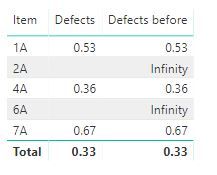
Create the relationship between Defect Data Table with Item Receive Data Table by Item field.

Then use DIVIDE Function to add a measure:

Defects = DIVIDE(SUM(Table16[Qty]),SUM(Table17[Qty]))

3.JPG

If not your case, please share your expected output.


Best Regards,

Lin


Community Support Team _ Lin
If this post helps, then please consider Accept it as the solution to help the other members find it more quickly.
Anonymous
Not applicable

Hi @v-lili6-msft,


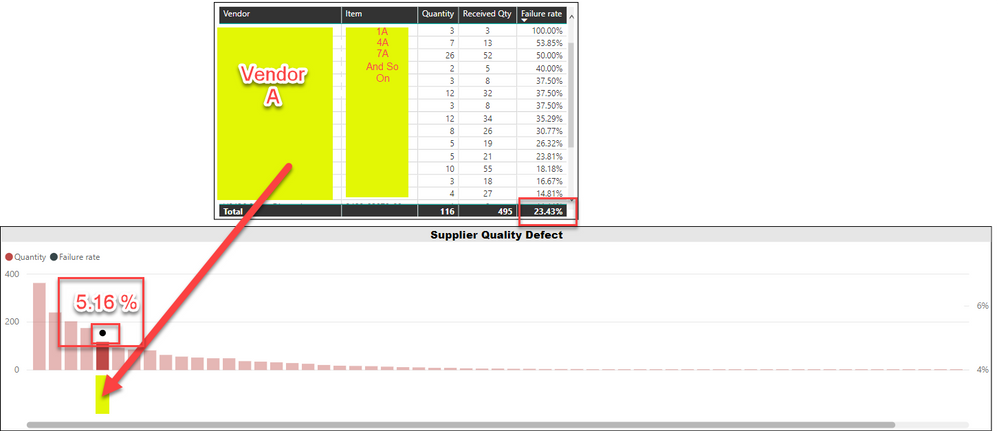
I already had an answer in table (by having filter: Qty (defect table) and Qty (Receive Table) is NOT BLANK) but to have it this defect rate by Vendor on line and bar chart, it's calculating total sum of QTY on both the table and showing a wrong result. 


As shown in below image, I got the result in table (23.43 % is expected outcome) but not on the chart (05.16 % not the correct one). 


Hope this help. Can you please advise?

Defect.png

hi, @Anonymous 

Could you share your sample pbix file for us to have a test, It is difficult to find out the reason from the screenshot.

You can upload it to Dropbox and post the link here. Do mask sensitive data before uploading


Best Regards,

Lin


Community Support Team _ Lin
If this post helps, then please consider Accept it as the solution to help the other members find it more quickly.
Greg_Deckler
Community Champion
Community Champion

You should be able to do something like:


Measure = 
VAR __table2 = FILTER('Table17',NOT(ISBLANK([Qty])))
VAR __table3 = ADDCOLUMNS(__table2,"__defects",SUMX(RELATEDTABLE('Table16'),[Defects]))
VAR __table4 = FILTER(__table3,NOT(ISBLANK([__defects])))
RETURN
DIVIDE(SUMX(__table4,[__defects]),SUMX(__table4,[Qty]),0)


Follow on LinkedIn
@ me in replies or I'll lose your thread!!!
Instead of a Kudo, please vote for this idea
Become an expert!: Enterprise DNA
External Tools: MSHGQM
YouTube Channel!: Microsoft Hates Greg
Latest book!:
DAX For Humans

DAX is easy, CALCULATE makes DAX hard...

Helpful resources

Announcements
New to Fabric survey Carousel

New to Fabric Survey

If you have recently started exploring Fabric, we'd love to hear how it's going. Your feedback can help with product improvements.

Power BI DataViz World Championships carousel

Power BI DataViz World Championships - June 2026

A new Power BI DataViz World Championship is coming this June! Don't miss out on submitting your entry.

Join our Fabric User Panel

Join our Fabric User Panel

Share feedback directly with Fabric product managers, participate in targeted research studies and influence the Fabric roadmap.

March Power BI Update Carousel

Power BI Community Update - March 2026

Check out the March 2026 Power BI update to learn about new features.