cancel
Showing results for 
Search instead for 
Did you mean: 

We've captured the moments from FabCon & SQLCon that everyone is talking about, and we are bringing them to the community, live and on-demand. Starts on April 14th. Register now

Reply
paz_23
Regular Visitor

COUNTX (Column with multiple duplicate values)

Hi, 

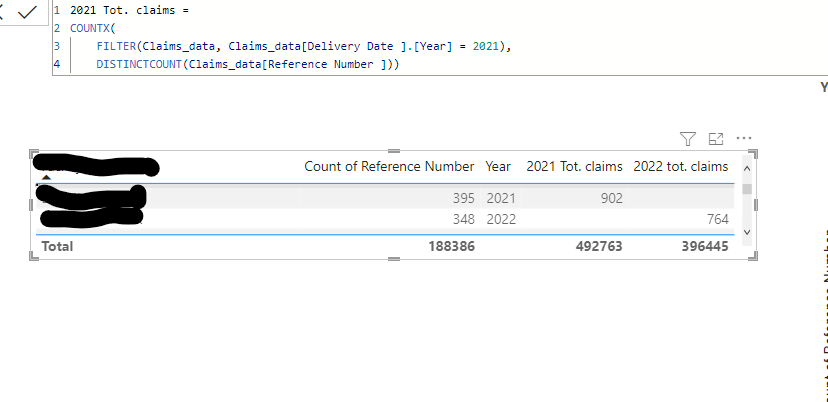
I am still very new to DAX and I am currently trying to get better with the formulas. My questions is that I have a column [Reference Numbers ] that has various duplicates due to itemization but on the below table I want it to tell me the disitinct reference numbers for the locations for 2021 and 2022. Below are the formula that I currently have but as seen I am getting a result of 902 for 2021 when it should be 395. All help is appreciated! 


Screenshot 2023-01-31 104718.png

1 ACCEPTED SOLUTION
olgad
Resident Rockstar
Resident Rockstar

Calculate( DISTINCTCOUNT('ClaimsData'[Reference Number]), Filter('ClaimsData', 'ClaimsData'[Year]=2021))

It would be great if you were using a separate data table thats a basis of any report.
Here you can read more on that https://learn.microsoft.com/en-us/dax/calendar-function-dax

DID I ANSWER YOUR QUESTION? PLEASE MARK MY POST AS A SOLUTION! APPRECIATE YOUR KUDO/LIKE!
PROUD TO BE A SUPER USER!
Best Stories, Interesting Cases: PowerBI Storytime Newsletter
Linkedin Profile: Linkedin
YouTube Channel: PowerBI Storytime

View solution in original post

2 REPLIES 2
olgad
Resident Rockstar
Resident Rockstar

Please kindly accept the solution since it worked for you. Thank you


DID I ANSWER YOUR QUESTION? PLEASE MARK MY POST AS A SOLUTION! APPRECIATE YOUR KUDO/LIKE!
PROUD TO BE A SUPER USER!
Best Stories, Interesting Cases: PowerBI Storytime Newsletter
Linkedin Profile: Linkedin
YouTube Channel: PowerBI Storytime
olgad
Resident Rockstar
Resident Rockstar

Calculate( DISTINCTCOUNT('ClaimsData'[Reference Number]), Filter('ClaimsData', 'ClaimsData'[Year]=2021))

It would be great if you were using a separate data table thats a basis of any report.
Here you can read more on that https://learn.microsoft.com/en-us/dax/calendar-function-dax

DID I ANSWER YOUR QUESTION? PLEASE MARK MY POST AS A SOLUTION! APPRECIATE YOUR KUDO/LIKE!
PROUD TO BE A SUPER USER!
Best Stories, Interesting Cases: PowerBI Storytime Newsletter
Linkedin Profile: Linkedin
YouTube Channel: PowerBI Storytime

Helpful resources

Announcements
New to Fabric survey Carousel

New to Fabric Survey

If you have recently started exploring Fabric, we'd love to hear how it's going. Your feedback can help with product improvements.

Power BI DataViz World Championships carousel

Power BI DataViz World Championships - June 2026

A new Power BI DataViz World Championship is coming this June! Don't miss out on submitting your entry.

Join our Fabric User Panel

Join our Fabric User Panel

Share feedback directly with Fabric product managers, participate in targeted research studies and influence the Fabric roadmap.

March Power BI Update Carousel

Power BI Community Update - March 2026

Check out the March 2026 Power BI update to learn about new features.