Join us at FabCon Atlanta from March 16 - 20, 2026, for the ultimate Fabric, Power BI, AI and SQL community-led event. Save $200 with code FABCOMM.
Register now!Vote for your favorite vizzies from the Power BI Dataviz World Championship submissions. Vote now!
According to the answer to this previous post: COUNT vs COUNTA Dax Function, COUNT function which previously only takes in numeric columns can now also be used the same way as COUNTA for date and string/ text data types. Their main difference is that COUNTA can take in logical values (TRUE/ FALSE) wherein COUNT cannot.
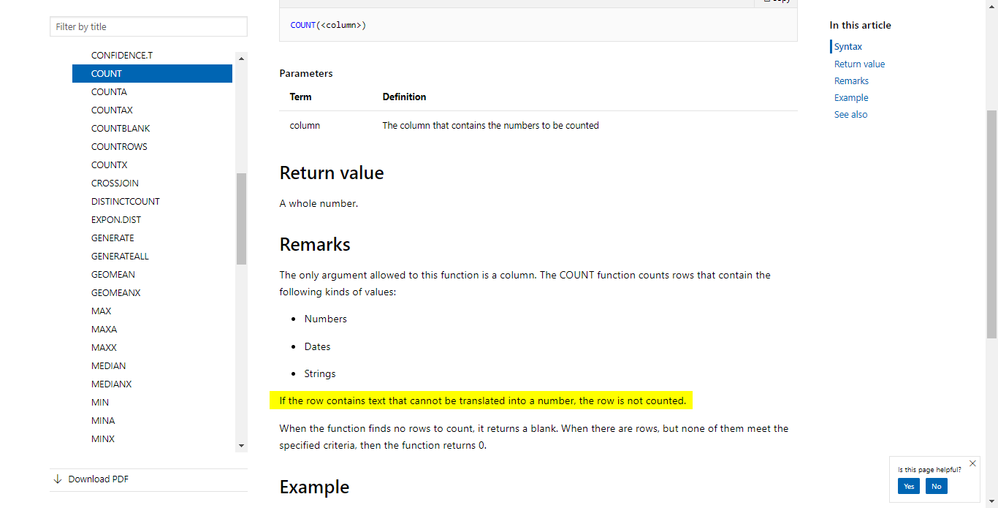
Given this, COUNT can now also work with non-numeric types. What I'm getting confused at is the documentation of COUNT Function which says that "If the row contains text that cannot be translated into a number, the row is not counted". What does this mean? How is a text supposed to be translated into a number? Can someone explain this remark in the documentation?
Thanks!
@Anonymous
dax.guide has better explanation on this. I already cross refer this.
Subscribe to the @PowerBIHowTo YT channel for an upcoming video on List and Record functions in Power Query!!
Learn Power BI and Fabric - subscribe to our YT channel - Click here: @PowerBIHowTo
If my solution proved useful, I'd be delighted to receive Kudos. When you put effort into asking a question, it's equally thoughtful to acknowledge and give Kudos to the individual who helped you solve the problem. It's a small gesture that shows appreciation and encouragement! ❤
Did I answer your question? Mark my post as a solution. Proud to be a Super User! Appreciate your Kudos 🙂
Feel free to email me with any of your BI needs.
Hi @parry2k,
Thanks for the response! I already saw the DAX guide explanation before and I agree that it explains it better than the official documentation. Just to confirm, are we implying that what is written in the official one is wrong? (Particularly, the one I highlighted)
Vote for your favorite vizzies from the Power BI World Championship submissions!
If you love stickers, then you will definitely want to check out our Community Sticker Challenge!
Check out the January 2026 Power BI update to learn about new features.
| User | Count |
|---|---|
| 63 | |
| 52 | |
| 41 | |
| 23 | |
| 18 |
| User | Count |
|---|---|
| 124 | |
| 108 | |
| 47 | |
| 28 | |
| 27 |