Join us at FabCon Atlanta from March 16 - 20, 2026, for the ultimate Fabric, Power BI, AI and SQL community-led event. Save $200 with code FABCOMM.
Register now!The Power BI Data Visualization World Championships is back! It's time to submit your entry. Live now!
According to the answer to this previous post: COUNT vs COUNTA Dax Function, COUNT function which previously only takes in numeric columns can now also be used the same way as COUNTA for date and string/ text data types. Their main difference is that COUNTA can take in logical values (TRUE/ FALSE) wherein COUNT cannot.
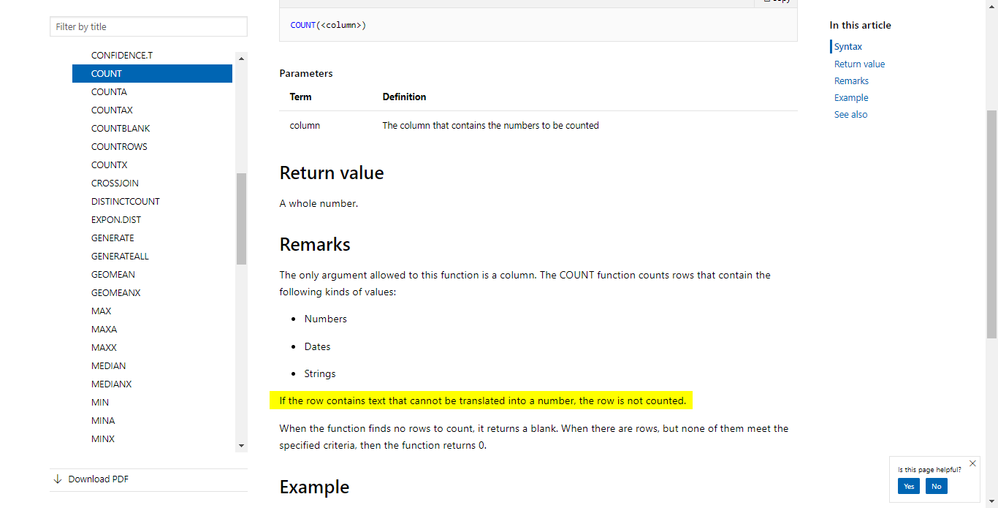
Given this, COUNT can now also work with non-numeric types. What I'm getting confused at is the documentation of COUNT Function which says that "If the row contains text that cannot be translated into a number, the row is not counted". What does this mean? How is a text supposed to be translated into a number? Can someone explain this remark in the documentation?
Thanks!
@Anonymous
dax.guide has better explanation on this. I already cross refer this.
Subscribe to the @PowerBIHowTo YT channel for an upcoming video on List and Record functions in Power Query!!
Learn Power BI and Fabric - subscribe to our YT channel - Click here: @PowerBIHowTo
If my solution proved useful, I'd be delighted to receive Kudos. When you put effort into asking a question, it's equally thoughtful to acknowledge and give Kudos to the individual who helped you solve the problem. It's a small gesture that shows appreciation and encouragement! ❤
Did I answer your question? Mark my post as a solution. Proud to be a Super User! Appreciate your Kudos 🙂
Feel free to email me with any of your BI needs.
Hi @parry2k,
Thanks for the response! I already saw the DAX guide explanation before and I agree that it explains it better than the official documentation. Just to confirm, are we implying that what is written in the official one is wrong? (Particularly, the one I highlighted)
The Power BI Data Visualization World Championships is back! It's time to submit your entry.
| User | Count |
|---|---|
| 50 | |
| 43 | |
| 36 | |
| 33 | |
| 30 |
| User | Count |
|---|---|
| 138 | |
| 120 | |
| 60 | |
| 59 | |
| 56 |