cancel
Showing results for 
Search instead for 
Did you mean: 

The Power BI Data Visualization World Championships is back! Get ahead of the game and start preparing now! Learn more

Reply
bkennedype
Frequent Visitor

CALCULATETABLE with 2 filters

New to Power BI and struggling a little bit with syntax.  I'm not a programmer but could easily do this with a regular SQL query.


Here is my CALCULATETABLE query - it uses a measure to filter what I need, but I need to add a second filter.


Events7Days = filter(CALCULATETABLE(ALL('pip Events')),'pip Events'[End_Date]>=DateTable[7DaysAgo])


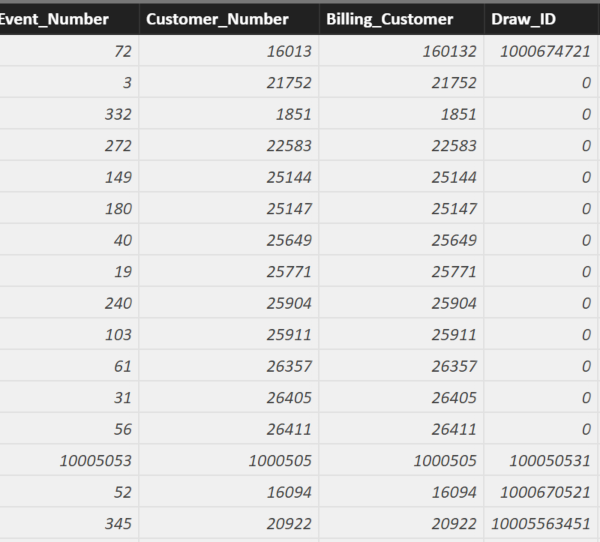
7DayAgo is a measure that I added to my DateTable.  The rows with "0" are the rows I want to filter but I can't figure out how to add a second filter to this.


2018-05-17_2117.png


Any help would be appreciated.


Thanks


1 ACCEPTED SOLUTION
Phil_Seamark
Microsoft Employee
Microsoft Employee

Hi @bkennedype


Have you tried...


Events7Days = 
    filter(
        CALCULATETABLE(
            ALL('pip Events')
            ),
            'pip Events'[End_Date]>=DateTable[7DaysAgo] && 
            'pip Events'[Draw_ID] = 0
            )

To learn more about DAX visit : aka.ms/practicalDAX

Proud to be a Datanaut!

View solution in original post

3 REPLIES 3
Phil_Seamark
Microsoft Employee
Microsoft Employee

Hi @bkennedype


Have you tried...


Events7Days = 
    filter(
        CALCULATETABLE(
            ALL('pip Events')
            ),
            'pip Events'[End_Date]>=DateTable[7DaysAgo] && 
            'pip Events'[Draw_ID] = 0
            )

To learn more about DAX visit : aka.ms/practicalDAX

Proud to be a Datanaut!

That works.....once I change the = 0 to <> 0


Events7Days = filter( CALCULATETABLE( ALL('pip Events') ), 'pip Events'[End_Date]>=DateTable[7DaysAgo] && 'pip Events'[Draw_ID] <> 0 )


Thanks for your help.  I now see how to add multi-filters

Hi @bkennedype


Well done!  I wasn't sure if you wanted to keep the zeros or get rid of them. I figure you could tweak the pattern to suit. 🙂


To learn more about DAX visit : aka.ms/practicalDAX

Proud to be a Datanaut!

Helpful resources

Announcements
Power BI DataViz World Championships

Power BI Dataviz World Championships

The Power BI Data Visualization World Championships is back! Get ahead of the game and start preparing now!

December 2025 Power BI Update Carousel

Power BI Monthly Update - December 2025

Check out the December 2025 Power BI Holiday Recap!

FabCon Atlanta 2026 carousel

FabCon Atlanta 2026

Join us at FabCon Atlanta, March 16-20, for the ultimate Fabric, Power BI, AI and SQL community-led event. Save $200 with code FABCOMM.

Users online (6,355)