Get certified for free when you join Fabric Data Days 2026 and dive into Fabric, Power BI, SQL, AI, and other essential data skills.
Join nowJuly 7 - July 17 | Round 2 of the Power BI Dataviz World Championships. Don't miss your chance! Learn more
Hello,
short directly question, is it possible to create a button which trigger a measure which only show 3 supplier at my table?
Or are there other solutions?
File:
https://1drv.ms/u/s!Ar9P7_DTkCuW5W5ELYRAQ877do7Y
Thanks for helping!
Kind regards,
Unkown
Solved! Go to Solution.
@Anonymous updated file attached with working buttons.
Subscribe to the @PowerBIHowTo YT channel for an upcoming video on List and Record functions in Power Query!!
Learn Power BI and Fabric - subscribe to our YT channel - Click here: @PowerBIHowTo
If my solution proved useful, I'd be delighted to receive Kudos. When you put effort into asking a question, it's equally thoughtful to acknowledge and give Kudos to the individual who helped you solve the problem. It's a small gesture that shows appreciation and encouragement! ❤
Did I answer your question? Mark my post as a solution. Proud to be a Super User! Appreciate your Kudos 🙂
Feel free to email me with any of your BI needs.
@Anonymous thanks for sharing pbix but not very clear what you are actually looking?
Subscribe to the @PowerBIHowTo YT channel for an upcoming video on List and Record functions in Power Query!!
Learn Power BI and Fabric - subscribe to our YT channel - Click here: @PowerBIHowTo
If my solution proved useful, I'd be delighted to receive Kudos. When you put effort into asking a question, it's equally thoughtful to acknowledge and give Kudos to the individual who helped you solve the problem. It's a small gesture that shows appreciation and encouragement! ❤
Did I answer your question? Mark my post as a solution. Proud to be a Super User! Appreciate your Kudos 🙂
Feel free to email me with any of your BI needs.
@Nishantjain thanks alot for your share your idea and maybe i need this one later ;D.
And additional if its not so a much work, could you make a sample in a new tab at my Sample1 File?
I think for other User would be great and for my too ( iam not so the power bi hero ;D)
@parry2k sorry for my late writing.
i have think about it and it right i did not describe it exactly: (BTW: i have updated the file)
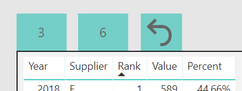
So i have three buttons two of them have numbers, when you click of a button ( for example button with number 3) then you see only 3 suppliers( with ranking 1-3). Same thing when you click button with the number 6 you see only 6 suppliers ( with ranking 1-6)
The last button with the arrow reset the supplier table and show all values.
I hope i could explain it well. 🙂
Thanks for helping!
@Anonymous updated file attached with working buttons.
Subscribe to the @PowerBIHowTo YT channel for an upcoming video on List and Record functions in Power Query!!
Learn Power BI and Fabric - subscribe to our YT channel - Click here: @PowerBIHowTo
If my solution proved useful, I'd be delighted to receive Kudos. When you put effort into asking a question, it's equally thoughtful to acknowledge and give Kudos to the individual who helped you solve the problem. It's a small gesture that shows appreciation and encouragement! ❤
Did I answer your question? Mark my post as a solution. Proud to be a Super User! Appreciate your Kudos 🙂
Feel free to email me with any of your BI needs.
Join us in Barcelona for FabCon and SQLCon, the Fabric, Power BI, SQL, and AI community event. Save €200 with code FABCMTY200.
Join Fabric Data Days 2026: 60 days of free live/on-demand sessions, challenges, study groups, and certification opportunities.
| User | Count |
|---|---|
| 22 | |
| 20 | |
| 14 | |
| 13 | |
| 13 |
| User | Count |
|---|---|
| 62 | |
| 40 | |
| 39 | |
| 39 | |
| 38 |